New Windows 11 Builds Are Available for Canary, Dev, and Beta Testers
- Laurent Giret
- Feb 20, 2026
-
1
Microsoft is wrapping up the week with three new Windows 11 Insider builds for the Canary, Dev, and Beta Channels. Things got slightly more complex on the Canary Channel earlier this week with a new optional upgrade path to 29500 series builds, but the Canary build that dropped today is still from the 28000 series of builds for Windows 11 version 26H1.
Let’s start with the main changes included in today’s Canary build 28020.1619. Most of these changes are also available in this month’s Patch Tuesday update for Windows 11 versions 25H2 and 24H2.
Cross-Device Resume: Users of Vivo Android phones can now continue browsing from Vivo Browser on their PC, and those with an Android phone from HONOR, OPPO, Samsung, vivo, or Xiaomi can resume online files that were opened in the Copilot app on the phone and continue working on them on their PC.
Narrator improvements: Narrator now lets users choose which details are spoken and adjust their order to match how they navigate apps.
Windows Hello New ESS improvements: Windows Hello Enhanced Sign-in Security (ESS) now supports external fingerprint sensors that can be used with desktop PCs, including Copilot+ PCs.
New languages for the AI Agent in Settings: The new Agent in Settings experience now supports German, Portuguese, Spanish, Korean, Japanese, Hindi, Italian, and Chinese (simplified)
New Second Chance Out of Box Experience: Some Insiders will see a refreshed screen allowing them to choose recommended settings for their PCs during the Second Chance Out of Box Experience.
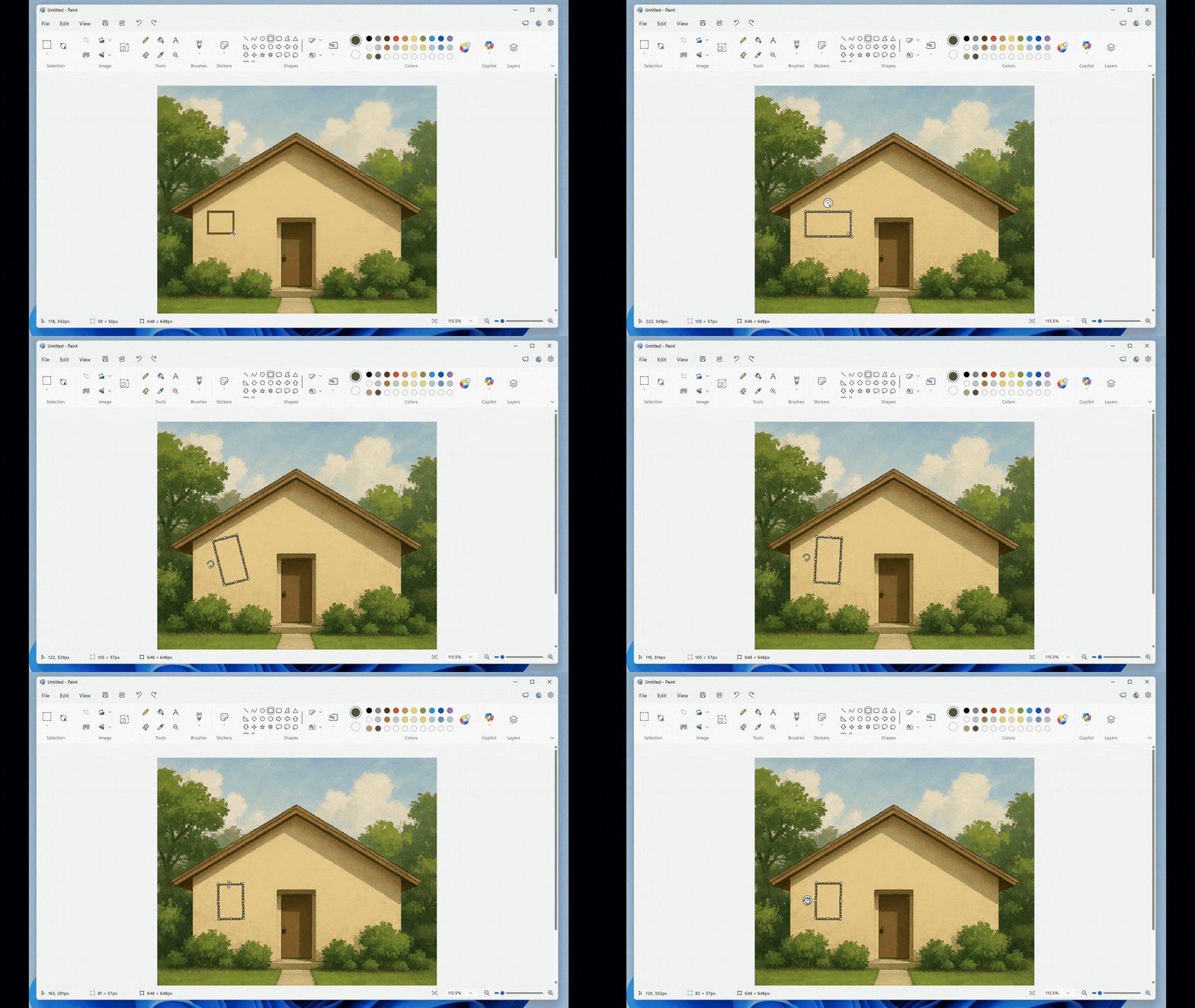
New freeform rotate tool in Paint: This new feature, available via a Paint update, lets users rotate shapes, text, and any active selection to any angle.
Let’s move on to the main changes included in the Dev build 26300.7877 and Beta build 26220.7872:
Context Menu improvements: The context menu’s “Open” verb will now match the icon associated with the file’s default app when right-clicking on a .exe, .bat, or .cmd file.
Settings improvements: Key device hardware details are now prominently displayed at the top of the Settings > System > About page. Insiders in the US will see that the ‘Device info’ Card on the Settings Home page has been refined to make device specifications easier to scan and understand.
Taskbar improvements: Microsoft has improved the animations for mousing over app groups on the taskbar.
The Paint update I mentioned in the section for the new Canary build is also rolling out to Insiders on the Dev Channel. The Windows Insider team said that it has been a “highly requested feature,” and this Paint update will likely roll out to the Beta Channel soon.