Zorin 17.2 Delivers New Customization Capabilities
- Paul Thurrott
- Sep 19, 2024
-
5
Zorin has updated Zorin OS to version 17.2, adding several nice user experience improvements and under-the-hood changes that make this user-friendly Linux distribution faster, more reliable, and more secure.
“We’ve designed Zorin OS to have the perfect blend of power and usability for everyone,” the company explains. “Zorin OS was built to be as easy as possible, so you won’t need to learn a thing to get started thanks to its familiar user interface. It comes loaded with all the apps and tools you need out of the box for browsing the web, working, playing and everything in between. By bringing together the power of Linux and making it possible for anyone to use it, we’ve created an operating system that makes your computer better so you can achieve more than you could ever before.”
Zorin OS 17.2 is a minor update to Zorin OS 17, which first arrived in December 2023 and brought numerous advances, like universal search, Power Modes, Spatial Desktop, and Spatial Window Switcher. And it’s the successor to Zorin OS 17.1, which added several enhancements of its own while bringing an Education edition to the product family.
Zorin OS 17.2 adds the following enhancements:
Window theme. A new Windows section in Zorin Appearance > Theme lets you customize numerous options related to the windows in the system, including placement, Action key, whether modal dialogs are attached to their owner windows, title bar buttons, title bar double-click, title bar middle-click, and more.
Cursor theme. In addition to supporting application, icon, and shell customization, you can now specify a specific mouse cursor style as part of the overall theme.
Easier third-party theme installs. There’s now a “How to Install Third-Party Themes” link in Zorin Appearance > Theme so you can more easily access the guide.
Overlay scrollbar customization. In Zorin Appearance > Interface, there’s a new Overlay Scrollbars toggle so you can switch between the traditional scrollbar type and this more modern version (similar to Windows 11).
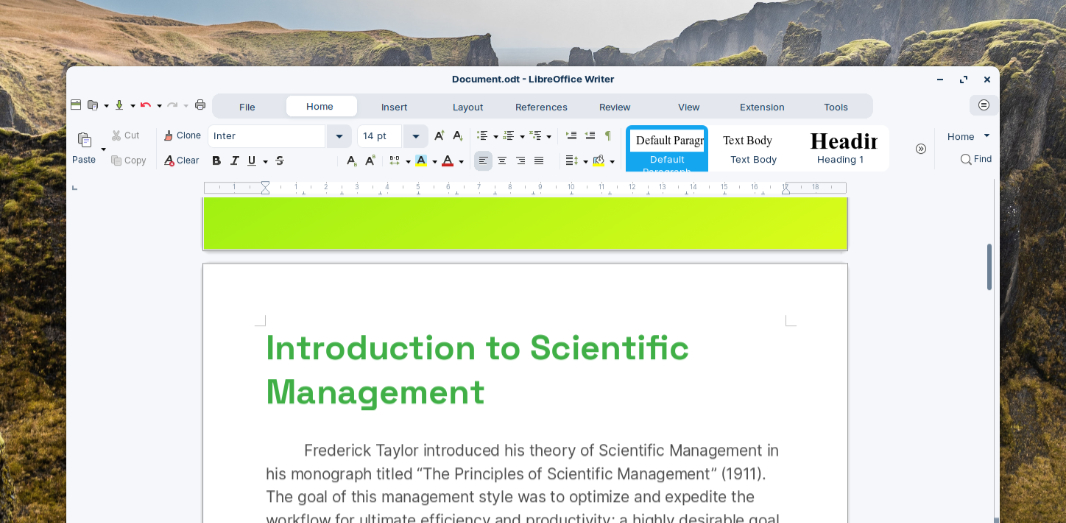
LibreOffice 24.8. Zorin OS 17.2 includes the latest version of LibreOffice. And as demonstrated by the shot above, it appears to support a ribbon user interface I’ve never seen in this product. Interesting.
App updates. Many of the in-box apps in Zorin OS have been updated for this release. And as the company notes, the system supports Flatpak, AppImage, and Snap packages for broad compatibility with whatever app sources you prefer.
Security, compatibility, and performance improvements. Zorin OS 17.2 is built on the same Linux kernel used by Ubuntu 24.04 LTS, meaning 6.8. So it supports Intel Core Ultra and AMD Zen 5 processors, NVIDIA GeForce RTX 20, 30, and 40 series graphics cards, various Logitech peripherals, game pads (Nintendo Switch Online, Google Stadia, and Lenovo Legion Go), Lenovo laptop keyboards, and more via new drivers. It also includes the latest Linux security patches.
Zorin OS 17.2 will be supported with software updates and security patches until June 2027, the company notes. You can download this release in ISO form from the Zorin website. Those on Zorin OS 17.x can upgrade with the Software Updater app, while those on Zorin OS 16.x can perform an in-place upgrade.
On a related note, Zorin celebrated its 15th anniversary this past July.
“We’re thrilled to say that the latest Zorin OS 17 release has reached over 1.3 million downloads & upgrades since its release six months ago,” the company noted at the time. “Over 78 percent of new downloads came from Windows and macOS users, reflecting our mission to bring the power of Linux to people who’ve never had access to it before.”