Google Starts Rolling Out Major Update to Gmail Summary Cards
- Paul Thurrott
- Oct 03, 2024
-
0
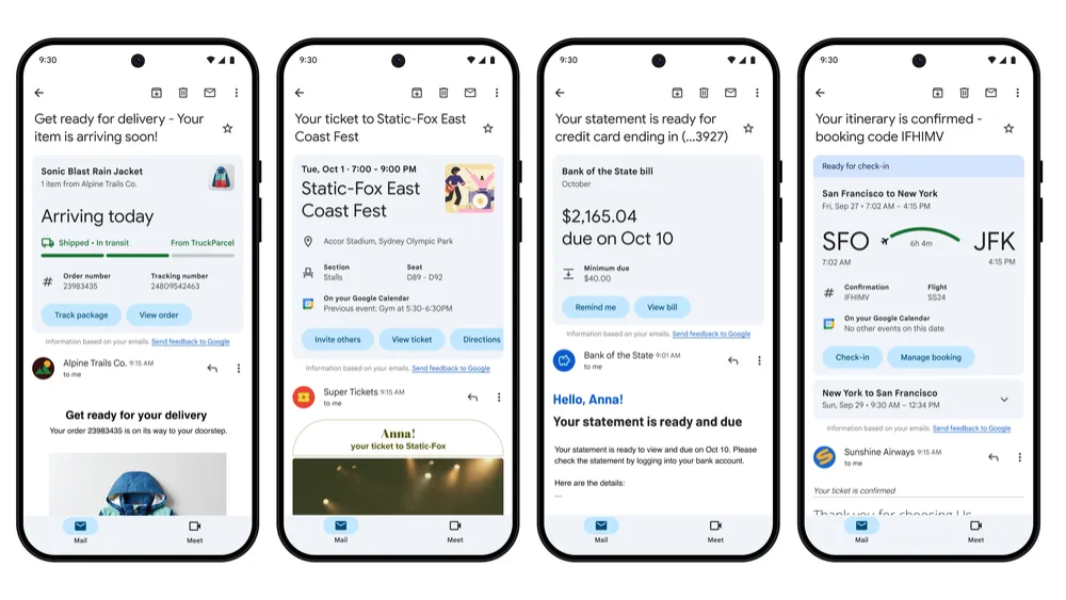
Gmail has long supported summary cards on mobile, providing at-a-glance summaries of receipts, reservations, deliveries, and more at the top of each message. This week, it announced a major update to this smart feature that will make summary cards even more useful.
“For years summary cards in Gmail have provided a snippet of helpful information at the top of your emails,” Gmail senior director Maria Fernandez Guajardo explains. “But we know email habits continue to evolve. That’s why today we’re announcing big changes to these summary cards and new features to help you find exactly the right information, just when you need it.”
Google is updating the design of summary cards with a more modern Material Design look and feel that includes new action buttons like “Track package,” “Invite others,” “Remind me,” “Check-in”, and others that are context-specific to the summarized item. They’re also more sophisticated, and can organize and summarize information you’ve received across multiple emails, as is the case with some deliveries. And Google has expanded the number of places in Gmail where you will find summary cards; in addition to your inbox, you’ll see them in Gmail search and the new “Happening soon” view in your inbox. “Happening soon” will appear at the top of inbox views when relevant and display stacked summary cards as required so you can quickly view and manage any pending items.
Summary cards now appear for four common email categories–purchases, events, bills, and travel–and the information they display is, of course, specific to each. For example, purchase summaries include the ability to track packages and view order details, while bill summaries let you easily view and pay bills and set reminders to do so.
Updated purchase summary cards are rolling out now to personal Gmail accounts on Android, iPhone, and iPad, while event, bill, and travel summary cards and “Happening soon” will arrive “in the coming months.” You can learn more in the Gmail Help Center.