Recall and Click to Do Preview Come to AMD and Intel Copilot+ PCs
- Paul Thurrott
- Dec 06, 2024
-
3
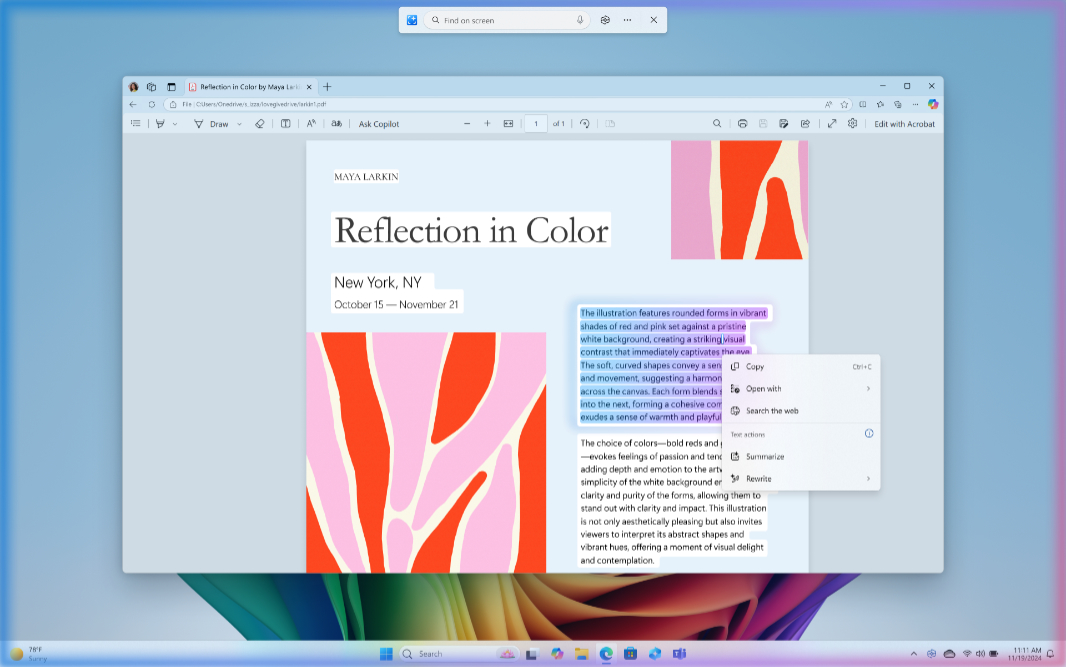
Two weeks after making Recall and Click to Do available in preview via the Insider Program, Microsoft has expanded the preview to include AMD Zen 5 and Intel “Lunar Lake”-based PCs too. As before, you need to enroll an eligible PC in the Dev channel of the Windows Inside Program to test these features.
There’s also a minor new Beta channel build, as noted below.
“Today we are releasing Windows 11 Insider Preview Build 26120.2510 to the Dev Channel,” a new post to the Windows Insider Blog reads. “With this update, we are previewing new experiences for AMD and Intel-powered Copilot+ PCs including Recall and more and expanding Click to Do (Preview) beyond Recall in Windows.”
This build includes the following features, all of which are new to those on compatible AMD and Intel-based PCs. But those on Snapdragon X will see changes as well.
Recall (Preview). After failing to draw even a single security concern in two weeks of testing, Recall is now available in preview on x64 PCs too. As before, this includes Click to Do (Preview) functionality in Recall. But new to this release, Recall is available in Chinese (simplified), English, French, German, Japanese, and Spanish, and it’s now available in the European Economic Area (EEA).
Cocreator in Paint. The latest version of the Paint app (build 11.2410.1002.0) brings Cocreator to AMD and Intel-powered Copilot+ PCs. That said, it’s a CFR, so you may not see it right away.
Restyle Image and Image Creator in Photos. Likewise, the latest version of Photos (2024.11120.1001.0) adds Restyle Image and Image Creator for those on AMD and Intel-based Copilot+ PCs. Ditto on the CFR warning.
Click to Do (Preview) improvements. Click to Do now works outside of Recall too: You’ll find it in Start, with Search, and via the WINKEY + mouse click keyboard shortcut, and it’s available in Snipping Tool. “Click to Do is the first experience to leverage the capabilities of Phi Silica, the on-device Small Language Model (SLM) that is built right into Windows,” Microsoft notes. “Results from our local model will show directly inline and if you’re happy with the rewrites you can copy them directly to your clipboard for use anywhere. These more intelligent text actions are available on Snapdragon-powered Copilot+ PCs today when your language is set to English with support for AMD and Intel-powered Copilot+ PCs coming soon.”
Modernized Windows Hello. Now rolling out via CFR, the new Windows Hello is here with a modernized UI, a passkeys-based credential user experience, and support for new administrator protection features (that are not yet available in the Dev channel).
There are a few other small changes, like the compact clock/date display in the Taskbar and the Microsoft Store update Microsoft discussed the other day, plus a lot of bug fixes.
—
Additionally, Microsoft has released a new build for users with PCs enrolled in the Windows Insider Program Beta channel. There’s not much going on here. It offers the simplified new clock/date display in the system tray, the new File Explorer behavior in which folders open outside the app open in new tabs (and not new windows), and the recent Microsoft Store update.