Lenovo ThinkPad X9 14 Aura Edition First Impressions
- Paul Thurrott
- Mar 03, 2025
-
16
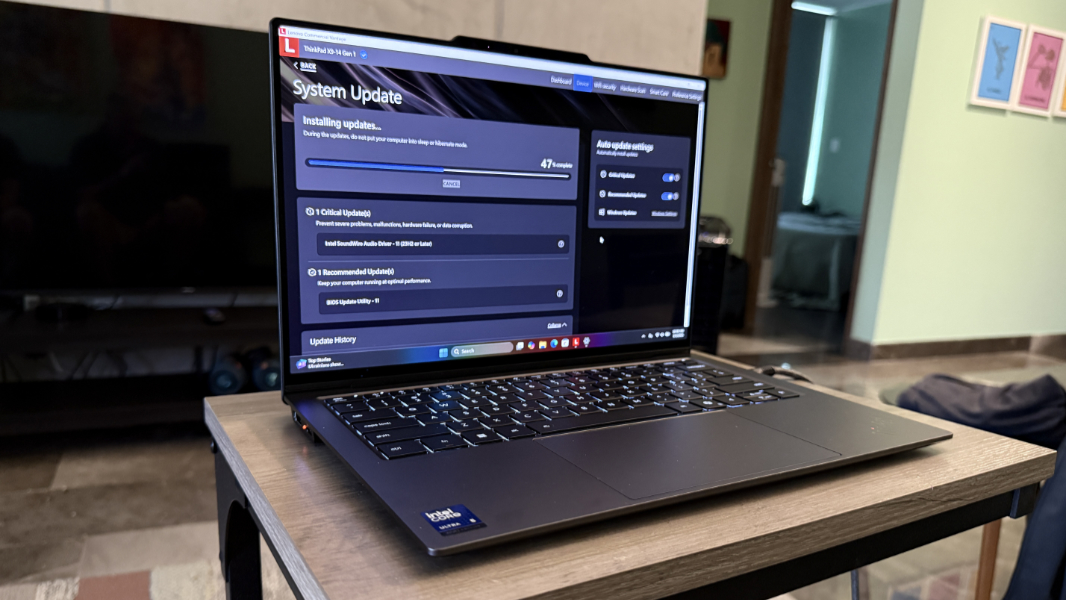
Lenovo’s new ThinkPad X9 line is in many ways the anti-ThinkPad, with no TrackPoint and an unfamiliar new gray design. But the build quality is impressive, there are USB-C ports on both sides, and it’s thin and light with an elevated rear bar on the bottom of the PC for improved airflow. It’s a unique look and feel, and not just when compared to other ThinkPads.

There are two X9 models available, the 14-inch version I’m reviewing and a larger 15.3-inch version that delightfully omits the numeric keypad so few customers want. Other than the display size, the two are nearly identical, though the 15.3-inch versions includes a USB-A port the 14-inch version lacks. No matter. I got the 14-inch version.

As Lenovo claimed at the product’s announcement at CES 2025 two months ago, the X9 has a sophisticated slim new design with a grooved metal bottom cover. But the marque feature of the design is its “engine hub,” the elevated rear bar noted above. This is curiously reminiscent of the Samsung 15-inch Ultrabook I bought on the opening day of the Microsoft Store in Boston in 2012–literally the first laptop sold at that location–and it’s a good look.

The blocky, black bar is practical: It provides enough vertical space for the ports on each side, houses the fans and other cooling components, and raises the typing angle a bit. But it also helps the design: The remainder of the PC’s sides are curved and thin, and elegant.

Speaking of ports, it’s mostly good news. The number of ports is minimal, but there is one Thunderbolt 4/USB-C ports on each side, which I love. There’s also a full-sized HDMI 2.1 port on the left, which is curious, but should appeal to traditional business customers. And then there’s a headphone/microphone combo jack on the right. Which should appeal to anyone.

Lenovo says it “reimagined” the X9’s keyboard, which was initially alarming: I don’t miss the TrackPoint, as I never use that pointing device anyway, but ThinkPads have historically had some of the best typing experiences in the premium PC space. My initial experience is positive, however, so we’ll see.

The touchpad is enormous.

There are two display choices, both 14 inches: The 500 nit 2.8K (2880 x 1800) OLED panel with a 120 Hz refresh rate found in the review unit and a 400 nit Full HD+ (1920 x 1200) OLED panel with a 60 Hz refresh rate. The bezels are quite small either way.

The X9’s prominent communications bar features a 4K (8 MP) Windows Hello-compatible webcam, and there are two side-mounted speakers with Dolby Atmos spatial sound capabilities.

A Windows Hello-compatible fingerprint reader is built in to the power button in the upper-right of the keyboard.

Internally, Lenovo provides customers with a range of Intel Core Ultra 5 and 7 200V-series processors, in vPro and non-vPro versions. These are Copilot+ PC-class processors, with 48 TOPs NPUs and ntel Arc Xe2 integrated graphics with 67 TOPs of AI accelerated performance. It supports up to 32 GB of LPDDR5x 8533MT/s dual channel (soldered) RAM (remember, this is Lunar Lake). And up to 2 TB of M.2 PCIe Gen4x4 SSD (2242) SSD storage.

Connectivity is modern–Wi-Fi 7 and Bluetooth 5.4, but no cellular data options–and the PC’s 55 watt-hour battery can be fast-charged with the bundled 65-watt USB-C power adapter to 80 percent in 60 minutes.

Pricing starts at $1240 for a configuration with an Intel Core Ultra 5 226V processor, 16 GB of RAM, and 256 GB of storage, and the Full HD+ display. A version with 32 GB of RAM, 1 TB of storage, and the 2.8K display is a little under $2000. These are reasonable prices for a thin and light PC of this caliber assuming the performance, battery life, reliability, and other metrics hold up.
But that’s what I’m here for.