Microsoft Announces Two New Microsoft 365 Companion Apps for Windows 11
- Paul Thurrott
- Mar 21, 2025
-
2
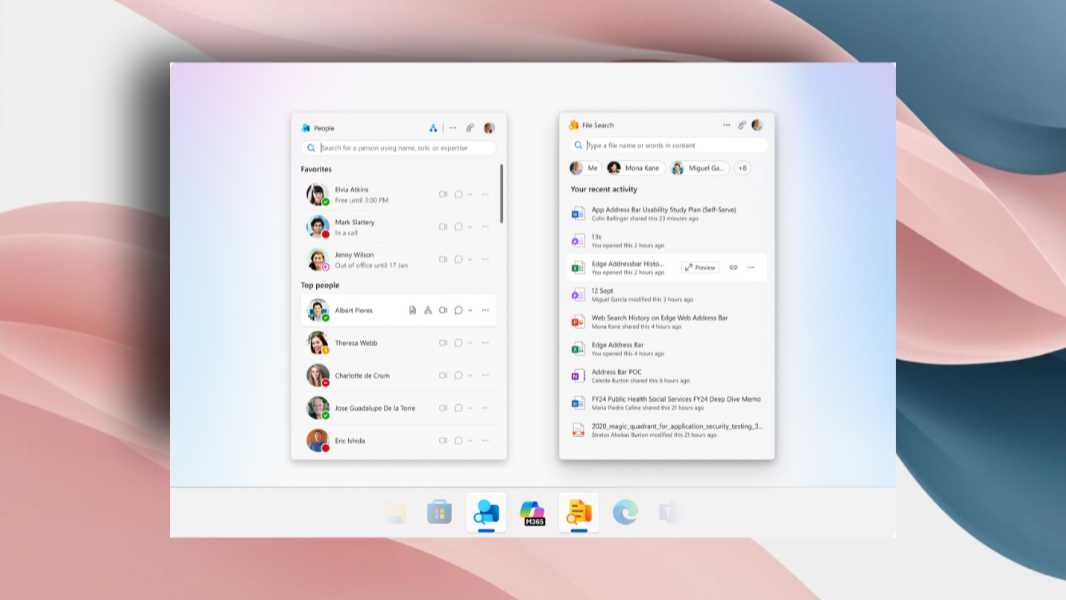
Microsoft today announced two new “companion” apps for Microsoft 365 commercial customers, File Search and People. They are currently available in preview form on Windows 11 to those in the Beta channel of the Microsoft 365 Insider program. And they require an active Microsoft 365 subscription for business (Enterprise or Business Edition) with the desktop Office apps installed.
“I’m thrilled to introduce you to two new apps designed to save you time and streamline your workflows within your Microsoft 365 tenant: People and File Search,” Microsoft’s Shilpa Patel writes in the announcement post. “The People and File Search apps will be available for Windows 11 users who have Microsoft 365 desktop apps installed, are part of M365 Insiders (Beta channel only), and are on either Enterprise or Business SKUs.”
Both apps are described as “mini apps” and they do share a smallish, portrait mode display that resembles Windows Search, but as detached, standalone windows. They both work “seamlessly” with Microsoft 365 tools like Teams and OneDrive, and in both cases it was unclear why a new app was warranted when Microsoft could have instead integrated these features into existing Windows 11 interfaces. But here we go.
File Search helps you find all your Microsoft 365 files without knowing file names; you can search for contents or use the people and file type filters as needed. It supports inline file previews and sharing, so you can be sure you’ve found the correct file before moving on.
People “helps you learn about your organization’s contacts and pull up relevant and important information on individuals for conversations, meetings, or other communications.” It supports inline profile cards for each contact, organizational charts, and messaging, so you can send a quick Teams message without leaving the contacts list. And there’s built-in search, of course, so you can find people in your organization by searching by job title, department, location, or project.
And … yeah. Not clear what the point is here, though the apps seem pretty lightweight and might be a good model for Microsoft to follow when it redesigns or creates utility apps for Windows 11 or Office going forward.
If you’re an admin in a Microsoft 365 commercial deployment, you can learn more about these Microsoft 365 companion apps on Microsoft Learn. There are also separate articles describing each app on Microsoft Learn: