Google Gemini Can Now Summarize Changes on Google Drive Files
- Laurent Giret
- Jun 05, 2025
-
2
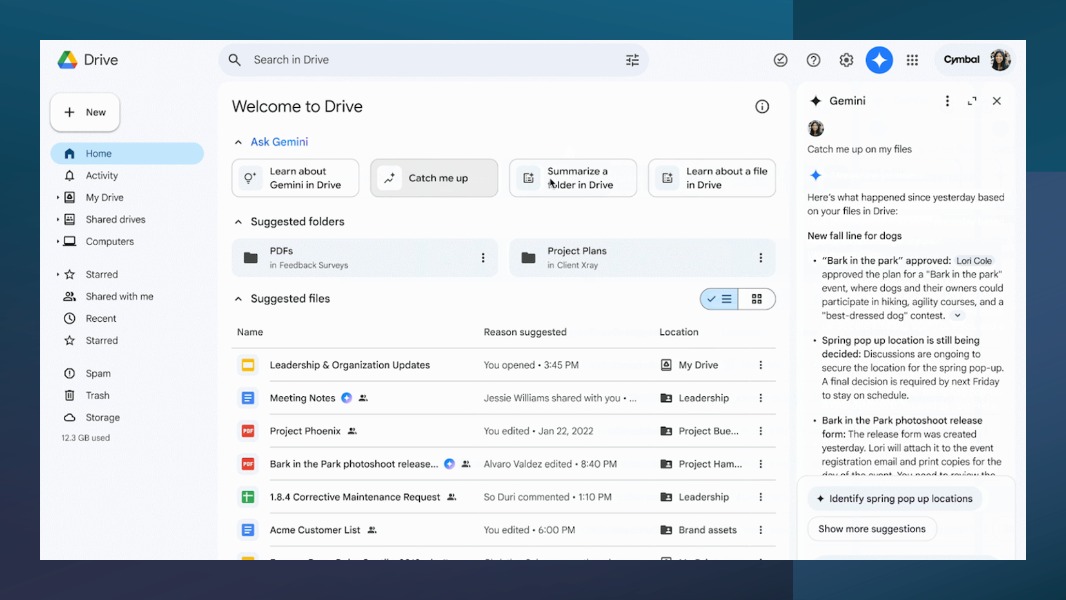
Google announced this week a new “Catch me up” feature in Google Workspace that uses the company’s Gemini AI to summarize recent changes to Google Drive files. The feature is currently only available in English for Google Workspace users with a Business or Enterprise plan, plus consumers with a Google One AI Premium subscription.
“Catch me up” provides a high-level overview of important changes across documents from your Drive, or a synopsis of the main changes and comments in a particular file since it was last opened to ensure users are always up to date,” Google explained in the announcement.
To get an overview of the main changes for all documents stored on Google Drive, Google Workspace users will just need to click the new “Catch me up” button at the top of the page and check out the summary in the Gemini side panel. In its response, the AI chatbot will also list file edits and comments on Docs, Sheets, and Slides.
Google Gemini can also summarize the latest changes on a specific Google Drive file. To do so, Google Workspace users will need to check for files with a “Catch me up” activity indicator and click on it. The “Catch me up” button will also appear in the selection toolbar when the file is opened.
This new Gemini feature is now rolling out gradually to Google Workspace users with the right license. Overall, this seems like a helpful use of AI to help users in collaborative scenarios to stay up to date with file edits.