Proton Introduces an Authenticator App
- Paul Thurrott
- Jul 31, 2025
-
11
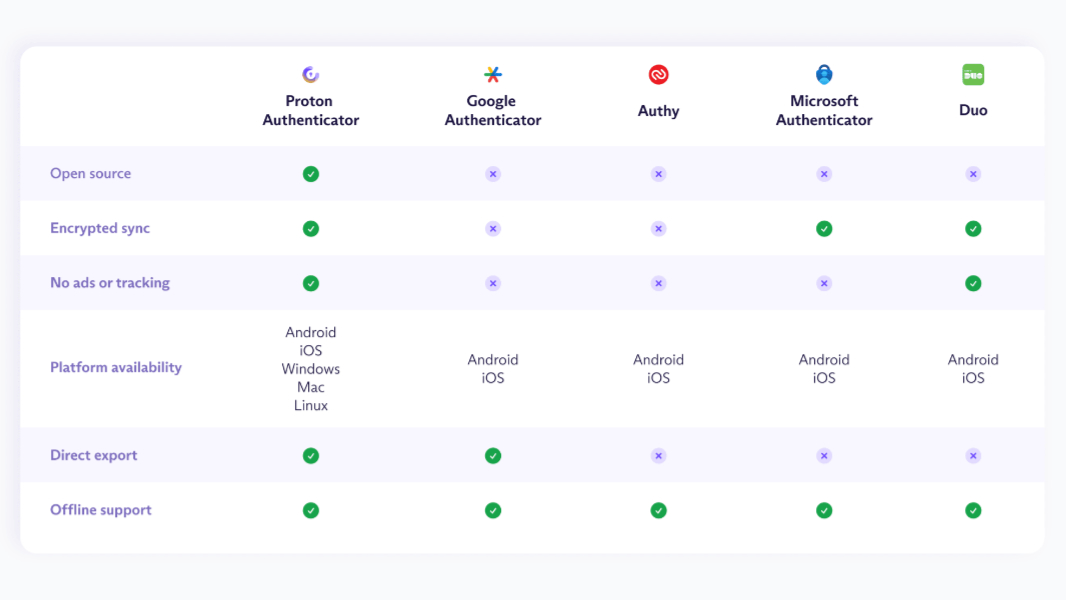
Proton this morning announced a new app in its suite of privacy-focused, open source apps and services, and it’s a terrific addition: Proton Authenticator is a two-factor authentication (2FA) solution that works on Android, iPhone, iPad, Windows, Mac, and Linux.
“Two-factor authentication adds a second layer of defense when logging in to your accounts,” Proton’s Son Nguyen Kim writes. “It’s a universally recommended way to keep your accounts secure.”
Proton Authenticator is free, and it provides more flexibility than other authenticator apps, Proton says. But its biggest benefit is that it’s made by Proton, a trusted Little Tech alternative to big platform players like Google and Microsoft.
According to Proton, other authenticator apps are closed source, rely on trackers and ads, and/or don’t offer end-to-end encrypted 2FA backups. Some don’t even support data export, making them a one-way, dead-end street.
Proton Authenticator offers what the company says is a “no compromise choice” in 2FA authentication. It works on mobile and desktop, whether online or offline, and provides automatic backups. (You can also sync 2FA codes if you sign in with a Proton account.) You can import your accounts from other authenticator apps and export them from Proton Authenticator at any time. It can be secured on-device using a PIN or whatever biometric security your device or computer offers.
Proton also offers a password/identity manager called Proton Pass that I use and recommend, and the latter already offers 2FA capabilities. So why offer a separate, standalone authenticator app? Choice: Those who prefer the convenience of having passwords and 2FA codes (and other data) secured by the same app can stick with just Proton Pass. But those who prefer the superior security of separating passwords from 2FA codes–which I strongly recommend–can use both.
“Proton Authenticator generates your 2FA codes in a separate, end-to-end encrypted app,” Proton explains. “This adds an extra layer of security and protects against sophisticated attacks. It also gives you a standalone app you can use to set up 2FA for your Proton Account.”
Proton says that Proton Authenticator will always be free because privacy is a right.
You can download Proton Authenticator from the Proton website. Yes, I’m evaluating it as a potential replacement for Google Authenticator and Microsoft Authenticator now.