Paul’s Pixel 10 Diaries: It’s Like Getting a New Pixel in Your Pixel
- Paul Thurrott
- Sep 10, 2025
-
2
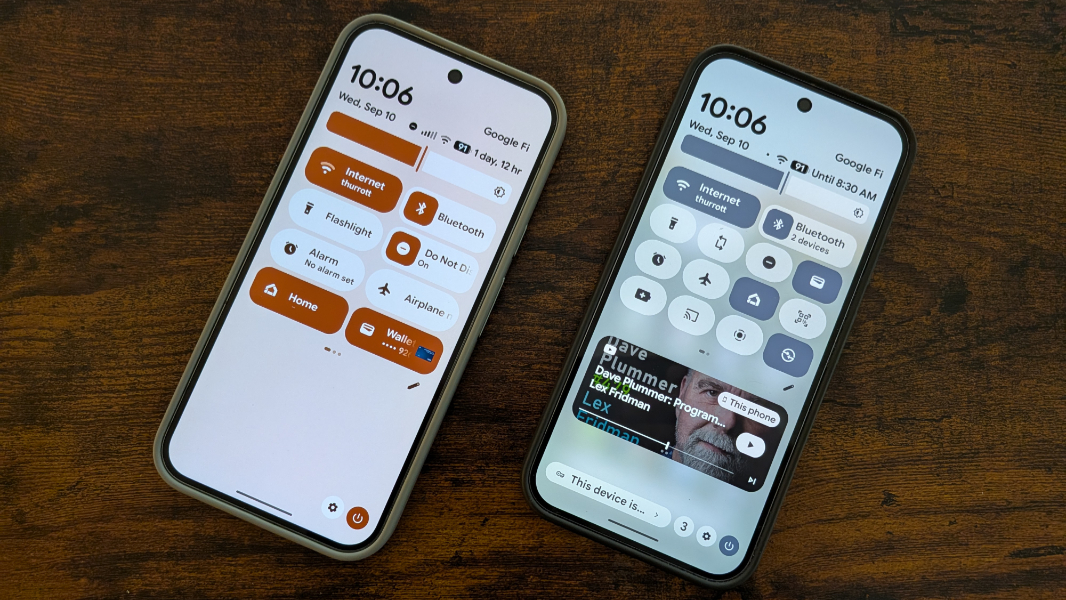
In the Apple bubble, “it’s like getting a new iPhone in your iPhone” was a one-off marketing slogan, never to be repeated. But Pixel users have this experience at least four times each year: Google releases major functional upgrades each quarter via Android QPR (Quarterly Platform Release) updates and Pixel Drops, plus a major new Android version once per year. And with recent Pixels, this process repeats itself over a full 7 years.
All platforms offer something in the way of free updates, I know. But where Apple’s interim updates tend to be minor, and Microsoft’s tend to be spastic and unpredictable, Pixel’s regular updates are usually thoughtful and meaningful. It’s just one of many perks that Google provides to those who buy into Pixel.
When Google announces new Pixel phones and other hardware, it of course touts new features that are unique to those devices. This, too, is common across the industry. But with Pixel, there’s a twist. Many if not most of the unique new software features that accompany new Pixel hardware make their way to previous models in subsequent Android QPR releases and Pixel Drops too. So even if you don’t intend to upgrade to a new phone, it’s wise to keep up on what’s new.
That’s good for customers. But it’s become an awkward problem for Google because its best fans understand how the system works. I am one of those fans, and when I scanned through the list of new software features in the Pixel 10 series phones, features that are for now unique to these devices, I started mentally ticking off which I felt would make their way to previous models. Pixel Screenshots Magic Cue. Camera Coach. Auto Unblur. Auto Best Take. Pixel Studio. On and on it goes. Which will come to previous Pixels, no one knows. Well, we do know, sort of. Most of them will.
As you may know, I was ready to trade in my Pixel 9 Pro XL for a Pixel 10 Pro XL, had, in fact already completed the transaction, when Google offered to let me review the Pixel 10, 10 Pro, and 10 Pro XL. This is a big deal for me, as I had been spending roughly $1000 each year since the first Pixel on these phones and various peripherals, and I could finally perform some meaningful side-by-side (by side) comparisons. But it also created a unique situation, to me. Because I cancelled my Pixel 10 Pro XL order and trade-in, I still have my Pixel 9 Pro XL.
And that means that the theoretical has become a bit clearer to me. I’m using and reviewing the Pixel 10 series as I write this. But I also have the Pixel 9 Pro XL sitting there, usually gathering dust. But also useful in the sense that I can compare it to the Pixel 10 Pro XL, especially. (So I guess it’s back to back to back to back?) The most obvious comparison is with photography, since the camera hardware is (or seems to be) identical. (It’s not really, but it’s close.) But there’s more.
Last week, Google released its September Pixel Drop alongside Android 16 QPR1, an unusually monumental interim update because of the shorter development cycle of Android 16, the first to ship in Q2 rather than Q3. And so the original release was mostly uneventful, with the most interesting new features, like the Material 3 Expressive look and feel, the DeX-like desktop mode, and a full implementation of a new notification type called live updates coming in subsequent quarterly updates.
The Pixel 10 series did ship with Android 16 QPR1, which delivers the new Material 3 Expressive design. But with the general release of QPR1 last week, customers with previous Pixel models can get this visual upgrade too. But I was away last week, in Berlin, and that meant I couldn’t get any of last week’s updates on the Pixel 10 and Pixel 10 Pro XL I brought with me on the trip. Yes, I kept checking. But Google didn’t deliver the updates until we got home this past Sunday.
Naturally, I updated each of the Pixel 10 series phones immediately. But then it occurred to me that I could also update the Pixel 9 Pro XL, too. So I powered it up and compared the look and feel of the Pixel 9 Pro XL to the newer Pixels. At a high level, they’re obviously similar, they’re all running Pixel Android, of course. But the Pixel 9 Pro XL was still on the initial release of Android 16, not QPR1. And there are some major visual differences in the core OS.
There are many examples, but here are two.
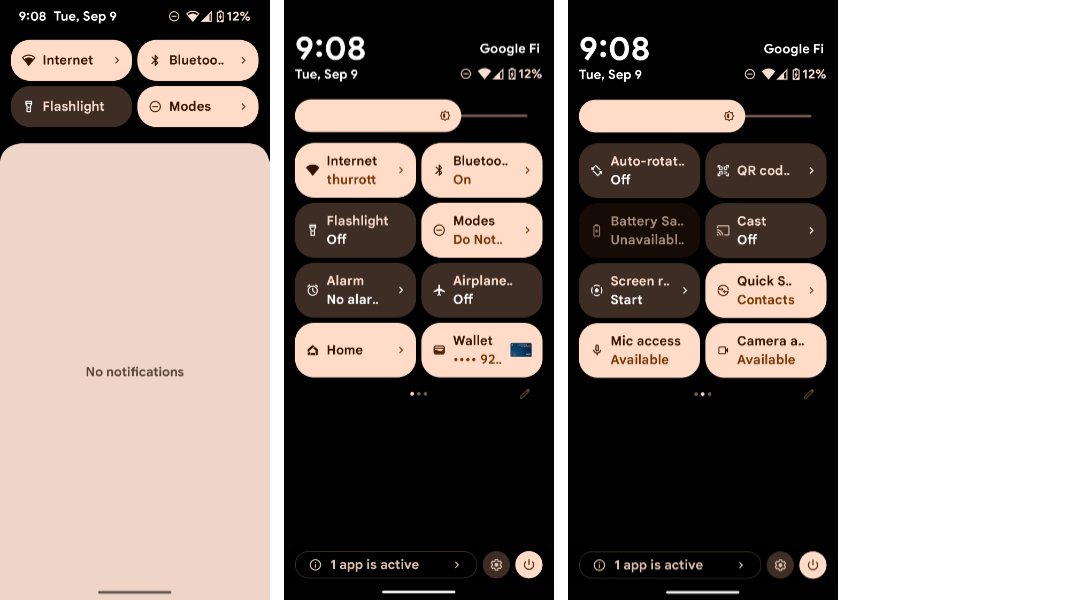
The Android 16 notification shade on Pixel resembles that of previous Pixel Android versions, with large, finger-friendly buttons and sliders that appear as you swipe down from the home screen in steps and then swipe to the right to see additional quick settings.
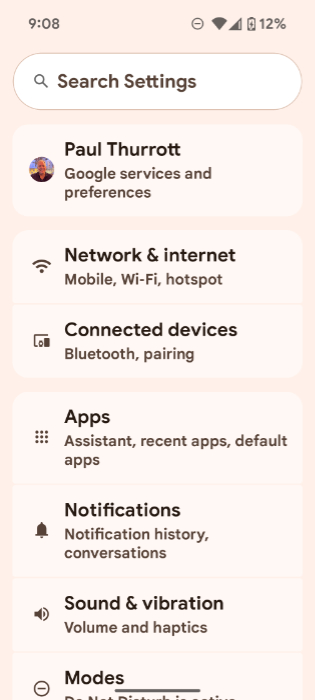
The Settings app has a consistent look and feel, with each group of settings on the mains screen contained in rounded rectangles but without much in the way of color or contrast.
Then, I installed QPR1 and the latest Feature Drop on the Pixel 9 Pro XL. This took a long time, and I’m still confused by why these things take so long on Android and iOS. Finally, I rebooted into the new look and feel, which immediately made itself known with some congratulatory notifications, new content in Pixel Tips, and so on. And I was struck by something I know is fairly obvious. This is like getting a new Pixel in your Pixel.
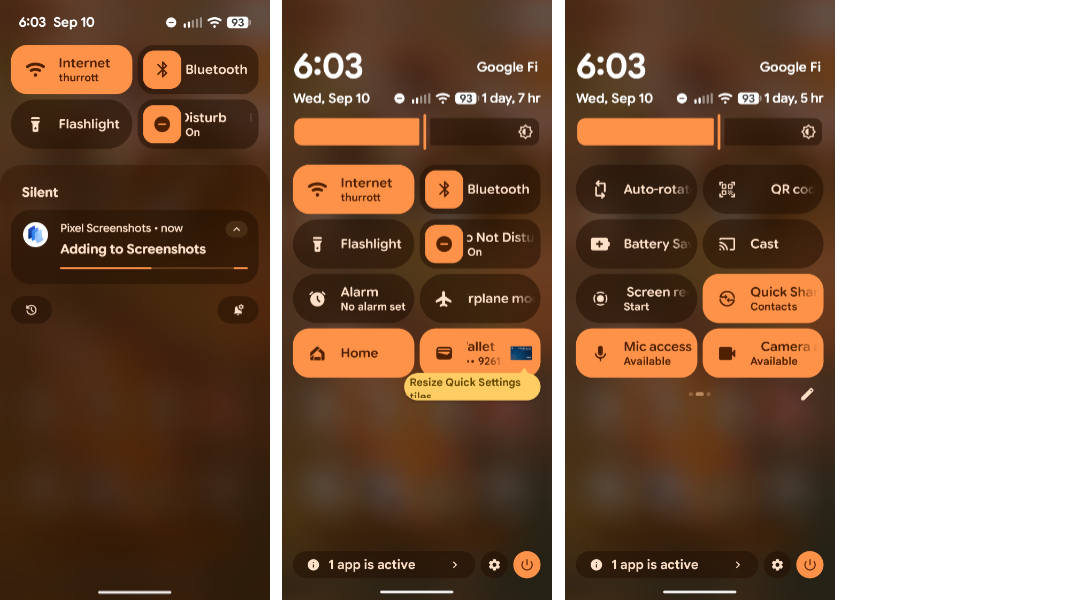
Here are the same notification shade views after the upgrade.
And here is the Settings app.
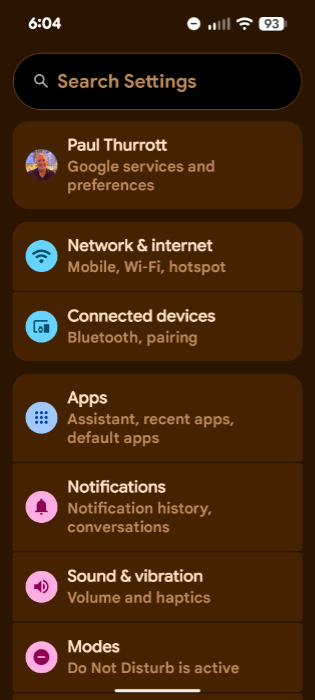
Getting past the subjective—if I know this world like I think I do, some will loudly complain that the new look is ugly or whatever, though I love it—this is a nice visual reminder of the value of Pixel. It’s obvious and unavoidable.
But it also begs the question. Maybe not right now. But surely in the coming months, perhaps by December or the following quarter, the Pixel 9 Pro XL and other supported Pixel phones will get most of the new Pixel 10 series software features that are, for now, unique to the latest models. I know this is coming. Everyone who uses a Pixel knows. The only question is, which features won’t make their way to the older devices?
The features to look out for, I think, are those that allegedly only work because the new Pixels have a Tensor G5 processor. Things like Magic Cue and Pro Res Zoom. I’m not saying one or more of those features will come to at least the Pixel 9 Pro series. But there is precedence for this: When Google announced the first Gemini AI models in late 2023, it brought the Gemini Nano on-device models to Pixel 8 Pro, but not the Pixel 8. The stated reason was “hardware limitations,” to support this feature. But customers complained when Samsung’s Galaxy S24 series arrived a month later with Gemini Nano, despite some models having just 8 GB of RAM, as with the Pixel 8. And so Gemini Nano came to the base Pixel 8 two months later.
So we’ll see. But with few hardware advantages over its predecessors, the Pixel 10 Pro and 10 Pro Max are a bit of a tough sell for those who upgrade more aggressively. The base Pixel 10, to me, is the biggest and most meaningful upgrade in so many ways because of its triple-lens camera system and reasonably low pricing.