Xbox App on PC Makes Cloud Save Syncing More Transparent
- Laurent Giret
- Sep 29, 2025
-
0
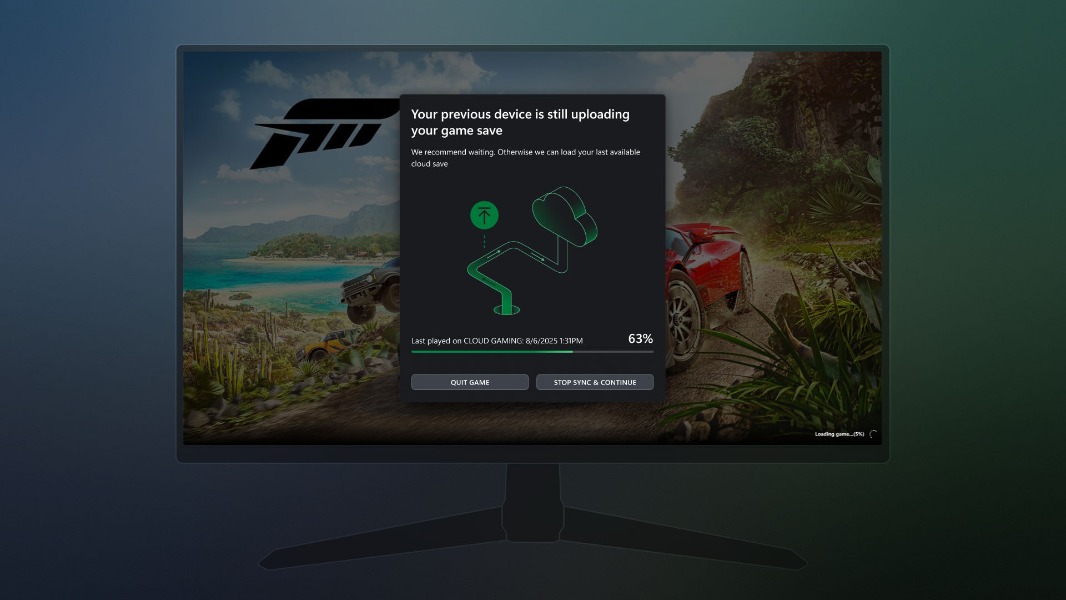
As more than 1,000 games on the Microsoft Store now support Xbox Play Anywhere and cross-progression across PC and Xbox, Microsoft is making it easier for PC gamers to see the status of their cloud saves. A new update for the Xbox app on PC will add a new pop-up indicating when game saves for Xbox Play Anywhere titles are out of sync.
If you play the same game across multiple Xbox consoles, you may have already ended up in the situation where one console didn’t properly upload your game save to the cloud. When launching the game on another console, it will ask you to either load your last local save or wait for the other console to sync your progress to the cloud.
This is all because Xbox consoles often take some time before uploading game saves to the cloud. Cloud saves are also paused when games are suspended in Quick Resume.
Until now, PC gamers couldn’t know when saves from an Xbox Play Anywhere game played on another device had yet to be uploaded to the cloud. That could cause progress to be lost, but that’s finally changing.
“Now, when there’s a save that has not been synced from a previous session, on the next device you play on you’ll see a progress bar, device name, timestamp, and more details to help you understand what’s going on. We’ve also added insights into where the sync is coming from, how it’s progressing, and what to do if something gets stuck,” the Xbox team explained today.
While it’s good for Microsoft to make Xbox save syncing more transparent on PC, it would be even better to add a cloud save sync indicator on Xbox and PC. This is something Steam has had for years, and Microsoft is going to need a similar indicator as it makes more of its games truly multiplatform.