Microsoft is Testing Web Integration in Copilot on Windows 11
- Paul Thurrott
- Mar 04, 2026
-
5
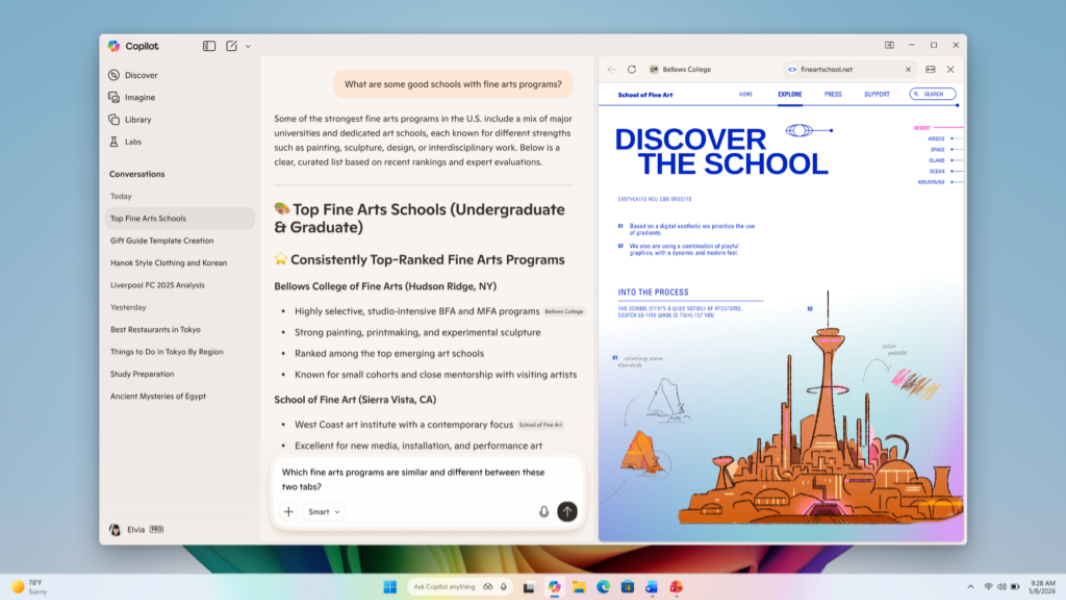
Microsoft is deploying a new feature for Copilot on Windows 11 to all channels in the Windows Insider Program that brings web integration directly into the app.
“In today’s update, we are introducing a new way to get things done in the Copilot app on Windows,” the Microsoft Copilot team writes in the announcement post. “Now, when you click to open a link, Copilot opens the content in a side pane next to your conversation instead of a separate browser window, so you don’t lose context.”
The idea here is two-fold. Instead of using Copilot side-by-side with your web browser, you can access a web tab inside the Copilot app directly. And instead of using your favorite web browser, you will be using Microsoft Edge when you do this, of course.
Or, as Microsoft describes it, Copilot will ask your permission to access the content of the web tabs you open within the app for context, and only for that conversation. Tabs you open within a conversation will be saved with that conversation so you can access them later. And, if you choose to enable it, you can sync passwords and form data so it’s easier to work within Copilot.
This update also adds the Podcasts and Study and Learn mode from Copilot.com features to the app, removes some unspecified features, and includes performance and reliability improvements. The removed features will be re-added to the app before its general release. These changes are available in Copilot app version 146.0.3856.39, Microsoft notes.