Google Upgrades AI Mode in Chrome
- Paul Thurrott
- Apr 16, 2026
-
0
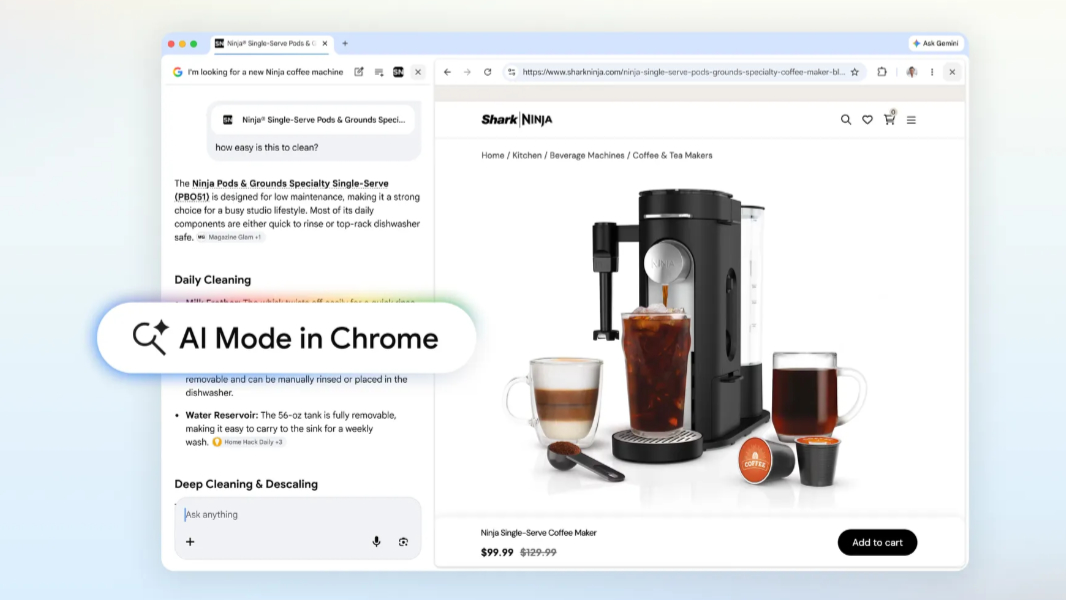
Google announced a major upgrade to AI Mode in Chrome that includes a new user interface, cross-tab search, and more.
“Today’s upgrades for AI Mode in Chrome make it easier to access and engage with content and dive deeper into what you find, all without losing your place or needing to switch tabs,” Google vice presidents Robby Stein and Mike Torres explain. “It’s a more fluid way to discover and learn from the vast range of perspectives across the web.”
Here’s what’s new.
Side-by-side AI Mode. Now, when you click on a link in AI Mode in Google Search, Chrome for desktop opens the webpage side-by-side with AI mode. That makes it easier to compare details and ask follow-up questions within the context of the original search. Google says that early testers found that having both Search and the web side-by-side helped them stay focused on their tasks while exploring useful web pages.
Search across recent tabs. You can now search across all the tabs you’re currently using in Chrome for desktop and mobile. To do so, just click/tap the new “+” (plus) menu in the search box on the New Tab page (or within AI Mode) to select recent tabs and add them to your search. You can mix and match multiple tabs, images or files (including PDFs) and bring that context into your AI Mode searches, Google notes.
Canvas and image creation integration. Canvas and image creation capabilities are available from the new “+” menu in Chrome, too.
All these updates are available today in the latest version of Chrome.