Spotify Now Lets Users Create and Share Podcast Clips
- Laurent Giret
- May 27, 2026
-
1
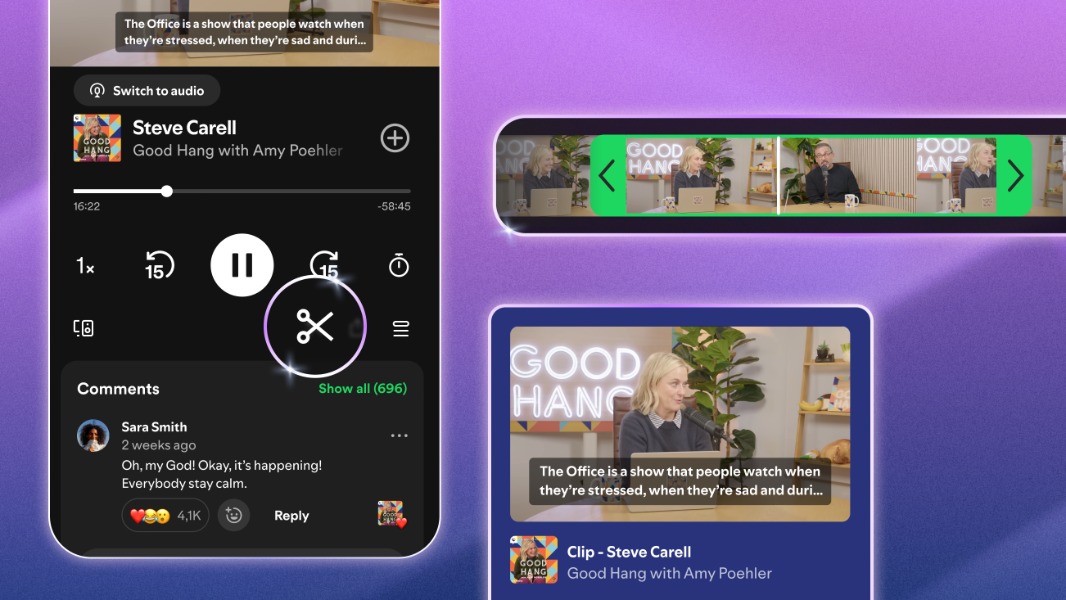
Spotify is now allowing mobile users to create clips of podcast episodes that can be shared with other people. Clips are automatically saved in users’ personal Libraries, and they can also be added to podcast playlists, similar to the podcast chapters that launched earlier this year.
“With clips, listeners can now capture, revisit, and share the exact moments from podcasts that resonate most, without having to search through an entire episode to find them,” the Spotify team explained today. “The updated sharing menu gives you more ways to share what you’re hearing, whether it’s a full episode, a chapter, a timestamp, or a clip—all accessible directly from the share icon.”
Spotify is allowing both Free and Premium users to create and share podcast clips. To get started, users will need to tap the scissor icon in the Now Playing view. Besides the ability to trim clips manually, users can also tap the share button to share the full podcast episode, a specific chapter, or a timestamp.
If you frequently watch videos on YouTube or Twitch, these two platforms also allow viewers to clip content from creators who have enabled the feature. This is usually a great way to get more people to discover content without requiring them to watch a full video or podcast episode.
Clips for podcasts are rolling out gradually to all Spotify users on mobile. Not all podcasts will display the new clip icon at launch, as Spotify will be expanding the feature to more shows over time.