Google Brings Native Markdown Support to Docs and Drive
- Paul Thurrott
- Oct 05, 2026
-
0
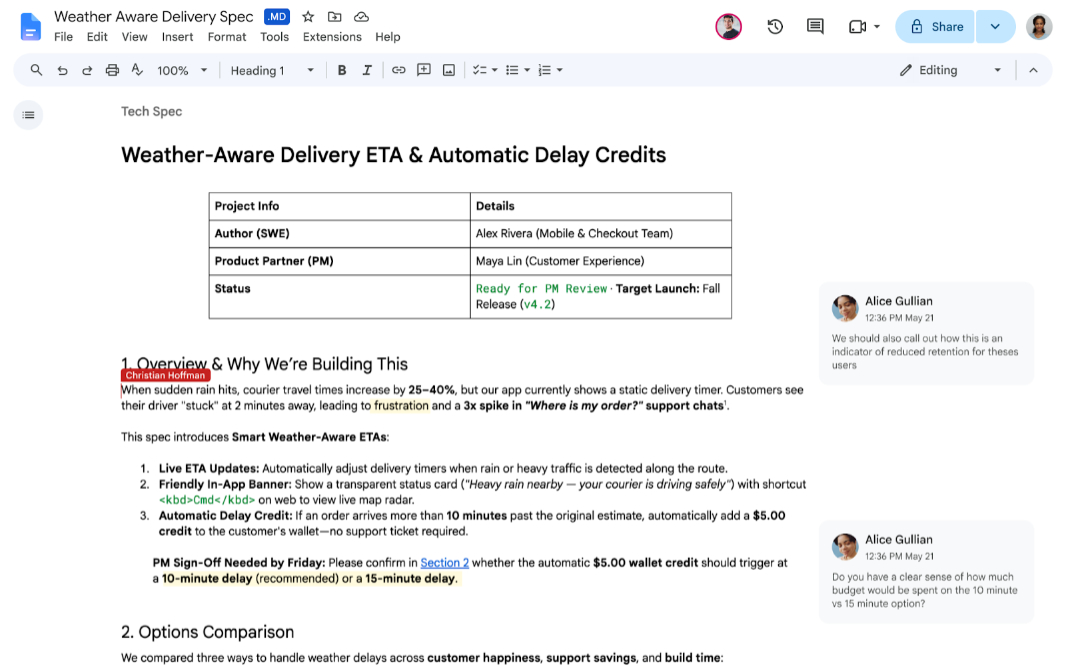
Google now supports viewing, editing, and collaborating on Markdown files directly in its Google Docs word processor app, plus rendered Markdown file previews in Google Drive.
“Markdown is a standard text format widely used by Large Language Models (LLMs) to preserve structured content, like tables, headers, and bulleted lists, without the bulk of heavy file formats,” the Google Workspace Updates blog explains. “Previously, you needed to import and convert Markdown files into a Doc format, which often altered formatting, stripped comments, and fragmented files.”
With this change, you can work with Markdown files natively in Google Docs, and you can edit in its traditional WYSIWYG editing mode or using raw Markdown syntax. And you can do so while taking advantage of the collaboration and commenting tools in Docs. And with Drive, you can view fully formatted, rendered Markdown documents with clickable links and structured tables.
This update is going out automatically to those with Workspace and personal Google accounts, starting today, though Google says it could take up to two weeks.
You can learn more about the Google Docs support for Markdown on the Google Support website.