Word, Excel, and PowerPoint Get Modern Comments on iPhone
- Paul Thurrott
- Apr 06, 2026
-
1
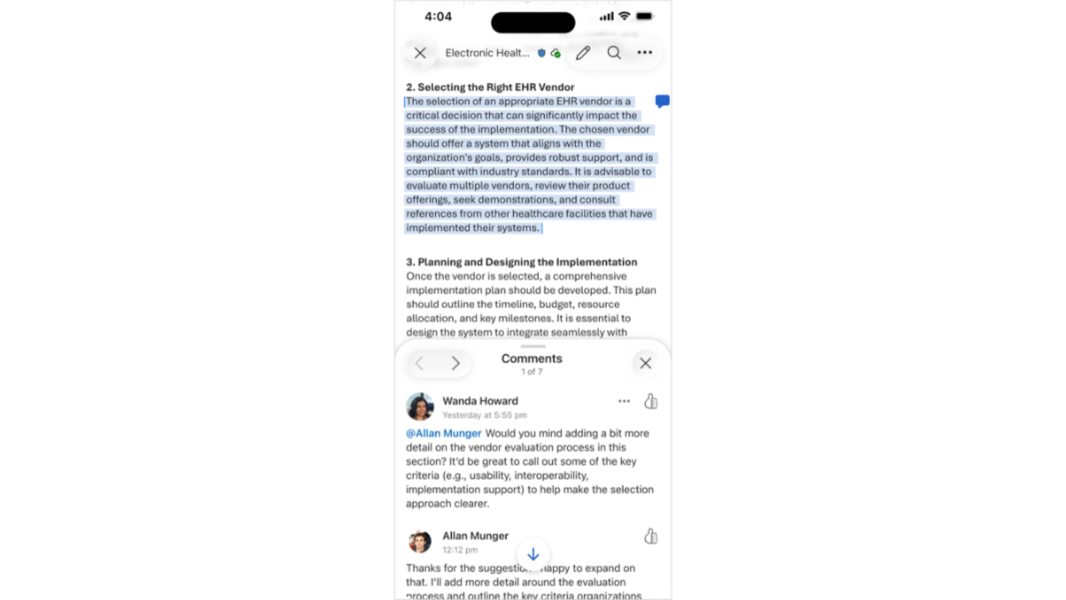
Microsoft today announced a modern Comments experience for Word, Excel, and PowerPoint on the iPhone.
“The updated Comments pane experience improves the clarity and usability of mobile commenting by making comment threads easier to find, read, and act on,” Microsoft product manager Jessica Hu writes. “With a more modern, streamlined user interface, you can more quickly understand what needs your attention, respond quickly, and stay engaged in collaboration as you review your files on the go”
To use the new Comments pane, open Word, Excel, or PowerPoint on your iPhone and then open a document. Then, you can tap on a comment in the document or the Review tab to display the new Comments pane. (Comments are also available from the task bar at the bottom of Word and PowerPoint.) From here, you can review, respond to, and thumbs up comments, of course.
Microsoft notes that it will add other new features, like filters, a new drafting sheet, and a new way to add comments from an empty state, in the coming months.
The new Comments pane is rolling out now in Word, Excel, and PowerPoint on the iPhone; look for app version 26022013.