More Mobile: NAS No More (Premium)
- Paul Thurrott
- Nov 06, 2021
-
40

A few weeks ago, I received an email I had been expecting for some time: my Western Digital NAS will soon exit support and will no longer receive security updates. By the time the April 2022 expiration date arrives, we will have had a good, seven-year run, so I guess I can’t complain too much. And for whatever it’s worth, the NAS was always a sort of secondary backup anyway, as I found it easier to find content on OneDrive, and the local network performance has never been all that great. Regardless, I was going to have to figure something out, given my desire to move to a more mobile lifestyle. So let me briefly ponder what (might) be next in this department.
As you may remember, I purchased the WD My Cloud EX2 in early 2015, a few months after moving to Thurrott.com. As I wrote at the time, my goal was to implement a local backup to supplement my cloud-based data sync and backup. In a What I Use article about a month later, I noted that this prosumer NAS was replacing a long line of local storage solutions that ranged from several actual Windows Server-based servers to various external hard drives. And at the time I was pretty impressed with its simplicity and performance. (I find that latter praise far-fetched today, given how bad the performance is now.)
The NAS has been running without issue—other than that performance thing—since I got it. In Dedham, where the house was partially wired for Ethernet, I kept it on a shelf in the unfinished part of the cellar. But here in Lower Macungie, PA, it’s sitting on the floor next to the entertainment system in the living room because that’s where the router is. It’s turned sideways so its blue status lights don’t light up the room while we’re watching TV, and the only issue with this location is minor: when I’m copying a lot of files to/from it, you can sort of hear the drives churning. For example, my wife thought it was raining the other day.
So. How do I use this thing? Honestly, I don’t use it interactively that much. I’ve got a variety of content spread across its 6 TB of storage—using two 6 TB drives mirrored with RAID 1—and there is currently about 1.25 TB of free space. Videos, mostly ripped DVDs of middling quality, take up 2.69 TB, with other (software and documents) (1 TB), photos (783 GB), and music (163 GB) taking up the rest.

The only important things on there are the photos and the documents, but neither is a primary source.
Whenever I configure a new phone, I configure it so that any photos I take with the device are automatically backed up to both Google Photos and OneDrive. But when I decommission a phone, to trade it in, sell it, or give it away, I copy its entire DCIM (camera) folder to whatever PC I’m using and then move that folder to the NAS as an alternate (and local) backup.
The documents are mostly work-related, and older, from 2012 or older, because I’ve used OneDrive replication since then. (Newer documents are only stored/archived in OneDrive and nowhere else.) You’d think this would be useful for finding older articles, but it’s not. Thanks to a combination of its slow speed on the network and terrible indexing—and OneDrive’s superior search capabilities—it’s almost always easier to just use OneDrive. So the NAS is more of a redundant archive, and only for older material.
Thinking about the NAS’s pending retirement, I’m not upset with Western Digital. I did get several years of solid use out of the machine, after all, and I find their explanation reasonable.
“We’ve determined that it’s necessary to end support for prior generations of My Cloud OS, including My Cloud OS 3,” the Western Digital email explains. “You should act now to protect your content. On April 15, 2022, support for prior generations of My Cloud OS, including My Cloud OS 3, will end. Your device isn’t compatible with critical security updates that are only available for My Cloud OS 5-compatible devices. As a result, you’ll only be able to access it locally. After April 15, 2022, your device will no longer receive remote access, security updates, or technical support. To help protect your content, we recommend that you back up your device, disconnect it from the internet, and protect it with a strong, unique password. Check out our recent My Cloud updates to learn more.” (Western Digital also promises to send a 20 percent discount coupon in January 2022 that I can use toward an eligible device at that time.)
A couple of points here.
I could, of course, keep using the NAS, at least for now: I don’t use remote access anymore anyway, and it will continue working as local storage. It will just never be updated again. But the performance issue I keep referencing has been an ongoing concern for years, and it would probably have driven me to a new local storage solution eventually, regardless of this More Mobile stuff. But now that we’re changing things up, I’m starting to think that I need to move on from the NAS.
How bad is the performance? Really bad.
I recently decommissioned three smartphones to sell as part of the recent decluttering push that was triggered by our desire to sell this house and be more mobile in the near future. And so I wanted to backup the photos each contained before wiping them out. The first phone had 28 GB of photos, and the second had 20 GB, and after copying them to my PC, I copied them over to the NAS slowly but successfully. The third phone, for whatever reason, has proven more problematic. It only has 18.4 GB of photos, but each time I’ve tried to copy them over, the process was gone glacially, with File Explorer reporting a two-day transfer time. I’ve not yet successfully made the copy.
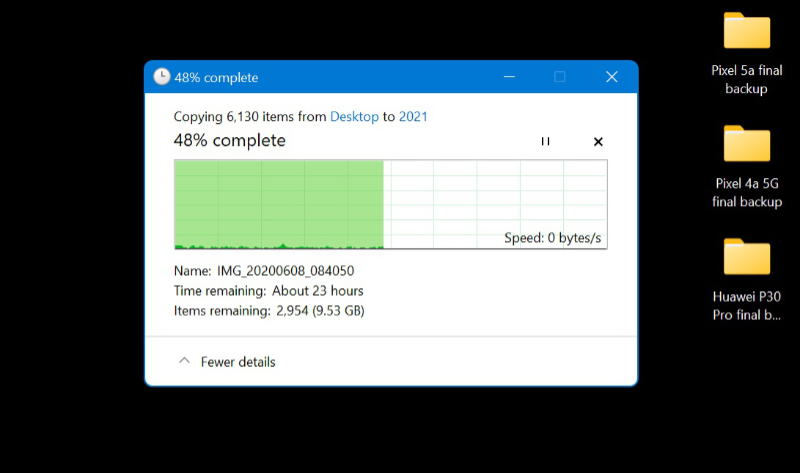
I’ve tried all the obvious troubleshooting tips—like powering down and then powering up the NAS—and I’m going to try directly attaching a USB3 external hard drive and seeing if that works. Copying this 18.4 GB folder of photos from my PC to that drive took just several minutes. And it’s not even a particularly new drive.
And that’s the thing. I like the idea of local storage, and I really like the redundancy that two mirrored drives provide. So I’m leaning towards some sort of direct-attached (USB3/Thunderbolt/whatever) storage with two mirrored drives. I’ve only just started researching this, but if you have any suggestions for something both portable and redundant, I’m listening.

Gain unlimited access to Premium articles.
With technology shaping our everyday lives, how could we not dig deeper?
Thurrott Premium delivers an honest and thorough perspective about the technologies we use and rely on everyday. Discover deeper content as a Premium member.