Tip: Twitter User? Disable Audio and Video Calling
- Paul Thurrott
- Mar 05, 2024
-
3
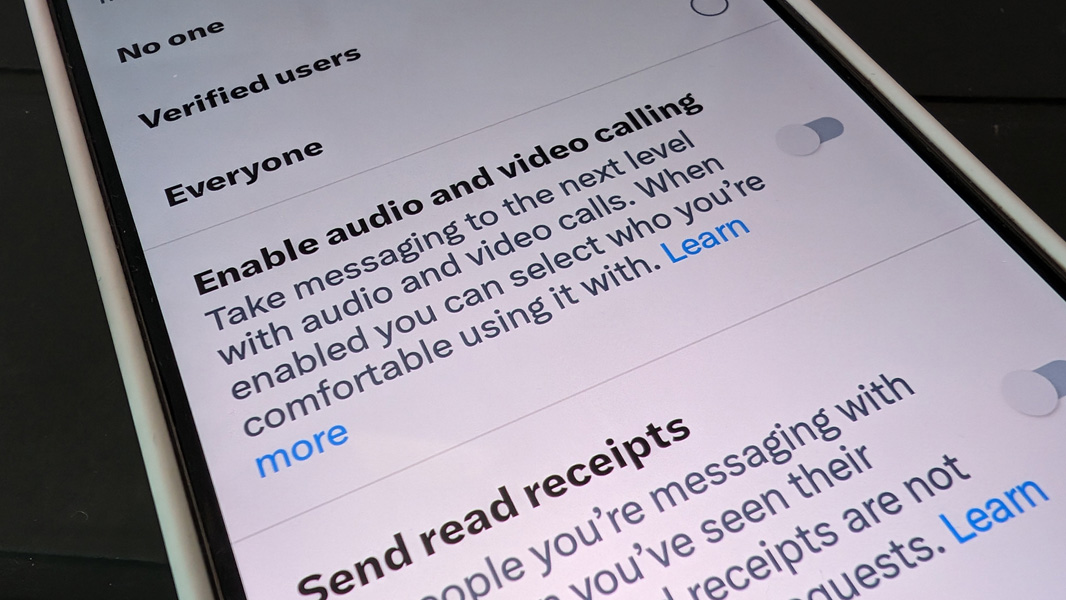
Last week, Twitter opened up its audio and video calling functionality to all users. But this feature introduces serious privacy concerns you should address. The best course of action is to disable it entirely.
For now, at least, this audio and video calling functionality is limited to those using Twitter with the mobile app on iOS or Android. But the privacy issues are many:
- This feature is enabled by default for all users and the app does not communicate this fact.
- This feature allows any user on Twitter to call or video call you at any time by default: All they have to do is follow you first.
- As with other messaging services, calls over Twitter are peer-to-peer and that means that each party can access the other’s IP address by default. So anyone can learn your rough location just by initiating a call.
- Twitter calls are not encrypted. Among other things, that means that representatives of Twitter could intercept your calls.
Put simply, if you use Twitter, it’s time to examine how this feature is disabled and either lock it down or, better still, disable it entirely. Here’s how:
Open the Twitter app on your phone and tap your profile picture in the top left. Then, navigate to Settings & Support > Settings and privacy > Privacy and safety > Direct messages. Here, you will see that “Enable audio and video calling” is enabled. My advice is to turn this off, as you already have too many ways to communicate with other people. But you could also:
- Change “Allow audio and video calls from” to “People in your address book” or “People you follow.” The default configuration is “Everyone.”
- Enable “Enhanced call privacy” to avoid revealing your IP address to anyone who calls you.
But seriously. Just turn this off.
You can learn more about Twitter audio and video calls on the Twitter Help Center.