Google Improves Search in Chrome for Android, iPhone, and iPad
- Paul Thurrott
- Jun 26, 2024
-
0
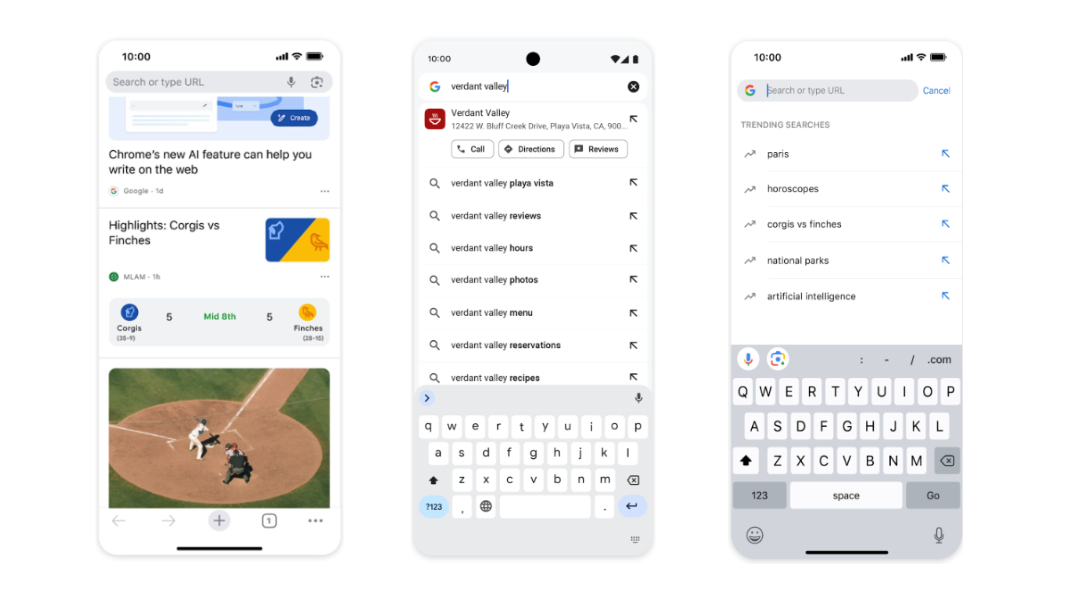
Google is adding five new search-related features to its Chrome web browser for Android, iPhone, and iPad.
“Looking something up on mobile should be just as smooth as if you were in front of your computer,” Google’s Nick Kim Sexton writes in the announcement post. “Today we’re announcing five updates to Chrome on Android and iOS to make it even easier to search from your phone or tablet.”
They are:
Chrome Actions for local places. The Actions chip appears under the Chrome address bar as needed, allowing lets you perform specific actions like Delete browser history, Manage passwords, and the like. Now, there are new actions for businesses and other local places so you can call it, get directions, read reviews, and more. This feature is live on Android now and is coming to iPhone and iPad later this year.
Redesigned address bar for tablets. The Chrome address bar has been refreshed on Android tablets and iPads, with an updated Material Design look and feel and a drop-down that doesn’t cover the website you’re currently viewing.
Shortcut suggestions. This new feature brings personalization to the Chrome address bar that suggests actions based on what you’ve done in the past. Google’s example: If you usually type in “schedules” to see the local metro schedule, and so that schedule will now appear higher in the search suggestions when you search for that word.
Trending searches. New to Chrome for iPhone and iPad (it’s already available on Android), search suggestions will now display trends below your recent searches when you tap the address bar on the New Tab page.
Sports cards in Discover feed. The Discover feed will now display live sports cards in Chrome for iPhone and iPad. These cards display automatic updates for teams you’ve followed in the past.