Windows Insiders Can Test Accessing Their Android Phones From File Explorer
- Laurent Giret
- Jul 26, 2024
-
0
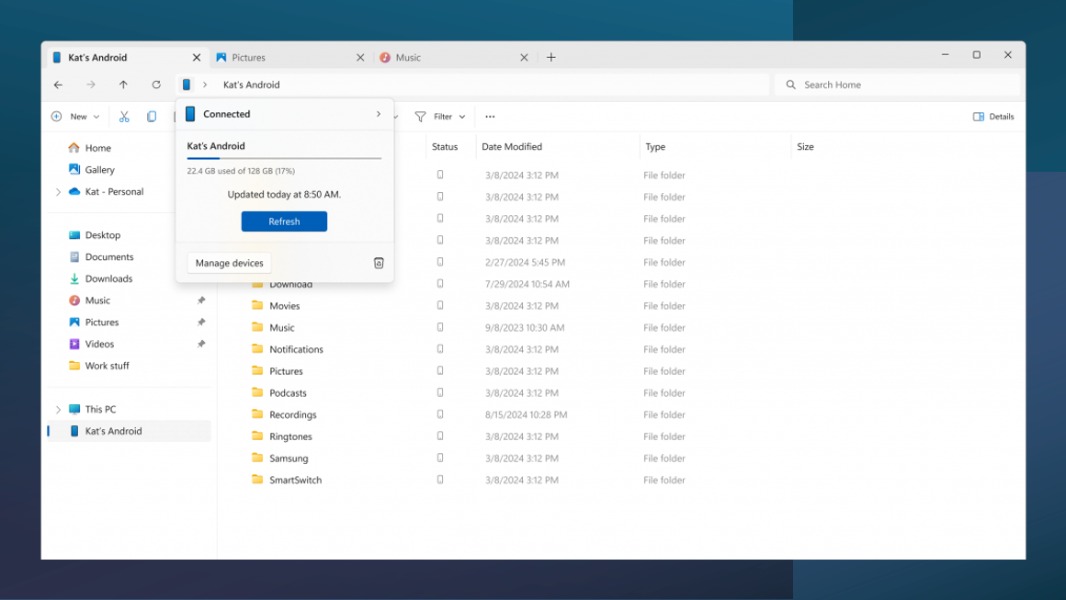
Microsoft is testing a new Link to Windows feature that lets Windows Insiders see their Android phone in File Explorer and browse its content. This new feature is rolling out to Windows Insiders on all channels, and it all works wirelessly.
“With this new experience, you will be able to wirelessly browse through all your folders and files, including media that is on your Android phone,” the Windows Insider team explained. “You can open them, copy them to your PC, copy PC files to your phone, rename files, move them, and delete them.”
This new experience requires a phone running Android 11 or higher and the beta version of Link to Windows (version 1.24071). It must also be manually enabled from the Settings window for managing mobile devices, which is available at Settings > Bluetooth & devices > Mobile Devices. The Windows Insider team noted that the toggle to show your phone in File Explorer will roll out gradually to all Insiders.
Link to Windows already allowed Windows users to easily sync recent documents and pictures on their Android phones, respond to messages and calls, and mirror their phone’s screen. Microsoft making Android phones visible in File Explorer was probably the next logical step for Phone Link.
Windows Insiders should be aware that the new Phone Link integration into File Explorer is still buggy: Operations performed on phone files from a PC may not sync back to the phone. Moreover, Microsoft will be fixing an issue causing deleted files in the new Recycle Bin folder on connected phones to be deleted after 5 days instead of the indicated 30 days. The company is also aware of a bug causing deleted files to sometimes not appear in File Explorer.
Back in June, Microsoft also started testing the integration of Phone Link features into the Windows 11 Start Menu, with a new widget-like panel providing access to messages, calls, photos, recent contacts, and more. This experiment is currently available for a subset of Insiders on the Beta Channel.