Lenovo ThinkBook 13x Gen 4 First Impressions
- Paul Thurrott
- Aug 02, 2024
-
0
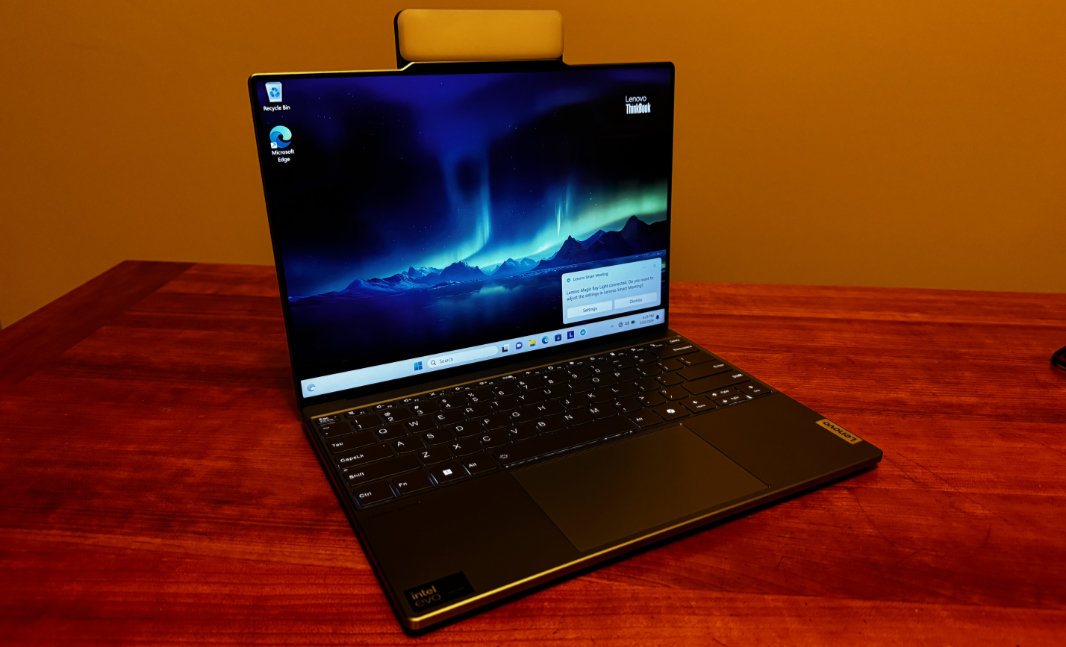
And now for something completely different. The Lenovo ThinkBook 13x is an elegant ultraportable laptop for the small business market. And it comes with a useful little, a detachable light that’s bright enough to guide Frodo through Mordor. So it should make short work of those Zoom meetings.

I’ve reviewed many ThinkBook products over the years, but it’s been a while, and I’ve never reviewed, or even seen, a ThinkBook 13x. But as is the case with the more expensive ThinkPad family, the X indicates the top of the line. More specifically, ThinkBook X series laptops deliver high-performance components, leading edge, ultra-thin designs, and long battery life for those who spend a lot of time on the road.

And there’s only a single model in this line currently, the ThinkBook 13x I’m reviewing. But the display is bigger and better than its name suggests. Not only is it 13.5 inches on the diagonal, but it’s a 2.8K (2880 x 1920) IPS multitouch panel with a 3:2 aspect ratio, elegantly rounded corners—unlike with Surface Laptop—and possibly the thinnest bezels I’ve ever experienced.

The display throws off a bright 500 nits of light and is Eyesafe-certified for low blue light. But it also supports adaptive color, similar to Apple’s True Tone, and Super resolution upscaling for videos in Chromium-based web browsers. Best of all, it offers a dynamic, high refresh rate capabilities that let it switch on the fly between 60 and 120 Hz.

I prefer larger displays—the bigger, the better, for the most part—but this is an impressive little package, a unibody aluminum CNC design in the signature ThinkBook dual-tone gray. It’s curiously heavy for its tiny size—about 2.7 pounds—and dense-feeling as a result. But it also exudes quality: CNC is getting less common these days, and it feels almost luxurious. I suspect its large 74 Whr (watt-hour) battery is contributed as well.

Inside, you’ll find an Intel Core Ultra (“Meteor Lake”) H-series processor, either a Core Ultra 5 125H, as in the review unit, or a surprisingly beefy Core Ultra 9 185H that exceeds 5 GHz in Turbo Boost mode. The 13x can be configured with 16 or 32 GB of 8400 MHz dual-channel LPDDR5x RAM and up to 1 TB of M.2-based PCIe Gen 4 SSD storage, but the RAM, which is soldered, is tied to the processor choice (as noted below). The review unit arrived with 16 GB of RAM and 512 GB of storage.

Expansion is minimal, in keeping with the svelte form factor, and Lenovo was thoughtful enough to provide at least one USB Type-C port on each side of the PC. As good, all three are identical USB4 ports, with 40 Gbps of data transfer speeds.
On the left, you’ll find one USB4 Type-C port, right at the rear. And then a combo headphone/microphone jack, which, speaking of thoughtful, is nicely positioned towards the front.

On the left, you’ll see the other two USB4 Type-C ports, and here, too, a single configuration in which one is right at the rear and the other is in an unusual position towards the front, below the wrist rest. There’s a power button and physical webcam privacy switch next to the rear USB port as well.

Connectivity is predictably modern—you get Wi-Fi 6E and Bluetooth 5.3—but there’s no cellular data option, which is surprising for this class of PC.
The AV credentials seem solid between the 2.8K display and the four Harman Kardon speakers—two upward-firing through the keyboard, and two downward-firing—which are backed by Dolby Atmos immersive sound capabilities.

The hybrid work capabilities are more notable. The basics are there, with a Full HD (1920 x 1080) webcam with Windows Hello-compatible facial recognition, and a four-microphone array.

But the bundled Magic Bay Light, which magnetically attaches to the back of the PC’s communications bar using pogo pins for guidance at the top of the display lid, is what puts it over the top.

When you attach it, a Lenovo Smart Meeting notification appears so you can fire on the light—and it almost literally seems like fire—and configure it as needed. It’s needed: on Auto, it’s incredibly bright … and that’s the lowest brightness setting! According to Lenovo, the Magic Bay Light emits 150lux of illumination while consuming just 3 watts of power. And you can control the brightness via a subtle button on its right side.

Interesting.
Smart Meeting also includes all the standard webcam configurations for smart appearance, background switching (but not blur), and subject tracking. (And thanks to its Meteor Lake processor, the ThinkBook 13x is an AI PC with an entry-level NPU, so you get basic Windows Studio Effects too.)

The keyboard is the familiar high-quality and full-sized Lenovo premium keyboard with scalloped keys (straight on the bottom row) and two levels of backlighting with an auto mode.

And you can configure the 13x with a ClickPad or a ForcePad, the latter of which, I assume, is a haptic design. The review unit has a standard ClickPad, which is medium large given the smallish size of the PC. The keyboard and touchpad, as I call it, both seem to work well in early testing, but I suspect the form factor will be tough on my big hands.

I don’t have a handle on battery life yet. Lenovo claims it’s all-day, but my Meteor Lake experiences are all over the place, so it’s difficult to predict. There’s a fun little 65-watt USB-C slim charger in the box, and while there’s no word about fast charging, that’s pretty much standard these days.

Aside from Windows 11 Home, there’s no crapware per se. Lenovo bundles four of its own utilities, plus a link to the user guide, in Start. And beyond that is Dolby Access and three Intel utilities. That’s it, though the Lenovo Vantage app is chock-full of services upsells, and you’ll see the occasional Lenovo banner notification.

The 13x is expensive for a ThinkBook. Prices start at over $2100, triggering a double-take. For that sum, you get the review unit, with its Core Ultra 5 H-series processor, 16 GB of RAM, 512 GB of storage, and your only hardware upgrade choice is bumping the storage to 1 TB for $121. The Core Ultra 9 H-series upgrade adds over $580 to the cost, but you can then upgrade the RAM to 32 GB ($161). So you could spend—gulp–$3000 on this mighty mite. The upgrade from Windows 11 Home to Pro will set you back another $80.
More soon.