Google is Adding OneDrive Migration Capabilities to Workspace
- Paul Thurrott
- Oct 11, 2024
-
1
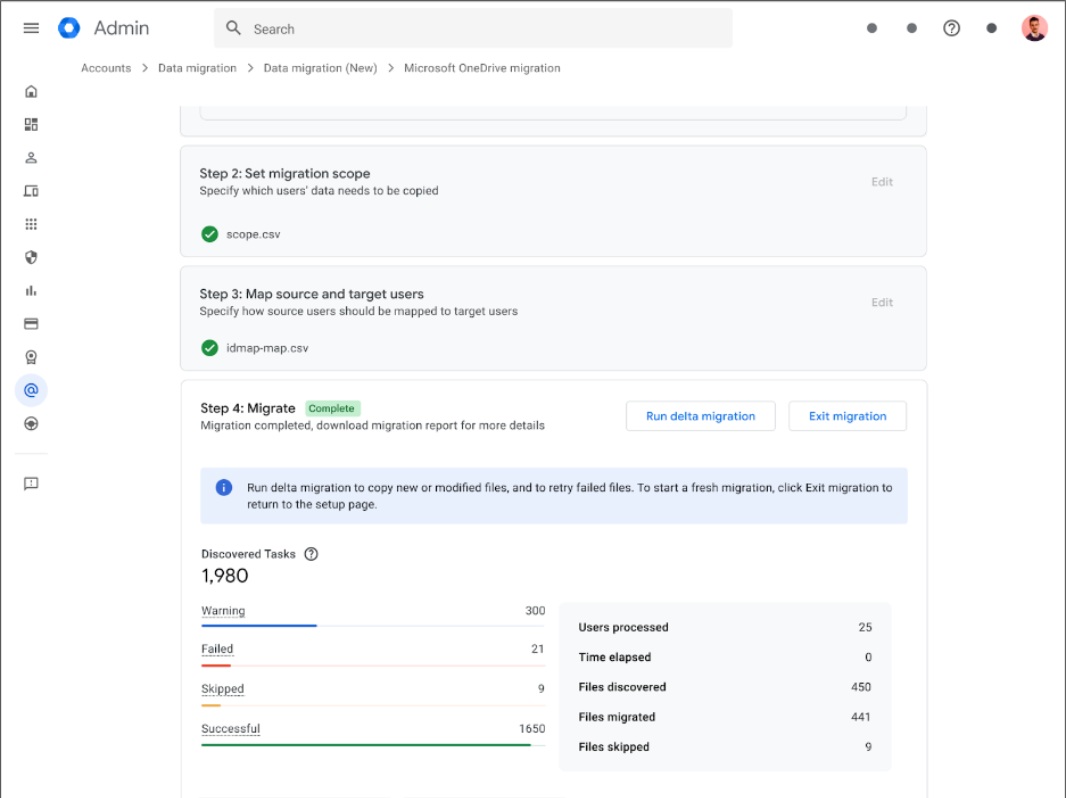
Google has issued an open beta of a new OneDrive migration capability that’s open to all Google Workspace customers.
“Under the umbrella of our data migration services, we’re introducing a new file migration service for Admins to transfer files between OneDrive data to Google Drive for up to 100 users at a time,” a Google Workspace Updates post explains. “Available directly under the Admin console, super admins can now migrate all your files and folders, as well as their corresponding access permissions with shared members. Starting a migration entails a few simple steps.”
Microsoft OneDrive Migration doesn’t require a sign-up, but it can only be performed by super admins in your organization. To get started, visit Workspace Admin, navigate to Accounts > Data migrations, and select Data migration (new) and then Microsoft OneDrive migration. (If you don’t see these locations, you may not have gotten the update yet; it’s rolling out through early November.) Then, connect to the OneDrive account you want to transfer files from, specific which users are included, and map each to a user in Workspace.
The console will report on the migration process as it occurs, provide metrics related to each user, migrated files, skipped files, and the like, and allow you to export a migration report. The tool also supports delta updates to migrate files later after the initial migration.
“Data migrations play a critical role in ensuring a seamless transition between various tools and Google Workspace for both admins and end users,” Google explains. “.Workspace now offers a first party solution that allows our customers to migrate their data at scale, and without the need for third-party workarounds or on-premises infrastructure. This will significantly reduce the overall migration process and onboarding time to Google Workspace, saving customers considerable administrative and infrastructural costs. Additionally, it ensures minimal interruption for end users, who will be able to access all of their files and documents within Google Drive.”
Microsoft OneDrive Migration is available to customers with Workspace Business Starter, Standard, and Plus; Enterprise Standard and Plus; Education Fundamentals, Standard, Plus, and the Teaching and Learning Upgrade; Essentials Starter and Essentials; Enterprise Essentials and Enterprise Essentials Plus; and Nonprofits.