Chrome OS 130 Add Quick Insert, Focus, Much More
- Paul Thurrott
- Nov 01, 2024
-
0
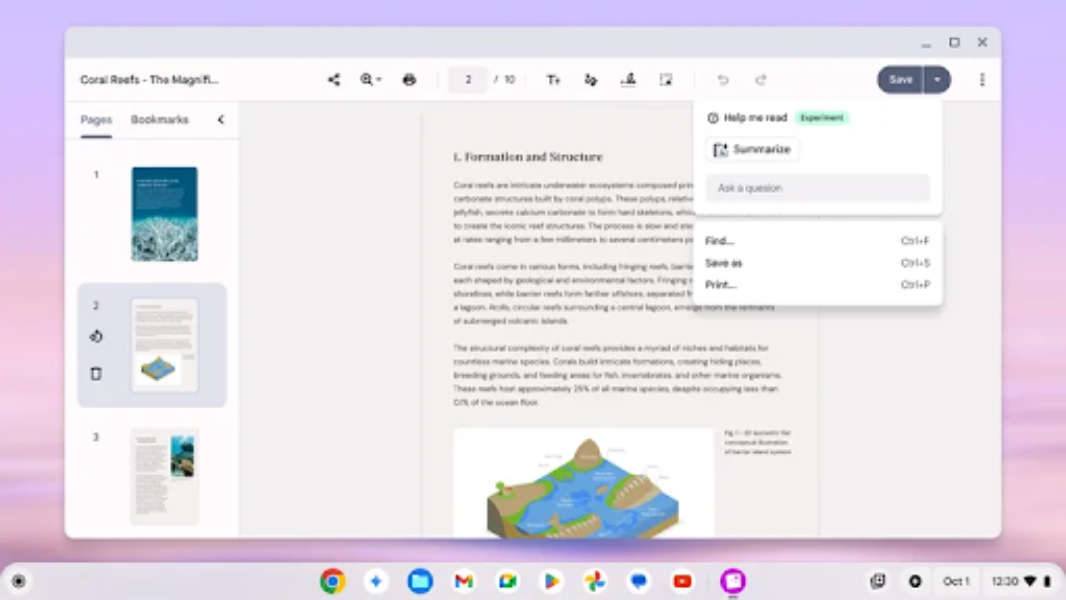
Google has released Chrome OS version 130, adding the many features it announced back in October to the platform. In fact, this is a pretty big upgrade.
Quick Insert. Chrome OS 130 introduces a new keyboard shortcut, Launcher + F, for quickly inserting emojis, symbols, GIFs, Google Drive links, and quick calculations and unit conversions anywhere you can type. Note that this feature is also coming to a new hardware key on Chrome OS devices, starting with the recently launched Samsung Galaxy Chromebook Plus.
Focus. As with the similar feature in Windows 11, Focus helps minimize distractions by enabling Do Not Disturb with a timer, and optionally using a curated playlist and a Google Task to get work done.
Tote Suggestions. In Chrome OS, the Tote icon in the shelf (Taskbar) holds recent downloads, screenshots, and pinned files, and it’s been updated with a new Suggestions feature that recommends files to pin and make available offline. (God, does that sound like Windows 11. I assume you can disable this.)
Enhanced access for Drive files. Tied to the above feature, you can now access any Drive-based files you’ve “starred” when the device is offline. Chrome OS will also offer Enhanced Drive suggestions in the Launcher so you can more access your most important and frequently used files.
Welcome Recap. This new feature helps users resume their work and explore new options at start-up, Google says. It also provides helpful information like weather, your next calendar event, recent tabs from other devices and relevant Google Drive suggestions. You can enable it in Settings > System Preferences > Startup > Welcome Recap.
Studio-style mic. This new Chromebook Plus feature uses noise cancellation, de-reverberation effects, advanced balancing, and room adaptation features to improve the audio quality of your device’s microphones. It’s enabled by default if you turn on noise cancellation, but can optionally revert to the old noise cancellation-only effect.
Recorder app. This new AI-powered app works like the version included with Pixel devices. It records audio, of course, and creates transcriptions with speaker detection and a summary. Some features are exclusive to Chromebook Plus.
Appearance effects improvements. On Chromebook Plus, you can now use Appearance effects in any video call.
Keyboard brightness improvements. Keyboard brightness, Ambient light sensor, and RGB lighting controls (when available) are now available in the Settings app.
Help me read. Google’s AI-powered Help me read feature is now available on Chromebook Plus. “Easily get to the heart of what you’re reading in the browser and in Gallery by right-clicking on an empty space to reveal the Help me read card above the existing contextual menu,” Google explains. “The Help me read panel showcases a summary of the text and a free-form Q&A field where you can ask specific questions about the text.
Multi-calendar support. Users can now view events from multiple calendars within Google Calendar.
Picture-in-Picture windows. When viewing a video, you can now switch to a Picture-in-Picture (PiP) window that can be moved to the side of the screen and toggle its size between two sizes with a double-click.
Google says Chrome OS 130 will roll out over “the coming days,” and some devices may not be immediately eligible for the update.