Microsoft Deprecates Suggested Actions in Windows 11
- Paul Thurrott
- Dec 11, 2024
-
3
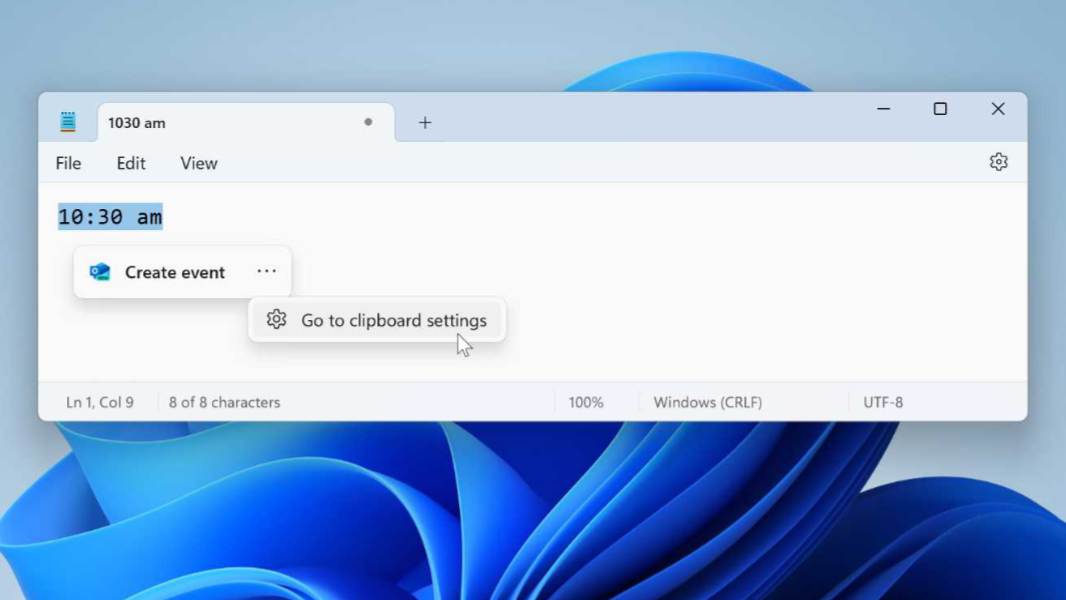
Microsoft has been aggressively deprecating underused Windows features for the past year or so, and now it’s added another victim to the list: Suggested actions has been deprecated in Windows 11.
“Suggested actions that appear when you copy a phone number or future date in Windows 11 are deprecated and will be removed in a future Windows 11 update,” the Deprecated features for Windows client page on Microsoft Learn notes in a new update.
I wouldn’t be surprised if you’re unfamiliar with Suggested actions, as this feature is quite limited and very well hidden. But I cover it in the Clipboard chapter of the Windows 11 Field Guide, which I guess I’ll need to update now. Suggested actions was limited in scope since its inception and it’s never been improved or updated, so I guess I’m not surprised it’s disappearing.
“Windows 11 includes an obscure feature called Suggested actions that appears when you copy a date, time, or phone number to the Clipboard and suggests relevant actions,” I write in that chapter. “For example, if you copy a date or time to the Clipboard, the Suggested action pop-up provides one or more ‘Create event’ options so you can do so using a compatible app on your PC … And if you copy a phone number to the Clipboard, the Suggested action pop-up provides one or more ‘Call number’ options so you can do that using a compatible app on your PC.”
Suggested actions joins a long list of features Microsoft deprecated in or removed from Windows this year, including legacy DRM services, Paint 3D, Adobe Type 1 fonts, DirectAccess, NTLM, Driver Verifier GUI, passwords in Multiple Provider Router (MPR) system notifications, certificates using RSA keys with key lengths shorter than 2048 bits, and Test Base for Microsoft 365.