Parallels Desktop Now Supports Intel-based Virtual Machines on Apple Silicon Macs
- Laurent Giret
- Jan 13, 2025
-
7
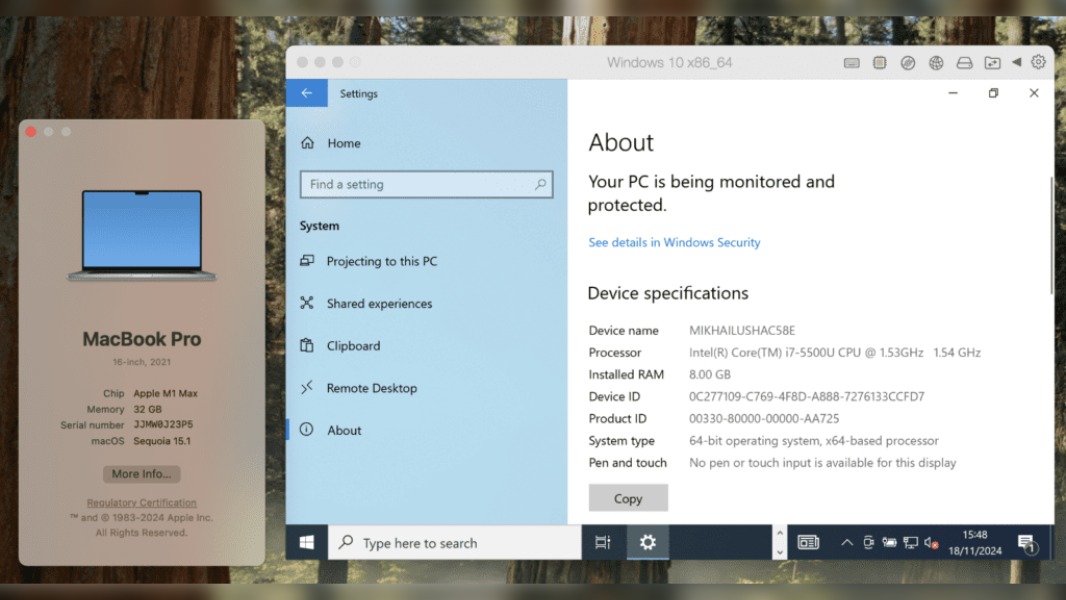
A new update for Parallels Desktop for Mac 20 is adding support for Intel-based virtual machines on Apple Silicon Macs. The feature, which has been a popular request from Parallels Desktop users, is currently labeled as “an early technology preview” and comes with some limitations.
“Many users have reached out to us and requested the ability to run, develop, and test 32-bit Windows apps in a native environment, the company explained today. “Some of you also asked for the ability to run x86_64 Linux virtual machines as an alternative solution to running Linux virtual machines through Rosetta.”
With the just-released Parallels Desktop 20.2.0, Apple Silicon Mac users can now run existing Intel-based Windows 10, 11, Windows Server 2019/2022, and Linux virtual machines or create new ones. However, performance is currently “really slow” with Windows boot time varying from 2 to 7 minutes. The installation of a new Windows Server or Windows 10 21H2 VM is also said to be taking 20-30 minutes, with the installation of Fedora 40 taking about 2 hours.
At the moment, it’s not possible to run Intel-based Windows 11 24H2 VMs due to the absence of SSE (Streaming SIMD Extensions) 4.2 support. There is also no support for USB devices and legacy BIOS, and VMs are limited to only 1 vCPU and a maximum of 8GB of RAM. Due to these limitations, the company doesn’t recommend to not run several applications at once. You can find more information about how to use Intel-based virtual machines on Apple Silicon Macs on this support page.
Parallels Desktop 20.2 brings other updates including a better integration of Apple’s Writing Tools for Windows apps. It’s now possible to access Writing Tools within the context menu of Word, PowerPoint, and the classic Outlook app for Windows.
For IT Pros, today’s update streamlines license management with corporate identity providers such as Microsoft Entra. There are also new Configuration Profiles to simplify the deployment of virtual machines on managed Macs.