Microsoft Begins Rolling Out a Major Update to Clipchamp
- Paul Thurrott
- Feb 12, 2025
-
2
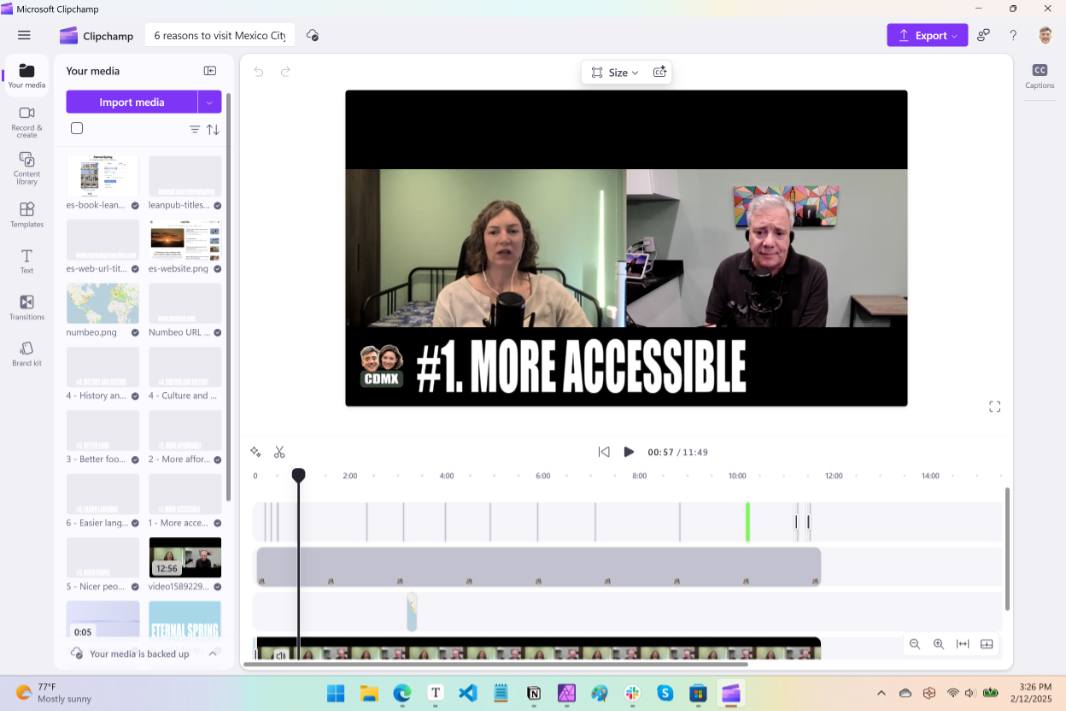
Microsoft today announced a major update to its Clipchamp video editor that’s rolling out to individuals this month. A version for businesses will be available in March.
“Microsoft Clipchamp’s diverse range of content and tools, as well as its user-friendly interface, make it the ideal platform for anyone to create personal and professional videos,” Microsoft’s Anastasia Passaris writes in the announcement post. “Today, I’m thrilled to share some exciting updates–including dark and light mode, improved asset grouping, and timestamps in the timeline–that will make your video editing experience in Clipchamp even simpler, and more seamless and enjoyable.”
Here’s what’s new.
Light mode support. To date, Clipchamp has run only in a native dark mode. But now you can switch between light, dark, and system modes, the latter of which matches the system setting you chose in Windows.
Improved asset management. Now, you can group multiple assets–music, text, and visuals–into a single track item in the timeline. Previously, you could group items, to move them as one, perhaps, or set the same settings on each at once. But now, grouped items will appear in a simpler, less cluttered view with a thumbnail that displays the type and number of items in the group. Just select multiple items, right-click, and choose “Group.”
Redesigned video editor. The Clipchamp video editor is simpler and more beginner-friendly now, with new options to collapse the sidebar and timeline, zoom in and out of the timeline, playback video in full-screen mode, undo and redo actions, change the video’s aspect ratio, and add AI captions.
More precise timeline editing. This is a feature I’ve been looking for: You can now get the timestamp by hovering the mouse over the timeline or while trimming an item, so you can make more precise edits.
As noted, these features are rolling out to individuals using Clipchamp now. If you access Clipchamp through a Work account, these changes will arrive in March.