Dev and Beta Channels Get New 24H2 Builds
- Paul Thurrott
- May 19, 2025
-
0
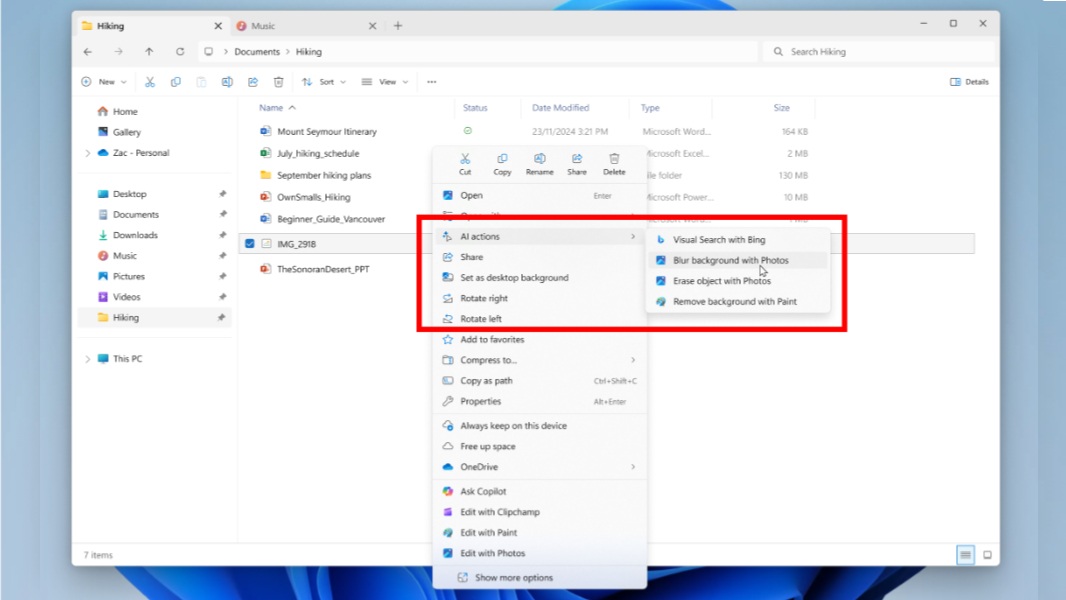
As if Build 2025 wasn’t busy enough, Microsoft issued new pre-release builds of Windows 11 version 24H2 to the Dev and Beta channels of the Windows Insider Program today. They appear to be identical, as has been the case for much of 2025. But there is one important distinction for those with PCs in the Beta channel: If you had stuck with 23H2 builds until now, you’ll be pushed to 24H2 now.
Cumulative update KB5058488 is available now from the Dev channel. It upgrades Windows 11 version 24H2 to build 26200.5603. Likewise, cumulative update KB5058486 is available in Beta, and it upgrades Windows 11 version 24H22 to build 26120.4151.
Here are some of the key new features and changes
AI actions in File Explorer. Now, you’ll see a new “AI actions” item in the context menu when you right-click a file so you can choose between various compatible options. For now, there are four image actions–Visual Search with Bing, Blur background with Photos, Erase object with Photos, and remove background with Paint–but Microsoft plans to add other actions for Microsoft 365 files, like Summarize and Create an FAQ, in the coming weeks. (Both of these require a Copilot subscription and, for now, for the PC to be enrolled in the Microsoft 365 Insider Program.
Advanced Settings. A new Advanced page in the Settings app (at System > Advanced) replaces the old For Developers page and adds new settings, like Enable long paths, Virtual workspaces, and File Explorer + version control, the latter of which lets you access Git repositories directly in the file system.
Search improvements. Search results will display a warning if Windows 11 is still indexing your drive, and a “Status” item for individual items so you can see whether it’s synced locally or only in the cloud at a glance.
Widgets experiment. Microsoft is testing a new layout for the widgets board in which your pinned widgets are laid out horizontally at the top. And the Discover feed features stories that were curated by Copilot. You can revert to the old experience in settings.
Share improvements. When you share an image, there’s a new quality drop-down with High, Medium, and Low Quality options below the filename in the Share pane.
Power & battery. These builds include a new feature called User interaction-aware CPU power management that automatically applies an efficient power management policy when the PC is unused for a period of time and then reverts to full performance when you return.