Microsoft Edge Gets a Nice Picture-in-Picture Update
- Paul Thurrott
- Jun 07, 2025
-
2
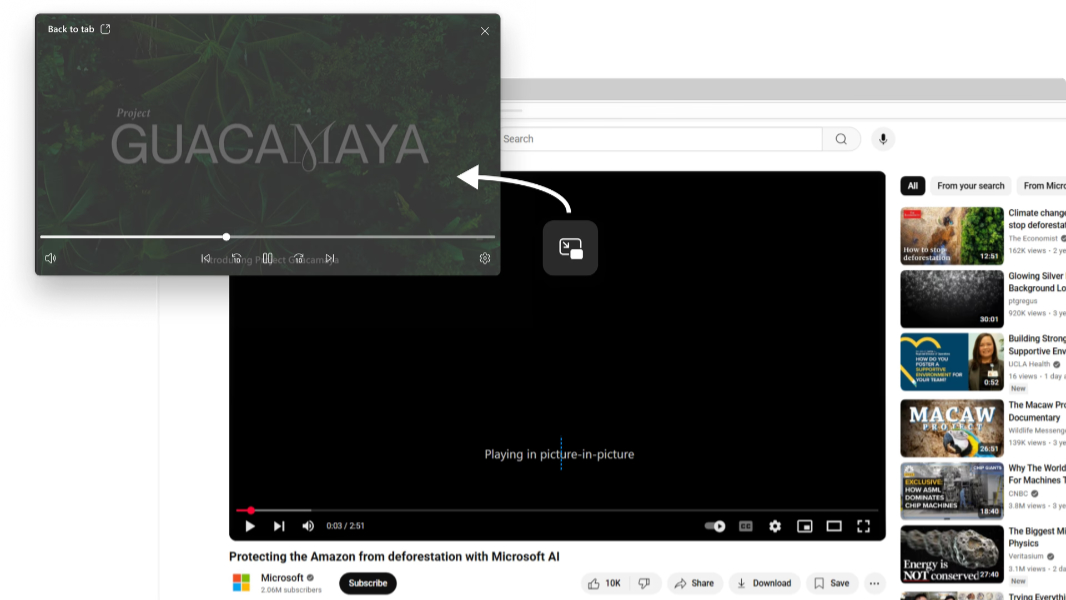
Like many alternative web browsers, Microsoft Edge for desktop offers a picture-in-picture (PIP) feature for viewing web videos like those on YouTube in a minimal window outside the main browser window. This week, PIP got a usability update, and it’s worth checking out if you’ve ever used this feature or it’s been a while.
“We’re rolling out a significantly enhanced picture-in-picture experience to all users,” Microsoft’s Siddhartha Pandey writes in the announcement post. “Our enhanced picture-in-picture feature is designed to make multitasking easier and more enjoyable. Whether you’re working, studying, or just browsing the web while watching a video, this update gives you the flexibility to manage your screen space efficiently.”
Here’s what’s new:
Hover menu on videos. When you hover the mouse cursor over a compatible video, Edge displays a small menu bar with three options: Picture-in-picture, Enhance, and Summarize video. The Enhance feature “sharpens and improves color, lighting, and contrast” in videos when your PC is plugged in to power. The summarize feature opens the Copilot sidebar to provide the summary.
Enhanced PIP controls. The PIP window now offers more intuitive controls with options to Play/Pause, skip forward or backward, and scrub via a progress bar in addition to Mute/Unmute and a settings link. To access the controls, open a video in PIP and hover over the window.
PIP resizing. The PIP window can be moved around the screen and resized as needed.