Microsoft 365 Copilot Finally Gets Memory
- Paul Thurrott
- Jul 14, 2025
-
0
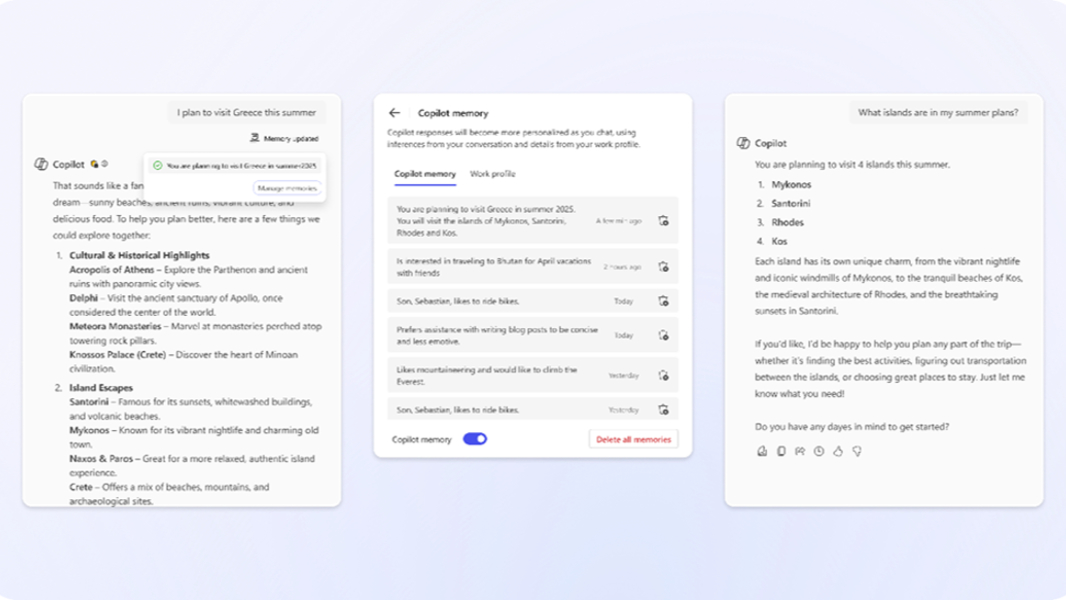
Microsoft announced that Microsoft 365 Copilot would get Memory shortly after announcing the feature for Copilot in Windows 11. This feature helps you personalize the Copilot experience.
“At Microsoft, we believe AI should work for you, not the other way around,” Microsoft’s Alli Parrett writes. “That’s why we’re introducing memory in Copilot, a new capability that makes your Copilot smarter, more helpful, and more in tune with how you work.”
This feature remembers key facts about you, including your preferences, working style, and recurring topics, Microsoft says, so it can personalize its responses and recommendations over time. But it won’t do that automatically. Instead, you need to tell it to remember certain things explicitly using prompts like “Remember I like using bullet points in my writing,” “Keep my emails concise,” “Use a formal tone,” and so on.
Copilot won’t make assumptions about what it should remember and will only remember those things you explicitly tell it to. When Copilot remembers something about you, it will display a subtle “Memory updated” message on-screen. And you can can view, edit, or delete your memories anytime from the Settings pane, or disable Memory entirely.
Memory in Microsoft 365 Copilot is currently in preview, with general availability expected later this month. It can be managed by IT, of course, but it will be enabled by default. And it’s not currently available for Agents.