New Windows 11 Dev and Beta Builds Are Available for Insiders
- Laurent Giret
- Aug 01, 2025
-
0

Microsoft has just released two new Windows 11 preview builds for Insiders on the Dev and Beta Channels. The new bits bring two changes for File Explorer and the Settings app, as well as the same set of bug fixes.
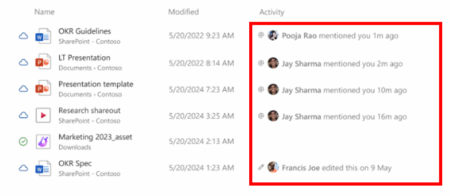
The 25H2 Dev build 26200.5733 and the 24H2 Beta build 26120.5733 introduce a change to the Home section of File Explorer for Insiders signed in with a work or school account. The app will now show people icons at the top of File Explorer Home and under the “Activity” column. Hovering the mouse cursor or clicking over a person’s icon will display the Microsoft 365 contact for that person.
The two new builds also remove the option to clear your Bing Search history from the Privacy & Security section of the Settings app. As a result, Insiders will now need to open the web-based Privacy dashboard to manage their Bing search history.
Lastly, Microsoft fixed an issue that was causing the updated Start menu to crash for some Insiders. Another bug causing multi-finger touchpad gestures not to work as expected has also been addressed.