Spotify Lets Premium Users Add Custom Transitions Between Tracks
- Laurent Giret
- Aug 19, 2025
-
0
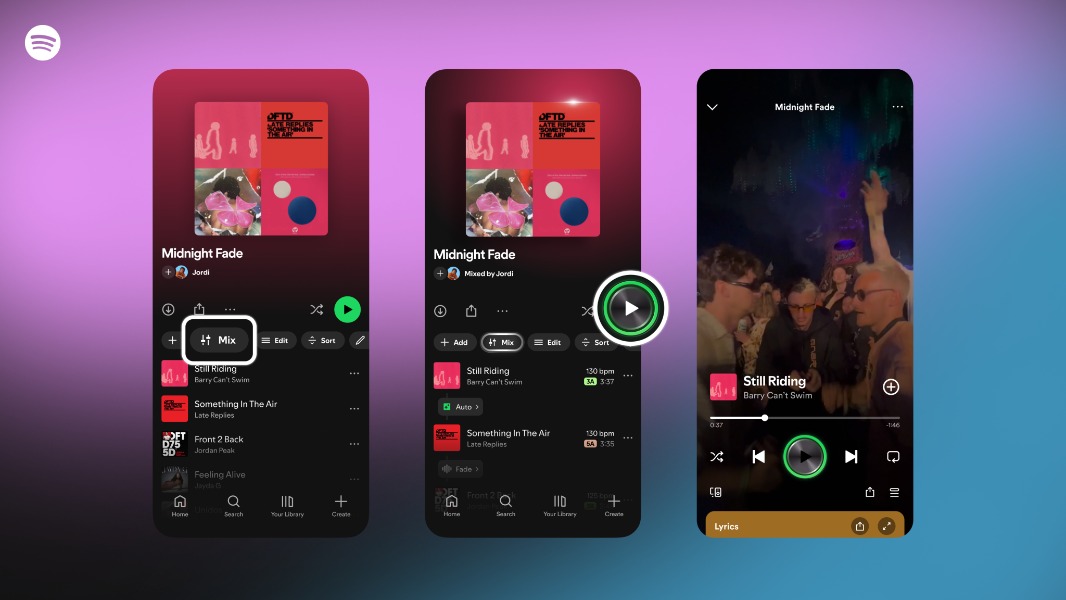
Spotify Premium users can now create custom transitions between tracks in their playlists. There’s an “Auto” option for people who aren’t audio mixing experts, but the app also offers various presets and advanced features like volume, EQ, and effect curves.
Spotify already offered options to remove silences between tracks such as Crossfade, which overlaps 2 tracks, and Gapless Playback, which removes any gaps or pauses between tracks. On select playlists, the Automix feature can also automatically create beat-matched transitions between tracks.
These new custom transitions, which are currently available in beta, can be created by selecting the “Mix” button when in a playlist. Tapping this button will automatically show the key and BPM (beats per minute) for each track, which helps to identify tracks that will be more transition-friendly.
To keep things simple, Premium users can choose the “Auto” setting or presets like “Fade” or “Rise.” Otherwise, they can dabble with volume, EQ, beat data, effects, and the waveform to create unique transitions between tracks in a playlist.
It will still be possible to disable custom transitions in playlists by pressing the “Mix” button. Spotify also encourages Premium users to create custom cover art for their mixed playlists with a collection of unique stickers and labels.