Vivaldi 7.6 Overhauls the Tab Bar
- Paul Thurrott
- Sep 18, 2025
-
1
Vivaldi is back with a new version of its desktop web browser, and this one is a pretty big update that includes a completely overhauled and more customizable Tab bar.
“A great browser should feel like familiar tools in your hands,” Vivaldi founder and CEO Jon von Tetzchner writes. “Not because you learned to work around it, but because it adapts to you. This release gives you full freedom to customize your browser with the editable tab bar and The Tab Button, forged for you to rule all your tabs.”
Here’s what’s new.
Tab Bar. The Vivaldi Tab bar is now fully customizable, in keeping with how other UI elements, like the Address bar, Status bar, Side bar, Themes, keyboard shortcuts, mouse gestures, and other Vivaldi features are likewise fully customizable.
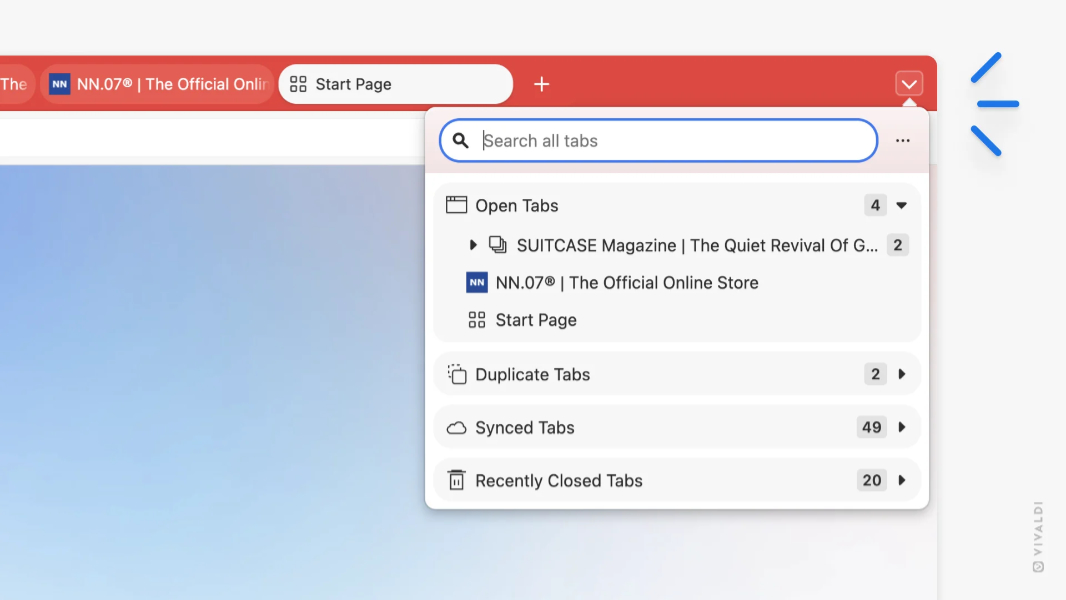
Tab Button. The new Tab button (not “New tab button”) is a new control that provides access to a panel where you can find, switch, and recover tabs without having to navigate through multiple menus. It also lists duplicate tabs, synced tabs, and recently closed tabs, and it replaces the old Synced tabs and Recently closed tabs button at the end of the tab bar. (You can, of course, move it.)
Context menu improvements. Vivaldi cleaned up the browser’s context menus so that core actions are easier to find.
Address bar improvements. The Address bar now supports @ commands like @tabs to jump to a specific tab, @bookmarks, and @history.
Pop-up blocker improvements. The pop-up blocker now supports rules and can automatically close secretly-opened tabs and windows.
Swipe gestures in Windows. The Windows version of Vivaldi now supports touchpad gestures so you can go back and forth as needed, similarly to with mouse gestures and keyboard shortcuts.
Sleeping tabs improvements. Sleeping tabs wake up more quickly than before thanks to some under-the-hood tweaks.
You can download Vivaldi 7.6 for Windows, Mac, and Linux for free from the Vivaldi website.