Microsoft Explains How It Will Secure AI Agents in Windows 11
- Paul Thurrott
- Oct 16, 2025
-
3
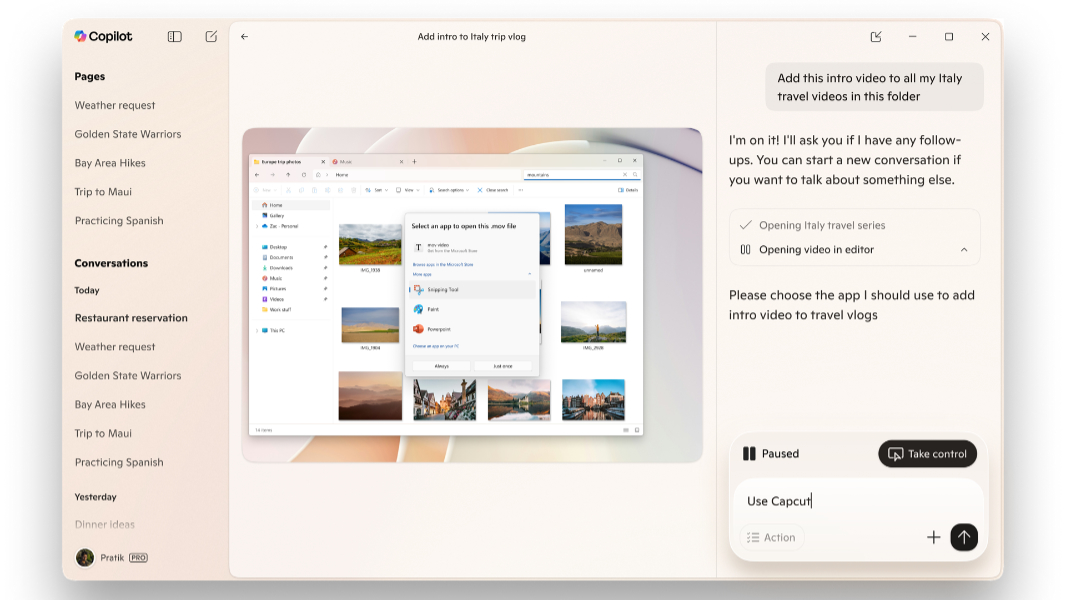
As Microsoft transitions all Windows 11-based PCs into so-called AI PCs thanks to a sweeping set of new Copilot and related AI capabilities, an obvious question emerges: How can Microsoft protect our security and privacy when there are potentially dozens of AI agents floating around out there, doing work on our behalf while interacting with our personal data?
Perhaps not surprisingly, Microsoft has a plan. As Windows 11 gains new agentic AI capabilities via a coming Copilot Actions platform (that already exists on the web), the software giant is taking steps to ensure that it’s secure and private by default.
“Copilot Actions is an AI agent that completes tasks for you by interacting with your apps and files, using vision and advanced reasoning to click, type and scroll like a human would,” Microsoft corporate vice president of Windows Security Dana Huang explains. “This transforms agents from passive assistants into active digital collaborators that can carry out complex tasks for you to enhance efficiency and productivity – like updating documents, organizing files, booking tickets or sending emails.”
The first point here is that Copilot Actions will be opt-in. It will appear first as an experimental mode in Copilot Studio through the Windows Insider Program. And once you’ve granted it permission, Copilot Actions can then interact with the apps and data found locally on your PC. And then it will expand and roll out more broadly. By which point one hopes that Microsoft has figured out how to make all this work correctly.
It’s not a small problem, as all AI models and chatbots today have familiar and well-understood hallucination issues. But AI agents pose unique security and privacy problems because of how they work and what they do. So Microsoft has created what it says is a “strong set of security principles to ensure agents act in alignment with user intent and safeguard their sensitive information.”
They are:
- Disabled by default. Agents in Windows 11 will be disabled by default and only enabled when the user chooses to do so.
- Distinct agent accounts. Agents in Windows 11 will operate within dedicated accounts separate from your user account so that they can be controlled with agent-specific policies. “You can share access to files and other resources to these dedicated agent accounts the same way you do with other users on your device like family or coworkers,” Microsoft notes.
- Agent workspace. Agents will run in a contained environment that isolates them from the rest of the system using recognized security boundaries. You can learn more about agent workspaces here.
- Limited privileges. Agents will start with limited privileges and will only obtain access to specific resources, like the local file system, when you explicitly permit that. Agents can’t change any settings on your PC without your intervention, Microsoft adds, and you can revoke any resource access at any time.
- Operational trust. Agents in Windows must be signed by a trusted source so that malicious or poorly designed agents can be revoked and blocked if needed through certificate validation and antivirus.
- Privacy-preserving design. Agents in Windows will conform to Microsoft’s Privacy Statement and Responsible AI Standard, and Windows will only collect and process data for clearly-defined purposes. Microsoft recommends its Privacy Report for a detailed account of its commitments to responsible AI, privacy, and other “fundamental rights.”
Microsoft added that more “building blocks,” like Entra and MSA identity support, are coming soon.
“During the experimental preview of Copilot Actions, the agent will have access to a limited set of the user’s local known folders—such as Documents, Downloads, Desktop or Pictures—and other resources that are accessible to all accounts on the system,” Microsoft says. “Only when the user provides authorization can Copilot Actions access data outside these folders. Standard Windows security mechanisms like access control lists (ACLs) help prevent unauthorized use.”
Microsoft will share more about agents in Windows at Ignite in November. But if you’re curious about how we got here, David Weston wrote about securing the Model Context Protocol that underlies these agents back in May.