Microsoft Issues New Windows 11 Dev and Beta Builds
- Paul Thurrott
- Oct 17, 2025
-
0
If you have a PC enrolled in the Windows Insider Program Dev or Beta channel, it’s time to check for updates.
Microsoft just issued cumulative update KB5067106—intriguingly described as a “preview quality update” in Windows Update–for those in the Dev channel, updating the system to Windows 11 version 25H2 build 26220.6972. Likewise, there is a KB5067106 update for those in Beta which updates the system to Windows 11 version 24H2 build 26120.6972. As is the case these days, the updates appear to be identical because they are.
Changes include:
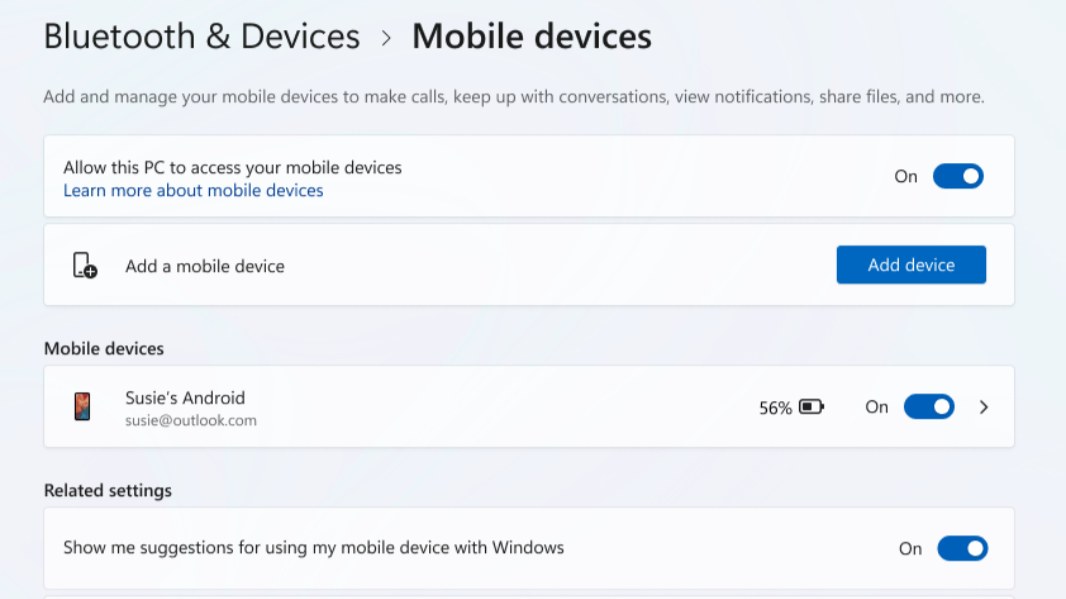
Mobile devices settings. If you’re familiar with the Mobile devices interface in the Settings app (Bluetooth & devices > Mobile devices), you know that there is a “Manage devices” button there today that opens a Manage mobile devices window separate from Settings in which you can, of course, manage the mobile devices connected to your account. With this update, that interface is changing so that it happens in-line, right in the Settings app. So you will see your connected devices listed on that page in Settings and can manage the features each supports without opening another window.
File Explorer improvements. As part of the long-overdue transition of always-white UIs finally adopting Dark mode support, the Folder Options dialog in File Explorer will finally display properly in Dark mode too.
Drag Tray improvements. The Drag Tray is an excellent example of pointless UI twiddling in Windows 11, but now you can at least turn it off. The setting will be found in Settings > System > Nearby sharing.
Account in the Start menu. In yet another example of UI twiddling, Microsoft has added a new “View my benefits” link to the bottom of the flyout that appears when you click your account name/profile photo in the Start menu. When you click this link, it opens the Microsoft account website in a browser. Because this is a burning need for everybody, I guess.
Game Pass descriptions in Settings. The Game Pass promotional tile in the Settings home page now reflects the recent branding and benefit changes.
Fixes. Aside from the changes noted above, Microsoft also fixed issues with File Explorer, display, Windows Update, and other system components. These updates also have a few known issues, too, including one that will prevent some Text actions from working in Click to Do and Recall; Microsoft says a fix is on the way.