Windows 11’s Redesigned Start Menu is Now Available for Release Preview Testers
- Laurent Giret
- Oct 22, 2025
-
5
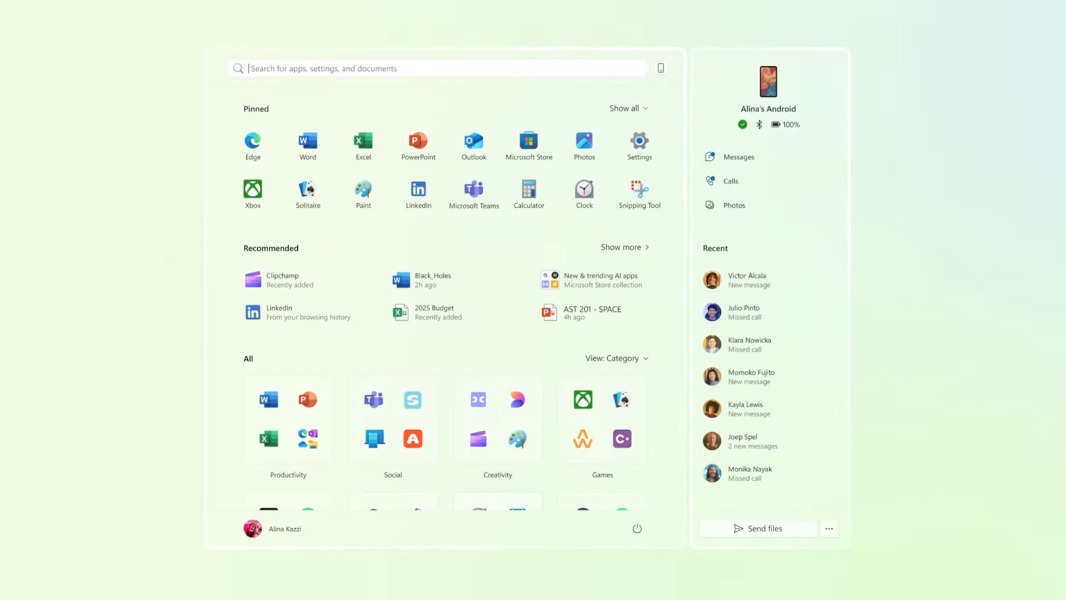
Windows Insiders on the Release Preview Channel can now test a redesigned Start Menu and other new features that will be coming soon to all Windows 11 users. The new Start Menu design was first made available for Dev and Beta testers in June, and Microsoft brought it to the Canary Channel earlier this month.
The KB5067036 update for Release Preview Insiders running the versions 25H2 and 24H2 of the OS also introduces new battery icons on the taskbar and lock screen, File Explorer updates, and Click to Do improvements on Copilot+ PCs. As usual, these changes will be rolling out gradually to Insiders, but here’s what to expect:
Redesigned Start Menu: The Start Menu now adapts to your screen size, and it offers a scrollable “All” section on the main page with two new ‘Category’ and ‘Grid’ views. A new mobile device button next to Search also opens the Phone Link sidebar.
New Battery icons: A green battery icon on the taskbar and lock screen now indicates that your PC is charging and is in a good state. A yellow icon shows that your battery is less than or equal to 20%. There’s also the option to display the battery percentage next to the battery icon in the system tray area of the taskbar.
Copilot Vision integration in Taskbar: When hovering over an open app icon on the taskbar, a thumbnail preview of the app window will appear with a new “Share with Copilot” button. Selecting it will allow Copilot Vision to analyze the content displayed by the app at that time. This can be turned off in Taskbar settings.
File Explorer improvements: Recommended files in File Explorer Home are now available in personal Microsoft accounts and local accounts (except in the EEA, and the feature can be disabled). Users signed in with a Microsoft account will also see new commands such as Open file location or Ask Copilot when hovering over a file in File Explorer Home.
Fluid Dictation in Voice access (Copilot+ PCs only): This new feature makes voice-based dictation in English smoother and smarter by correcting grammar, punctuation, and filler words in real time.
Click to Do improvements (Copilot+ PCs only): Click to Do can now be used to translate on-screen text and provide unit conversions for length, area, volume, height, temperature, and speed. The feature can also detect tables and share them to Excel, and it’s also adding a Freeform selection mode.
All these new features should become available for non-Insiders later this month with the October optional update for Windows versions 25H2 and 24H2. The public rollout should follow next month with the November 2024 Patch Tuesday updates.