The Orion Web Browser is Coming to Windows
- Paul Thurrott
- Aug 06, 2026
-
7
When it comes to web browsers, I use and recommend both Helium and Brave in Windows for all the obvious reasons: Incredible security and privacy, all the compatibility one gets from their Chromium base, and the performance benefits inherent in products that automatically block all trackers and ads. But thanks to the lock-in limitations we see across Android, iPhone, and iPad, what I use and recommend on mobile is different.
Someday, perhaps, the makers of Helium will port that browser to mobile. Or maybe Apple and Google will eventually be forced to allow browser makers to use the rendering engines of their choice on their platforms, which will make Brave, Firefox, and other web browsers more capable on mobile. Until then, I ping-pong between different browsers on Android and iPhone/iPad. And the latter case is particularly interesting because Apple’s platforms tend to attract attention from app makers, including browser makers, that we just don’t see on Android.
One of those Apple-centric web browsers, called Orion, is quite good. I use this on iPhone, iPad, and Mac, though I’ve been looking at Safari lately because of the ’27 OS updates I’m testing now. Orion is built on top of WebKit, the Apple web rendering engine used by Safari and other in-box apps in iOS and iPadOS (and, yes, by third-party web browsers on Apple’s mobile platforms, whether their makers want that or not).
Like Helium and Brave, Helium is focused on privacy and has built-in tracker and ad blocking. It offers better performance and much lower memory usage than Safari. And there are some neat features and customization capabilities. But what puts Orion over the top, I think, is that it’s compatible with browser extensions for Chrome, Firefox, and Safari. No, not all browser extensions, but a “curated” list of extensions that will appeal to most people and thousands of Chrome and Firefox extensions. Among the team curated extensions are things like 1Password, Microsoft Single Sign On, and iCloud Passwords.
If this browser was stuck in the Apple ecosystem, I’d only reference it in passing. But Orion is available in beta for Linux in both x86 and Arm64 forms now, and it’s coming to Windows. Soon.
How soon is unclear. But I signed up for their Windows mailing list some months ago, and they’ve sent out updates in March, April, and this past week, and while there’s no code to download and run yet, it appears to be coming along nicely. I am quite curious to try this browser in Windows 11, especially on Arm, assuming there’s a native version coming.
This is what Orion has told me since March:
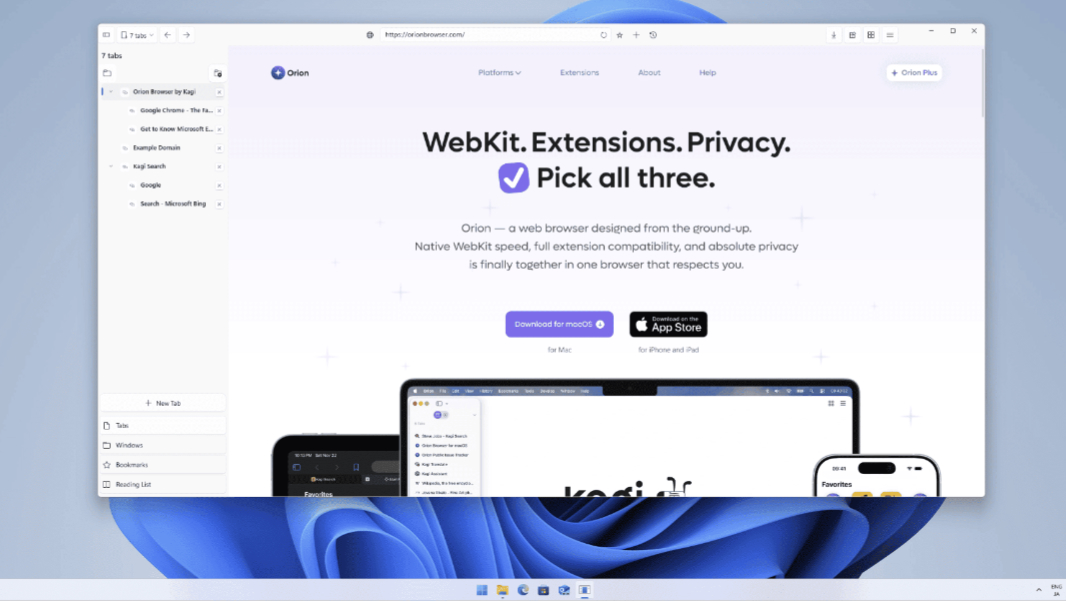
- The Windows port is built with a C# and WinUI 3 frontend and C++ backend and browser core, so this is a truly native app with a native Windows 11 user interface.
- Orion for Windows can create and manage multiple WebKit web views, which form the basis of its tabs-based interface.
- Features like bookmarks, history, settings persistence, profile support, Dark mode, a compact tabs mode (as with Safari), and more are fully implemented. And other features like tab management, cross-platform sync, password manager, extensions support, and more are partially done.
- Orion for Windows will support both WebKit and Blink rendering engines, though it’s not clear if this is experimental for now.
The screenshots the Orion team has provided so far don’t represent the final user interface, they say, but they look nice, and I do like the look and feel of this browser on Apple’s platforms. I wish there was more clarity on the timing, but for now, I assume we’ll get at least a beta before the end of the year.
So why mention this now?
Aside from the obvious point that web browsers are, by far, the most important and frequently used apps across both desktop and mobile, this chaotic AI era we’re in has threatened to change software of all kinds, but especially web browsers. In keeping with the rapid-fire nature of AI these days, we’ve seen AI added to traditional browsers, built from scratch AI-powered web browsers, and, most recently, the addition of in-app browsers to AI assistants like ChatGPT and Claude.
Like many of you, I’ve tested most of these things, and while I agree that AI is both inevitable and useful in many ways, when it comes to web browsers, I prefer a more minimalist approach. And I’m not super-interested in integrated AI in whatever web browsers I use. This is just part of the reason that Helium and Brave are interesting on the desktop. But that’s true for Orion as well. And like the companies or teams behind those apps, Orion is independently developed, with ties in this case to Kagi, the independent (and, yes, paid) online search service. It’s not open or open source, but I like the small team vibe.
Anyway, this is just a heads-up. I’ll report back when there’s a Windows app to try.