Google Gemini in Chrome is Now Available on Android in the US
- Laurent Giret
- Aug 18, 2026
-
1
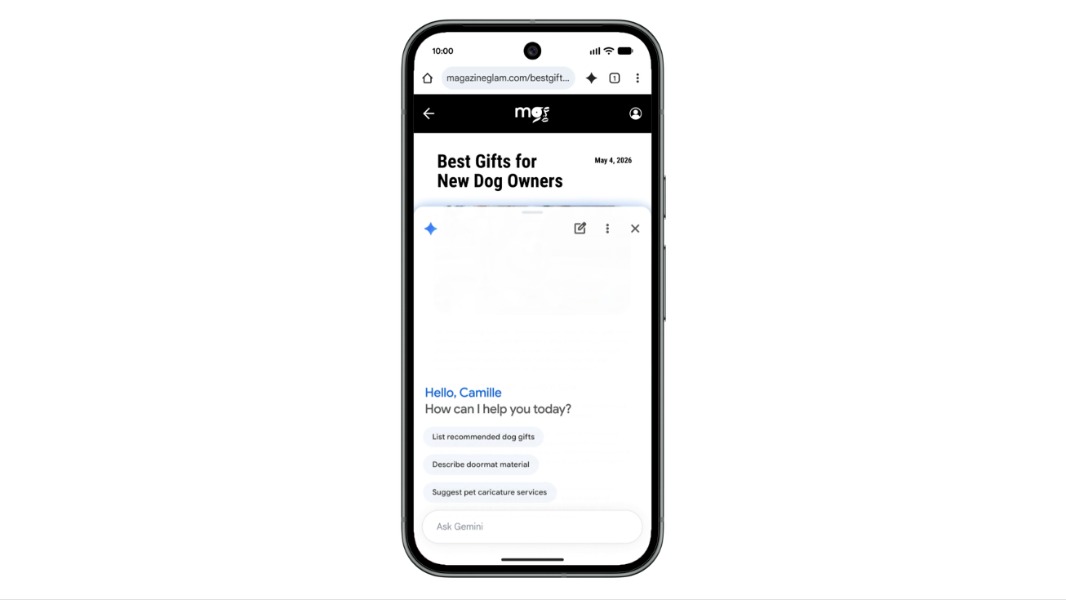
The Android version of Google Chrome is getting the same Gemini integration today as the iOS version. Gemini in Chrome for Android is launching first in the US, similar to what Google did for iPhone and iPad users, and it also requires a phone running Android 12 or higher with at least 4GB of RAM.
To access Gemini in Chrome, Android users in the US just need to tap the Gemini icon or the three-dot menu on the top bar of their device. Chrome will also require users to opt in the first time they use Gemini in Chrome.
When summoned, the chatbot will appear as a floating chat box over the opened browser tab. “Gemini in Chrome summarizes long articles, answers questions about web pages, and connects with your favorite Google apps — including Calendar and Keep — without making you switch between tabs,” Google explained. “It even lets you customize and generate images on the go with Nano Banana.”
Gemini in Chrome for Android also supports the agentic Auto Browse feature that lets the browser perform multi-step tasks on its own, including ordering things online, booking tickets, or planning a vacation. Auto Browse includes additional safeguards against prompt injections, and users will always be asked for confirmation to complete sensitive tasks.
While Gemini in Chrome is now available for all Android users in the US, Auto Browse is currently restricted to Google AI Pro and Ultra subscribers. For users with a work or school Google Account, access to Gemini in Chrome must be enabled by an administrator.