Android Now Supports Password and Passkey Migrations
- Paul Thurrott
- Sep 10, 2026
-
3
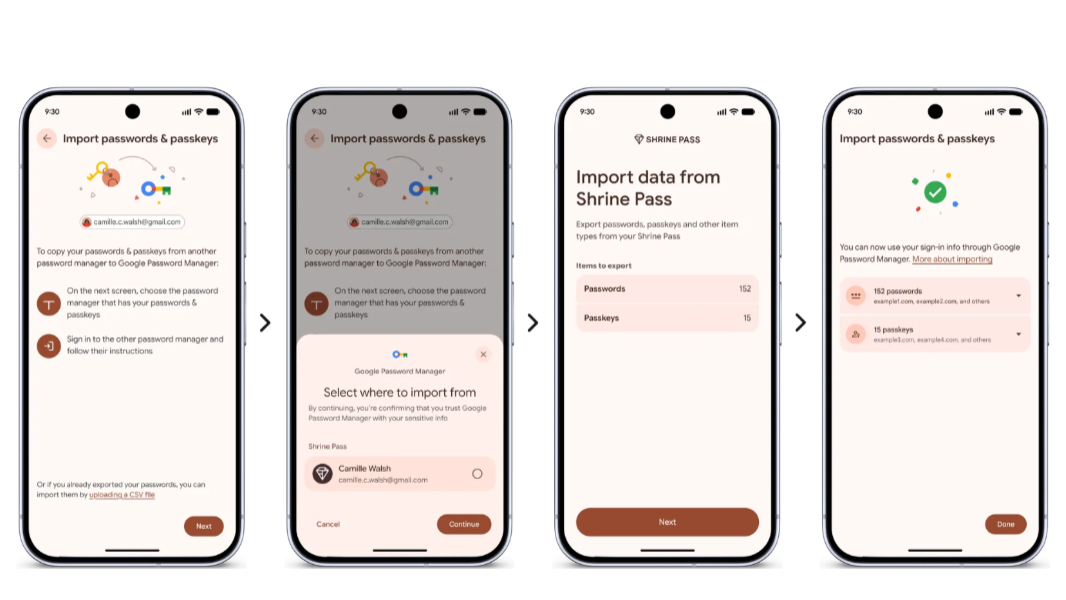
Android now natively supports the ability to securely copy passwords and passkeys between password managers without requiring a file download or additional tools.
“We believe you should have control over your digital life, including the freedom to choose the security tools that work best for you,” Google senior product manager Chirag Desai writes. “With that in mind, today we’re introducing a new experience on Android to help you safely and easily move your passwords and passkeys between password managers in just a few clicks [and] no file downloads required. This gives you more flexibility, all while keeping your information safe.”
Password managers have long supported import and export capabilities, but the process for doing so is manual and often requires you to use a plain text file that’s insecure and easily mismanaged. Plus, there’s no standard way for importing and exporting passkeys between these solutions.
This new experience is built on an Android platform feature called Credential transfer that’s available in Android 8 or newer. It also requires a password manager that supports it. 1Password, Bitwarden Password Manager, Dashlane, and Google Password Manager do so already and Google says more are on the way.
If you have all the right pieces in place, you can simply choose to export your passwords and passkeys from your current password manager on Android and it will hand off this task to the OS. Android will detect existing password managers on the phone or other device and let you select the one you wish to use. Then, it will let you select, review, and authorize the transfer. Google says the transfer should take just a few seconds.