Microsoft Edge is Improving How It Installs Updates
- Paul Thurrott
- Oct 15, 2026
-
0
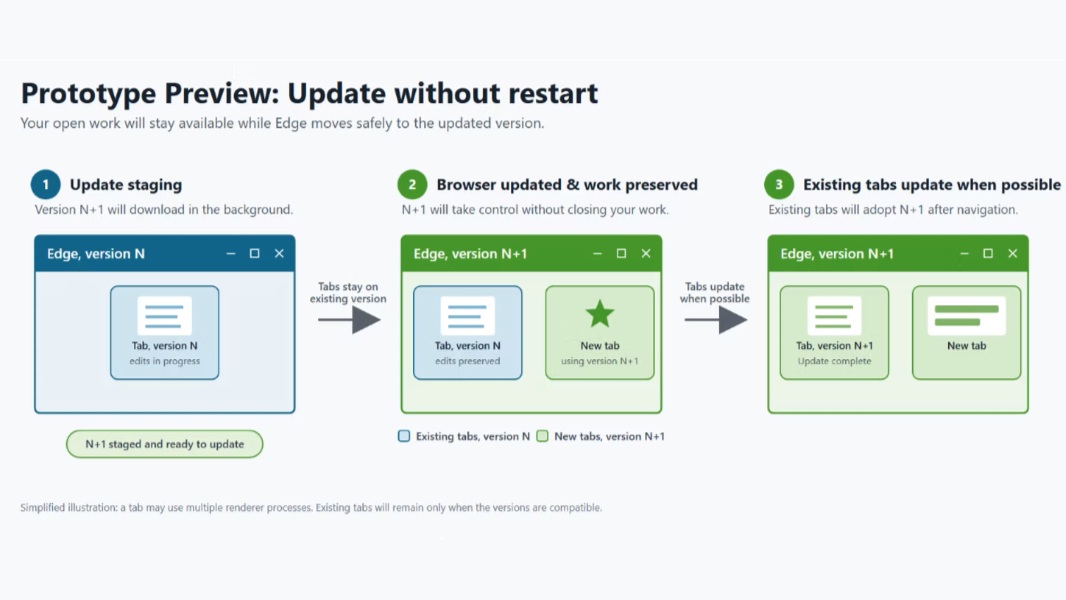
The Microsoft Edge team envisions a future in which security and other updates happen in the background without requiring restarts. This is important because AI has ramped up the discovery of security flaws and the speed at which they can be exploited.
“We’ve developed a working prototype that moves Microsoft Edge to a new, more secure version while your open work continues, with no restart prompt and hardly anything to notice,” Microsoft’s Rob Franco and Arunesh Chandra write. “Our goal is that you won’t have to click the update button at all; you would simply continue working with a safer browser. Importantly, your updates could be applied within minutes of availability.”
Microsoft is sharing the Edge prototype early to get feedback, but it’s not available in Chromium or the production versions of its web browser yet. But one piece of this puzzle is available now if you don’t mind opting-in to an experimental feature called Restart to update on idle (previously called Instant Updates). With this enabled, Edge will automatically restart to install updates when the browser is idle. So it’s not a truly seamless updating process like that envisioned in the prototype, but it can still help users install updates without being interrupted.
For managed businesses using Edge for Business, Microsoft is also introducing a Security Updates Alert feature so admins can configure a minimum severity threshold and receive dashboard alerts and email notifications when new updates contain security fixes that meet or exceed it or address zero-day vulnerabilities.
“Microsoft Edge is working toward a simple outcome: Protection that moves faster and asks less of you,” the two conclude. “The seamless-updates prototype makes that future visible, while Microsoft security engineering and organizational management tools help close update gaps today.”