Proton Updates Lumo and Proton Pass
- Paul Thurrott
- Aug 03, 2026
-
4
Proton announced major updates to its Proton Pass password and passkey manager and Lumo AI assistant.
“The latest version of Proton Pass includes a few updates our community has been anticipating,” Proton’s Son Nguyen Kim writes. “Improving autofill has been one of the main community requests for Proton Pass. We heard you, and we’ve worked hard to deliver a significant improvement: The new version resolves 80 percent of the autofill issues users reported to us. We’ve also improved the 2FA autofill. On the business side, we made it easier to roll out Proton Pass across an organization.”
The Proton Pass updates include:
- Improved autofill. Proton changed how Proton Pass detects web-based forms and can now autofill more reliably across more sites. And Proton says further improvements are on the way to URL matching, native autofill on Mac, and language support.
- Improved 2FA autofill. Proton improved the reliability of the prompt that appears when a site needs a 2FA code. And you can now configure Proton Pass to automatically code 2FA codes to the Clipboard so you can paste it if it can’t autofill.
- Installer improvements. Proton Pass now uses a more modern MSIX installer on Windows which, among other things, makes it more easily installed and managed with Intune.
- More updates. Proton Pass also got a new button to check for updates on Windows and Mac, Liquid Glass animations on iPhone and iPad, and username generation on iPhone and iPad.
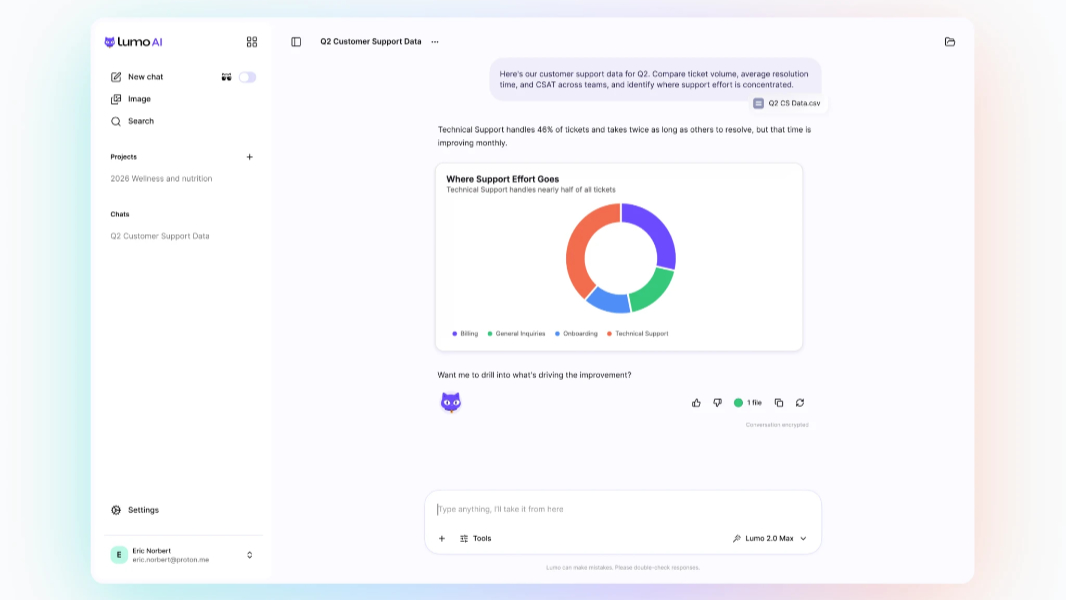
As for Lumo, Proton’s AI assistant now offers a data visualization feature that can create charts, graphs, and other custom visuals directly in chats.
“Lumo can now create custom visuals directly in chats, making it easier to understand complex information in a completely private environment,” Proton’s Eamonn Maguire writes. “Ask Lumo to analyze a dataset, and it will generate visuals that highlight trends or key findings, so you digest and act on insights faster. Lumo can also decide when an answer is easier to understand with a visual and generate one automatically.”
Proton says that Lumo will now analyze the information you provide and then create results in the format that makes the most sense for that type of information. Those results can include charts, key metrics, summaries, comparisons, and callouts that surface important findings. And then you can ask follow-up questions, refine the visual results, and do other things without starting over.
Lumo data visualization is good for reviewing financial performance, analyzing sales pipelines, summarizing operational metrics, exploring internal reports, and researching business questions, Proton says. As always, Lumo is private by design. It keeps no records of your chats, uses zero access encryption, doesn’t train AI with your data, is open source and independently verified, and is protected by some of the world’s strongest privacy laws.