OpenAI Announces Massive Set of ChatGPT Upgrades
- Paul Thurrott
- Sep 29, 2026
-
1
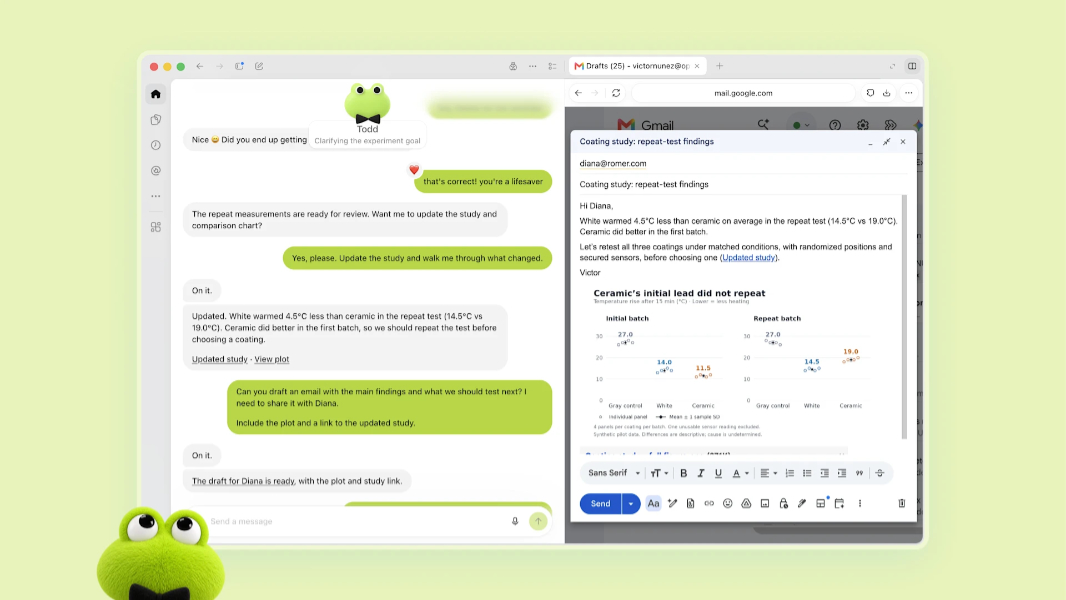
OpenAI is hosting its DevDay 2026 event today, it’s a big one with over 20 new features and other advances for ChatGPT.
“Today, we introduced agents that can take on ongoing responsibilities and new ways for people and AI to work together,” OpenAI explains in a DevDay 2026 summary. “We also expanded our commitment to an open ecosystem by opening up ChatGPT as a shared surface where humans and agents can collaborate and where developers can directly launch new native experiences to our collective 1.2B weekly users.”
Some of today’s key announcements include:
Dots. Dots are GPT-6 Astra-powered frontier always-on AI agents, each with its own cloud computer and extensible with an ecosystem of over 4,000 plug-ins, that can, yes, work on your behalf or answer questions, explore ideas, and provide feedback as you work through various projects. And they’re not just available via ChatGPT, you can also access Dots in Slack and Teams. Dots are rolling out now to those with ChatGPT Pro, Business Premium, and Enterprise plans in eligible markets, with more users onboarding soon. Learn more.
GPT-6.1 Sol. This is a major upgrade to GPT‑6 Sol that OpenAI says offers “exceptionally strong performance on agentic coding, along with computer use and professional work.” And it provides near-Astra intelligence to everyone at a fifth of its standard input and output token prices, allowing developers more flexibility to execute complex workflows within the same budget. GPT-6.1 Sol is now available to all API, Plus, Pro, Business, Enterprise, and Edu users. Learn more.
Codex in the cloud. With this addition, developers can access Codex wherever they need it: On a computer, remotely from a phone, or in the cloud from any device. Codex in the cloud provides reusable development environments and team-based settings and permissions. It’s available now in Plus, Pro, Business, Healthcare, Education, and Enterprise. Learn more.
Refreshed Codex CLI. The Codex command line interface (CLI) now supports voice interactions and lets you delegate work to agents and track multiple tasks at once. Plus, there are new capabilities like editing prompts, resuming sessions, and using worktrees, and a cleaner terminal UI. This one is available to all plans. Learn more.
Computer use via the Agents API. The Agents API now supports computer use so developers can build agents that interact with software to complete tasks, OpenAI says, while letting you use Codex’s multi-agent capabilities, tool search, tool calling, and context compaction in your application. This one is available in the API, Codex, and ChatGPT Work on Pro 500 and Enterprise plans. Learn more
Plug-ins improvements. OpenAI is opening up its extensions platform so third parties can create their own experiences that run directly in ChatGPT. Developers can use plug-in extensions to add their plug-ins to the ChatGPT sidebar, build interactive panels that display next to chat, and create file type viewers. (Learn more.) The Plugin Creator submission flow has been redesigned, you can host ChatGPT plug-ins in Sites, and OpenAI is supporting the the proposed MCP Events specification so plugins can start automations when something happens in a connected app.
ChatGPT Space. This is a new dedicated space where teammates, ChatGPT, and your Dot can build on shared knowledge, OpenAI says. It’s available in all Pro, Business, and Enterprise plans on the ChatGPT desktop app and web, with finding, reading, and sharing pages also available on mobile. Mobile creation and editing are coming soon. Learn more.
Pages. This is a new document type that is designed for human and agent collaboration and it supports anything you can do in ChatGPT, including writing, researching, generating charts, creating images, and visualizing information. It’s available now in ChatGPT Pro, Business, and Enterprise plans. Learn more.
@ChatGPT in Microsoft Teams and Slack. Now, you can mention @ChatGPT in a channel, thread or DM to get help with your team’s work. It’s configurable by admins and teammates can add context and refine results in conversations without needing an individual ChatGPT license. It’s available to all Business and Enterprise plans. Learn more.
Sign-in with ChatGPT. Yep, OpenAI is taking on identity management so that you can use your ChatGPT plan in other participating apps and services. When enabled, AI requests count toward ChatGPT Work and Codex usage and you can set weekly usage limits for each app. Learn more.
New Pro 500 plan. ChatGPT Pro 500 joins Pro 100 and Pro 200 by offering Astra Ultrafast support plus the Pro models, Codex, deep research, image creation, memory and file uploads available in those other plans. The cost is steep, though, at $500 per month. (And, yes Pro 200 plans are back.) Learn more.