Microsoft Begins Rolling Out Vision Desktop Share Across All Insider Channels
- Paul Thurrott
- Jul 15, 2025
-
0
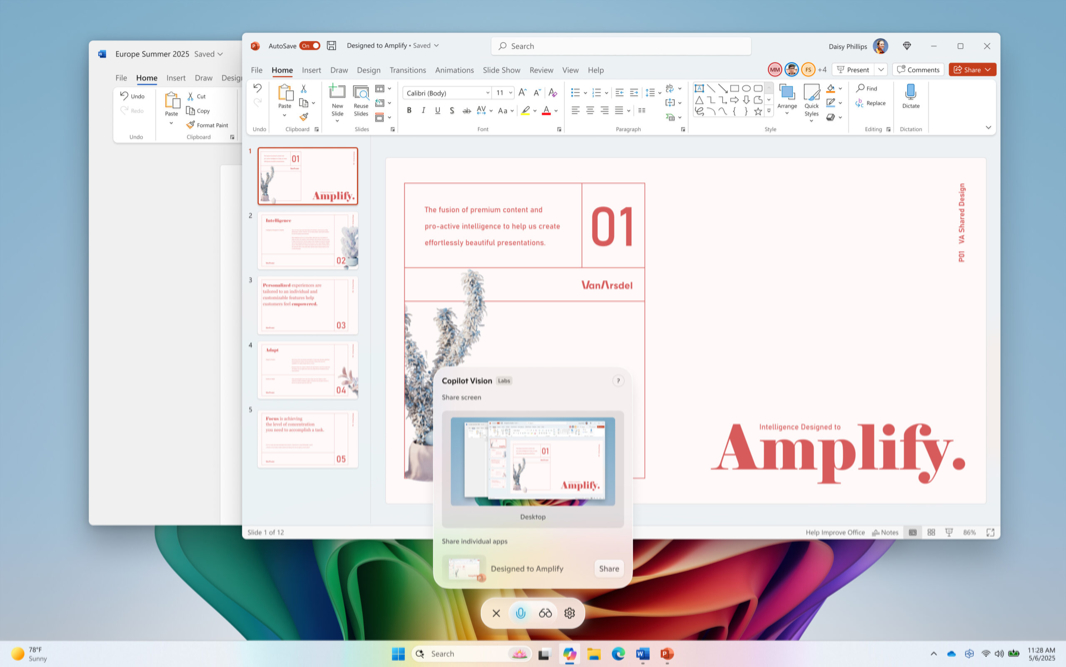
“We are beginning to roll out an update for the Microsoft Copilot app on Windows via the Microsoft Store,” . “This Copilot app update (version 1.25071.125 and higher) is beginning to roll out across all Insider Channels via the Microsoft Store.”
This update introduces two new features to Copilot Vision:
Desktop Share. This feature lets you share your entire desktop in addition to a a specific web browser, app, or other window with Copilot. “Copilot can see what you see and talk to you about it in real time,” . “It can help analyze content, provide insights, and answer your questions, coaching you through it aloud. Get tips on making improvements to your creative project, help with improving your resume, or guidance while navigating a new game.” To use this feature, click the “Share screen with Copilot” (glasses) button, select a desktop instead of an app, and ask Copilot to help with whatever you’re working on.
Access Vision from Copilot Voice. You can also access Copilot Vision using Copilot Voice now. As you’re talking with Copilot, just click the “Share screen with Copilot” (glasses) button and share the desktop.