iOS 26.1 Beta 4 Adds More Opaque Liquid Glass Option
- Laurent Giret
- Oct 21, 2025
-
3
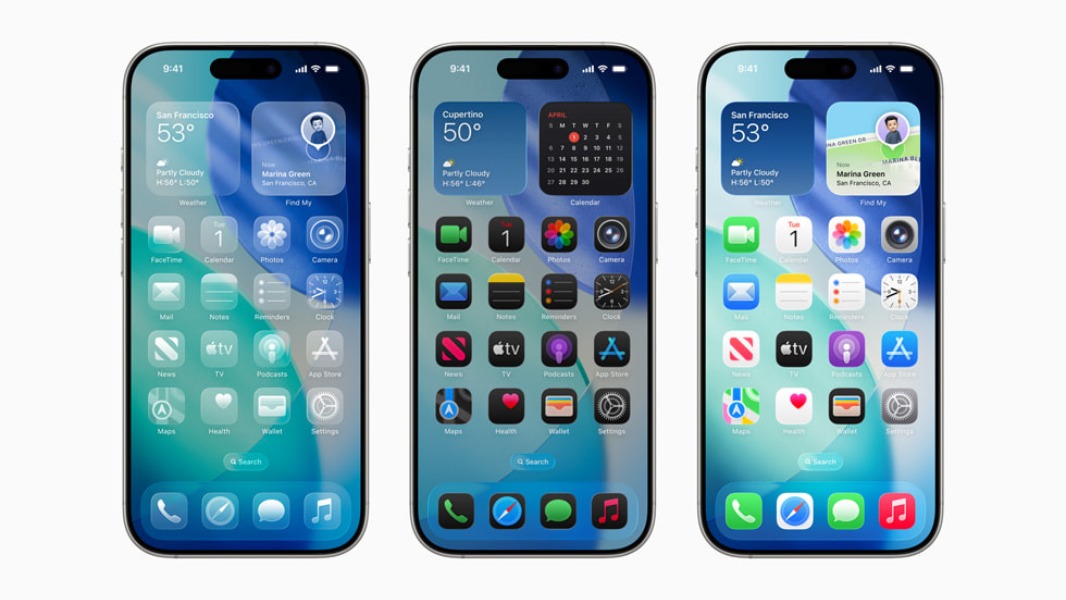
Apple released a fourth round of iOS 26.1, iPadOS 26.1, and macOS 26.1 betas yesterday, and the main change is a new option to make Liquid Glass effects more opaque. This new setting is also available on iPadOS and macOS.
Instead of a slider offering different levels of transparency, there are just two options for the appearance of Liquid Glass: ‘Clear,’ which is more transparent, and the new ‘Tinted’ option that “increases opacity and adds more contrast.” The new settings are available in the “Display & Brightness” menu on iOS and iPadOS, and in the “Appearance” menu on macOS Settings.
Notification Center with Liquid Glass Clear vs Tinted in iOS 26.1 Beta 4. pic.twitter.com/9rO1JbO5LW
— Beta Profiles (@BetaProfiles) October 20, 2025
The two design options apply to inbox apps, lock screen notifications, as well as third-party apps that already added support for Liquid Glass. Apple’s platforms already had an accessibility option to tone down Liquid Glass, but it’s quite hidden: You can find it under Accessibility > Display & Text Size > Reduce Transparency on iOS 26, iPadOS 26, and macOS 26.
Other notable changes included in iOS 26.1 beta 4 include support for Chinese (traditional), Danish, Dutch, Norwegian, Portuguese (Portugal), Swedish, Turkish, and Vietnamese in Apple Intelligence. The AirPods Live Translation feature that recently launched on the AirPods Pro 2, AirPods Pro 3, and AirPods 4 (except in the EU) is also adding support for Chinese (Mandarin simplified and traditional), Italian, Japanese, and Korean. Lastly, there’s a new toggle for turning off the ability to swipe left on the lock screen to open the camera.