Microsoft Teams is Getting Threads in Channels
- Laurent Giret
- Jul 09, 2025
-
4

Microsoft Teams is adding support for threads in channels, which will let users reply to channel messages in a dedicated thread space. Threads in Teams channels are quite similar to how threads work on Slack, and they’re now available in public preview.
“With threads, you can reply directly to specific messages, keeping related conversations grouped together without disrupting the main flow. This preserves context and order, making it easier to stay up to date, while allowing for in-depth discussions,” Microsoft explained in the announcement.
Teams users will be able to follow specific threads and view them all in a new “Followed Threads” view. They will also automatically follow threads they’ve started, replied to, and been mentioned in.
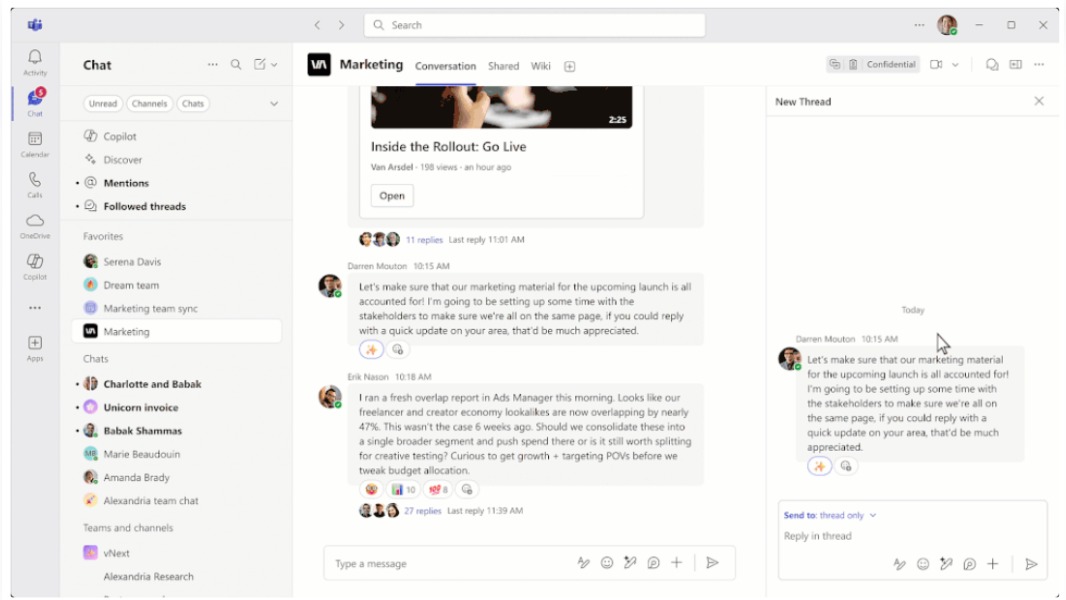
Microsoft is also introducing a new Threads layout for Teams channels that will display replies to channel messages on the side in a thread. This new Threads layout also supports apps, Channel meetings, and the “Meet now” feature.
When creating a new channel, Teams users will also be able to choose between the traditional Posts layouts with replies to channel messages appearing below the post in chronological order, and the new Threads layout that shows threaded conversations in a side panel.
Threads in channels, which are now in public preview, are supported on desktop and mobile. You can join the public preview by going to Settings > About Teams, though users with a work or school account will need to be granted access from their Teams administrator.
Other new features that are currently available in public preview include the ability to react with multiple reactions per message, triggering workflows with emoji reactions, and using slash commands to find GIFs or switch channels. Testers can also customize their keyboard shortcuts and create custom commands.