You Can Now Test Copilot Mode for Microsoft Edge
- Paul Thurrott
- Jul 28, 2025
-
2
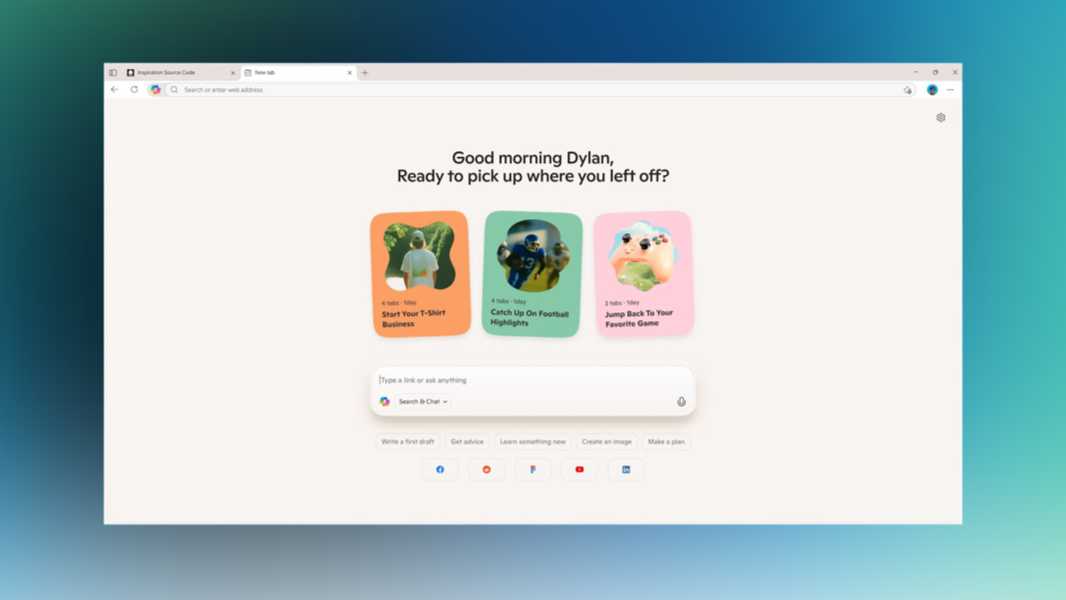
Not to be outdone by Comet, Opera Neon, and other AI web browsers, Microsoft announced Copilot Mode for Edge today. This experimental new feature paves the way for a future in which Microsoft’s browser can “pilot the web” on your behalf.
“With Copilot Mode on, you enable innovative AI features in Edge that enhance your browser,” Microsoft’s Sean Lyndersay writes. “It doesn’t just wait idly for you to click but anticipates what you might want to do next. It doesn’t just give you endless tabs to sift through but works with you as a collaborator that makes sense of it all. It keeps you browsing, cuts through clutter and removes friction to unlock your flow–all built to the highest Microsoft standards of security, privacy and performance trusted by billions of people and businesses worldwide–with you as the user always in control.”
With this shift, Microsoft is channeling my desire to see the most important app that we all use evolve dramatically to meet the needs of this AI age and move well beyond basic browsing. With Copilot Mode, Microsoft Edge will feature a single input box that combines the existing web navigation features of today’s address bars with AI chat and search capabilities. It understands your intent in the current tab and across all tabs, and can be used to perform “some tasks” on your behalf, compare items, make decisions, and get things done more quickly and easily.
Copilot Mode also brings natural voice navigation, and it will soon be expanded to access–with your permission–your history and credentials so it can do even more on your behalf, “like booking reservations or managing errands.” There’s a modern new home page–really a New tab page–with a minimalist new Copilot experience. A Quick Assist interface to access Copilot functionality from the address bar. Multi-tab context. And a Copilot-inspired theme for those who like tan.
In this early test, Copilot Mode is available as free, opt-in feature in Microsoft Edge for Windows and Mac. It will improve over time as Microsoft adds new features and, presumably, learns from feedback. And Microsoft says that you can always turn off it and return to the classic Edge experience. Yes, it is already calling the existing Microsoft Edge interface “the classic experience.”
To try it now, visit the Copilot Mode website with Edge and click “Turn on Copilot Mode.”