Build 2025: Windows 11 Gets New Developer Capabilities
- Paul Thurrott
- May 19, 2025
-
0
During its Build 2025 keynote, Microsoft announced a sweeping set of improvements to the developer experience in Windows 11. Key among them are a major update–and name change–to the Windows Copilot Runtime, MCP support in the OS, and a VBS Enclave SDK.
“Over the past year, we’ve spent time listening to developers, learning what they value most, and where we have opportunities to continue to make Windows an even better dev box, particularly in this age of AI development,” Microsoft corporate vice president Pavan Davuluri announced. “That feedback has shaped how we think about the Windows developer platform and the updates we’re introducing today.”
Here are the key Build 2025 announcements for developers on Windows 11.
Windows AI Foundry replaces the Windows Copilot Runtime
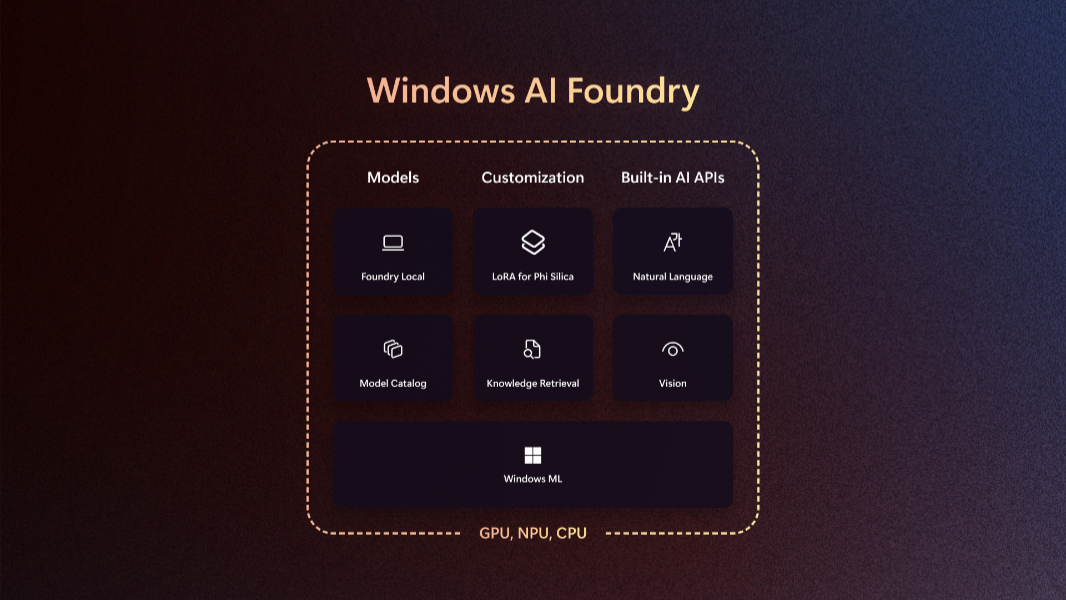
Windows AI Foundry is described as an “evolution” of the Windows Copilot Runtime that Microsoft announced one year ago at Build 2024 and has yet to deliver in stable; the first preview version didn’t arrive until early 2025. As I wrote at the time, Windows Copilot Runtime was not really a runtime, but rather a platform that was to include an API called the Windows Copilot Library, a set of AI frameworks–DirectML, ONNX Runtime, PyTorch, and WebNN–and toolchains like Olive and the AI Toolkit for Visual Studio Code.
Windows AI Foundry appears to follow the same model, but this time there may really be a runtime: The Windows ML (Windows Machine Learning) API is the foundation for this technology, and it provides Windows AI Foundry with a “built-in AI inferencing runtime” on Windows that works across CPU, GPU, and NPU hardware from AMD, Intel, Nvidia, and Qualcomm. It will be built directly into Windows 11 and will integrate with model catalogs like Ollama and Nvidia NIMs and the local AI models they offer.
The APIs that come with the Windows AI Foundry work with the on-device models used by Copilot+ PCs for key language and visions tasks–text intelligence, image description, text recognition, custom prompt, object erase, image super resolution, and image segmentation–all available in Windows App SDK 1.7.2. Microsoft is announcing new capabilities, too: LoRa (low-rank adoption), which fine-tunes the Phi Silica model with custom data, and new Semantic Search and Knowledge Retrieval APIs.
LoRA is available now in public preview on Snapdragon X-based Copilot+ PCs and is coming to AMD and Intel in “the coming months”; it currently requires Windows App SDK 1.8 Experimental 2, and you can train and fine-tune models using the AI Toolkit for VS Code. The new search APIs are available in private preview on all Copilot+ PCs. You can sign-up here to get early access.
Microsoft says that Adobe, Bufferzone, McAfee, Reincubate, Topaz Labs, Powder, and Wondershare are already working with Windows ML and the Windows AI Foundry.
MCP (Model Context Protocol) support in Windows 11
Like the rest of the AI industry, Microsoft has embraced the MCP interoperability standard for AI agents that was first introduced by Anthropic, and now it is bringing this technology to Windows 11.
“We will offer a standardized framework for AI agents to connect with native Windows apps, enabling apps to participate seamlessly in agentic interactions,” Davuluri said. “Windows apps can expose specific functionality to augment the skills and capabilities of agents installed locally on a Windows PC. This will be available in a private developer preview with select partners in the coming months to begin garnering feedback.”
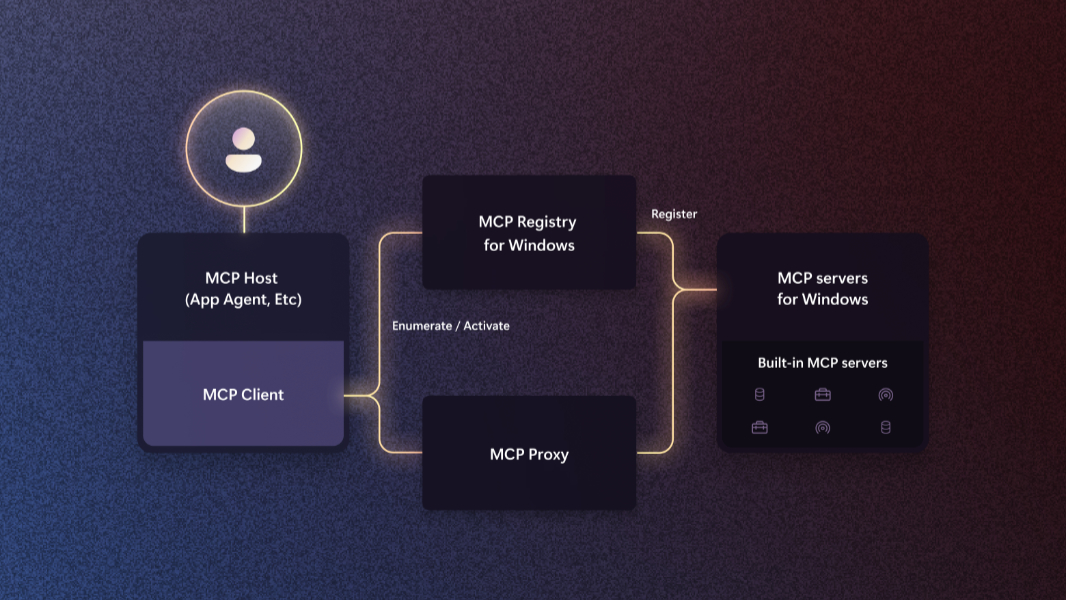
MCP in Windows 11 is available will be available in private developer preview in “the coming months,” Microsoft says. Unlike with the Recall launch last year, it’s taking security seriously this time, too. MCP access will be disabled by default and opt-in by users. Microsoft will introduce a new MCP Registry for discovering available MCP servers and their unique capabilities. Tied to this …
New App Actions
Windows 11 version 24H2 has introduced a new system feature called App Actions that’s used by Click to Do to provide an interface between compatible apps and the actions one might want to take on on-screen text and images. For example, Paint and Photos are registered by default–in Settings > App > Actions–to interact with images, while Notepad is registered for text. Soon, developers will be able to register their own apps for these actions as well, and they will be available as built-in MCP servers for agents.
To facilitate this, Microsoft is introducing App Actions APIs so developers can author and consume App Actions in their own apps; this requires Windows SDK 10.0.26100.4188 (which is new) or greater. There’s also a new testing tool called App Actions Testing Playground that you can download now.
Microsoft called out Zoom, Filmora, Goodnotes, Todoist, Raycast, Pieces for Developers, and Spark Mail as among the first to adopt App Actions in Windows 11.
VBS Enclave SDK (Preview)
Microsoft is making the VBS Enclave trusted execution environment that protects Copilot+ PC features like Recall available to developers in this new SDK. Now in public preview, the VBS Enclave SDK provides the needed a set of libraries and tools, and it’s available now on GitHub.
“Developers can now define the interface between the host app and the enclave, while the tooling does all the hard work to validate parameters and handle memory management and safety checks,” Davuluri explains. “The libraries make it easy for developers to handle common tasks such as enclave creation, encrypt and decrypt data, manage thread pools and report telemetry.”
Windows Subsystem for Linux is now open source
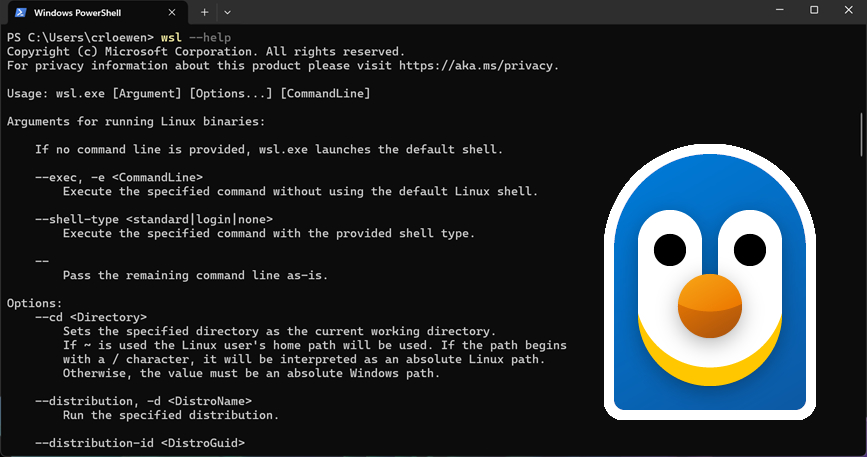
The Windows Subsystem for Linux (WSL) lets developers run Windows and Linux GUI and command line tools side-by-side, and Microsoft is now open sourcing it so that outside developers can more easily bring other distributions to WSL and integrated Linux more seamlessly with Windows.
Winget improvements
The Windows Package Manager (Winget) now supports a configure command so developers can quickly set up and replicate their development environments. (This is clearly a replacement for the similar feature in Dev Home, which has been deprecated and will soon disappear.) Winget now supports Microsoft DSC (Desired State Configuration) V3, enabling apps installed with it to package settings and configurations. You can learn more about this on GitHub.
PowerToys improvements
If you use PowerToys, you will have noticed the inclusion of a new utility called Command Palette, a superset of (and replacement for) PowerToys Run. It’s now generally available.
“Command Palette enables developers to reduce their context switching efforts by providing an easy way to access all their frequently used commands, applications, and workflows from a single place,” Davuluri notes. “It is customizable, fully extensible, and highly performant, empowering developers to manage interactions with their favorite tools effectively.”
Advanced Windows Settings
A new System > Advanced page in the Settings app will let developers more easily customize Windows 11 using “powerful, advanced settings” that are currently hidden elsewhere all over the app (or not available) from a central location. This addition is coming soon in preview via the Windows Insider Program.
Edit, a new command line text editor
This sounds crazy, but Microsoft has announced a new command line text editor for Windows called Edit. This tool will let developers–wait for it—edit text files directly from the command line. It’s open source and will be available soon in preview in the Windows Insider Program. But you can learn more now on GitHub.
Microsoft Store improvements
Davuluri revealed that the Microsoft Store in Windows now has over 250 million monthly active users, and that the popular app Notion is coming to the store soon. To continue this momentum, Microsoft is making account registration free for individual developers, and it’s introducing a new Microsoft Store FastTrack program so qualified companies can more easily submit their first Win32 app. You can learn more on the Windows Developers Blog.