Google Delivers Android 15 Beta 2
- Paul Thurrott
- May 15, 2024
-
1
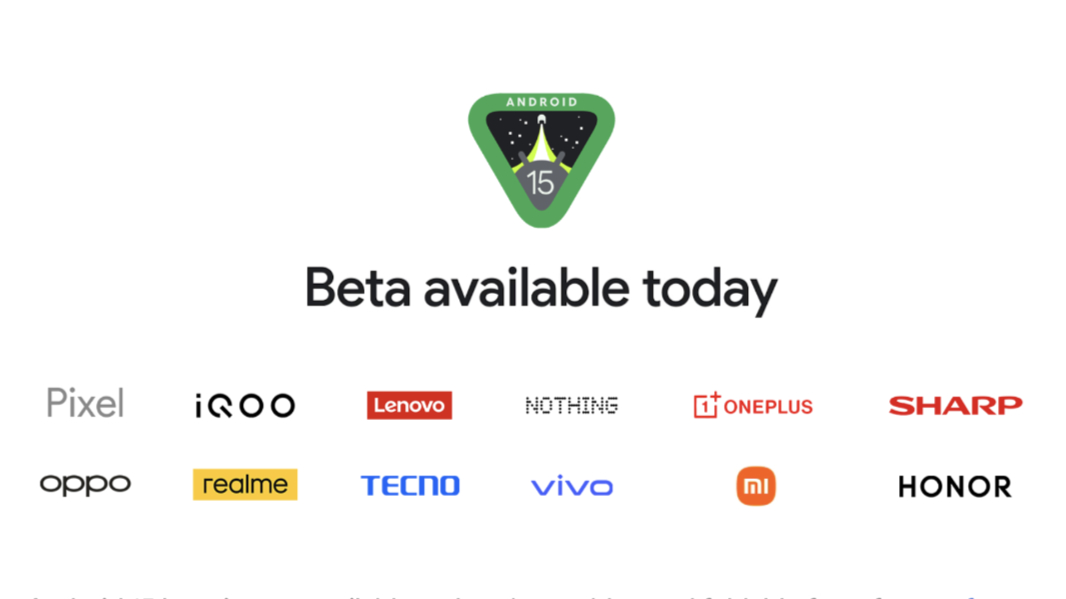
At Google I/O 2024 today, Google announced the release of Android 15 Beta 2 for Pixel and a wide variety of third-party phones, foldables, and tablets.
“Today we’re releasing the second beta of Android 15, which continues our work to build a platform that helps improve your productivity, minimize battery impact, maximize smooth app performance, give users a premium device experience, protect user privacy and security, and make your app accessible to as many people as possible — all in a vibrant and diverse ecosystem of devices, silicon partners, and carriers,” Google vice president Dave Burke writes in the announcement post. “Android delivers enhancements and new features year-round, and your feedback on the Android beta program plays a key role in helping Android continuously improve.”
The biggest news with this release, arguably, is its expanded availability. Where Android 15 Beta 2 and the other prerelease versions were available only on supported Pixel devices and via emulation, Beta 2 is also available across a long list of devices from Honor, IQOO, Lenovo, Nothing, OnePlus, OPPO, Realme, Sharp, Tecno, vivo, and Xiaomi Mi.
And as you might expect of a major milestone announced at Google’s annual developer event, there are several new features of interest. These include:
Improved multitasking on large screens. For tablets, Chromebooks, and foldables, Android 15 supports a pinnable taskbar with support for split-screen app combinations, new full-screen app layout capabilities, and updates to picture-in-picture.
Predictive back. Previously locked behind a developer option, Predictive back makes Android’s gesture-based navigation scheme more fluent and predictable with new system animations for back-to-home, cross-task, and cross-activity gestures in supported apps.
Choose how you’re addressed. This new system preference lets the user customize how they’re addressed with a grammatical gender preference.
Widget improvements. In Android 15, widgets can provide remote views into the widget picker so that they appear with personalized content when the user is browsing through widgets to appear on the home screen.
Private space. This feature allows users to create a space on their device separate from the main system and with its own user profile that hides sensitive apps and secures access with an additional layer of authentication. Private space apps appear in a separate container in the launcher and are hidden from the recents view, notifications, settings, and from other apps when the space is locked. Likewise, user and downloaded data and accounts are kept separate.
Health Connect improvements. Android’s Health Connect service now supports new data types like skin temperature and training plans to support more health and fitness use cases, plus training plans tied to completion goals (calories burned, distance, and so on) and performance goals (heart rate, repetition, etc.).
Secured background activity launches. Android has long included protection against malicious apps, which can’t bring other apps to the foreground, elevate their privileges, or abuse user interaction. But Android 15 includes additional protections, like task hijacking prevention and new intent protections. It also raises the minimum target SDK from version 23 to 24 to ensure that apps adhere to the latest security protections.
Efficiency improvements. Android 15 will improve quality, performance, and battery life with major changes to foreground services, support for larger 16 KB pages (up from 4KB) to support memory-intensive workloads and devices with significantly more RAM, modern GPU access, more efficient AV1 decoding, and more. (This is clearly related to on-device AI capabilities.)
Separately, Google also revealed several new security and privacy protections coming to Android 15 later this year. A new Google Play Protect live threat detection service will use on-device AI capabilities to improve fraud and abuse detection in malicious apps. One-time passwords will be hidden from notifications to help protect them from malware. Android’s restricted settings are expanding to require additional user approval when installing a sideloaded app. There will be new protections for screen-sharing social engineering attacks, and new advanced cellular protections for cell site simulators and SMS-based fraud messages.
“Android’s commitment to user safety is unwavering,” Google vice president Dave Kleidermacher says of these new features. “We’re constantly evolving our multi-layered user protections – combining the power of advanced AI with close partnerships across OEMs, the Android ecosystem, and the security research community. Building a truly secure Android experience is a collaborative effort, and we’ll continue to work tirelessly to safeguard your device and data.”
Google says that Android 15 will reach platform stability in June/July, so developers interested in targeting this version should get started now if they haven’t already. Platform stability is the milestone at which Google releases the final SDK and NDK APIs, internal APIs, and app-facing system behaviors.
Those with a supported Pixel device can enroll in the Android 15 beta at the Android website. Developers can also access new 64-bit Android 15 emulator images with the Android Studio; Google recommends using the latest Android Studio Koala version if possible.
You can learn more about Android 15 on the Android Developer website.