Google Adds New Accessibility Features to Android and Chrome
- Paul Thurrott
- May 15, 2025
-
0
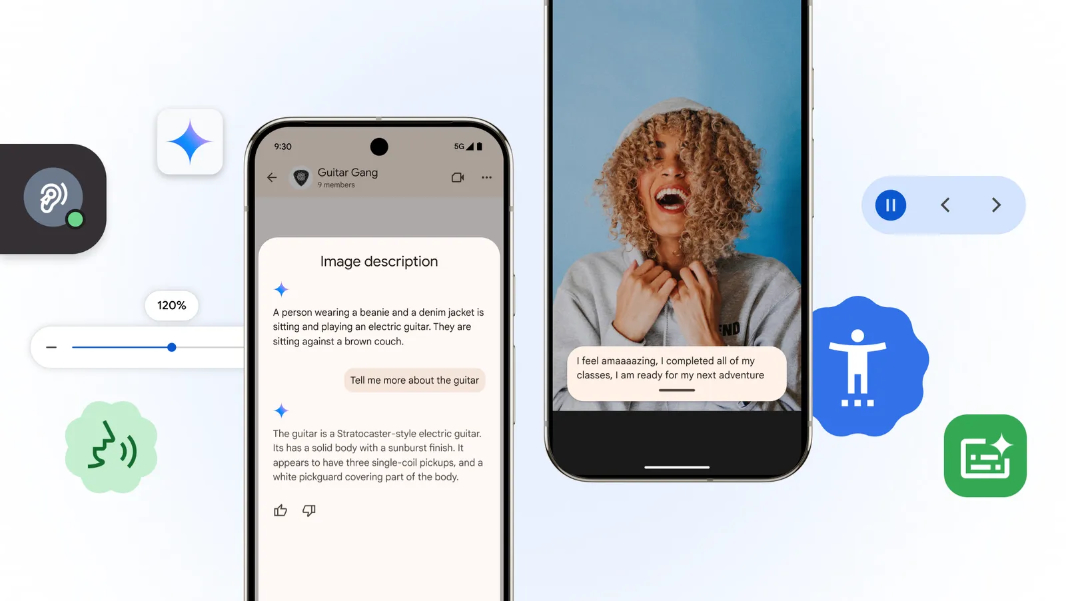
It’s Global Accessibility Awareness Day, so Google is rolling out new accessibility features in Android, Chrome, and more. Oh, and some AI features too.
“Advances in AI continue to make our world more and more accessible,” Android director Angana Ghosh writes. “Today, in honor of Global Accessibility Awareness Day, we’re rolling out new updates to our products across Android and Chrome, as well as adding new resources for developers building speech recognition tools.”
Here’s what’s new.
Talkback with expanded Gemini support. Google added Gemini capabilities to Talkback, the Android screen reader, last year, with support for AI-generated descriptions for images. Now, this Gemini integration can also answers questions about images or about their entire screen.
Expressive Captions improvements. Expressive Captions provides real-time captions for anything with sound, but now it’s getting support for long-duration words, such as when a sportscaster says “goooooal” or similar. There are also more labels for sounds like whistling and throat clearing. This feature requires Android 15 or higher and is currently limited to the U.S., UK, Canada, and Australia.
Speech recognition improvements. Building on the Project Euphoria initiative it started in 2019, Google is expanding its speech recognition capabilities to support non-standard speech. There’s a new open source repository on GitHub so developers can create personalized audio tools and train their models on more diverse speed models. And in partnership with the Centre for Digital Language Inclusion (CDLI) in London, Google is trying to improve speech recognition technology for non-English speakers in Africa via open-source datasets in 10 African languages, new speech recognition models, and ongoing support for the organizations and developers in this space.
Chrome improvements. Chrome now includes optical character recognition (OCR) capabilities so that those using screen readers can highlight, copy, and search for text in PDF files. And its Page Zoom feature now works in Chrome for Android after arriving on desktop previously; this feature lets you increase the size of the text you see in the browser without affecting the webpage layout.