Auto SR Video Game Scaling Will Only Work on Snapdragon X-Based Copilot+ PCs
- Paul Thurrott
- Jun 06, 2024
-
3
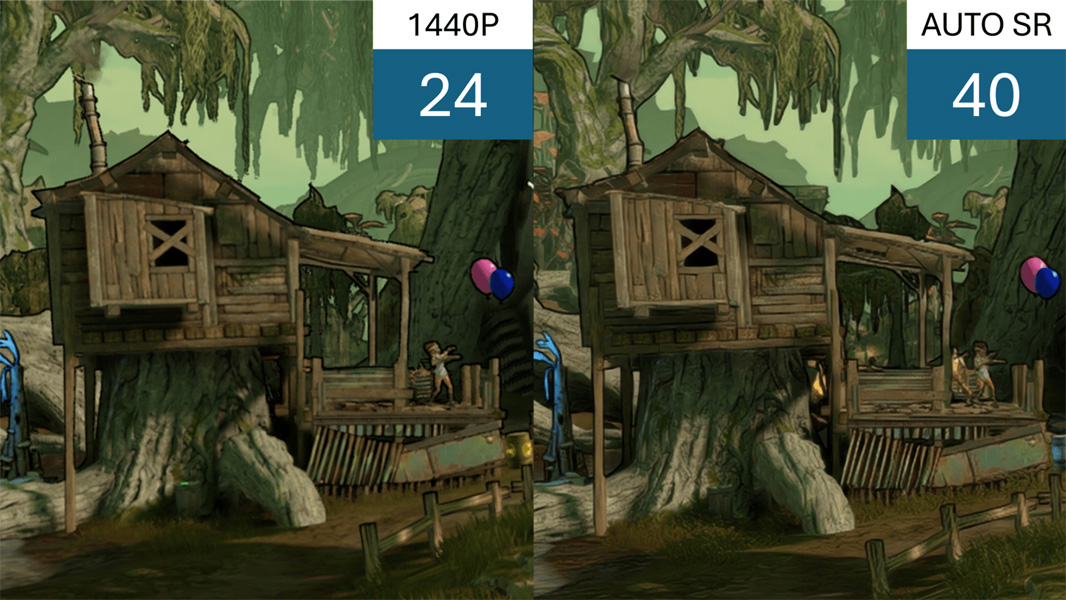
Microsoft is bringing various Super Resolution (SR) video game capabilities to Windows 11, but the best of them will only work on Snapdragon X-based Copilot+ PCs. Yes, really.
Back in February, Microsoft announced DirectSR, a new video game API that will bring Super Resolution (SR) capabilities to Windows 11. Designed in partnership with AMD, Intel, and Nvidia, DirectSR eliminates the need for proprietary SR solutions like AMD FidelityFX Super Resolution, Intel XeSS, and NVIDIA DLSS by providing a single, system-level API that can use any modern GPU efficiently.
DirectSR isn’t automatic. Instead, game developers have to support this technology in each game, which saves them from having to support multiple proprietary solutions. But the gains can be incredible: Gamers can run titles on lower resolutions for the frame rate advantages, but still get an incredible level of visual quality.
Like DirectSR, Auto SR improves frame rates and image quality, but it’s based on AI and is a major leap forward. It’s applied automatically, on the fly, and so it works with any game, with no need for developer involvement. And it enhances existing games, not just the latest titles.
“Auto SR instantly enhances [any game], allowing you to effortlessly enjoy visuals that surpass native 1080p quality with the fast frame rates typically seen at lower resolutions,” Microsoft’s Amanda Skrabut, Luke Olsen, and Matt Bronder explain. “Auto SR boosts detail and performance on compatible hardware, transforming your game play and letting you experience select titles in a new light.”
It’s that compatible hardware bit that will cause a few ruffles: Because Auto SR requires a powerful NPU to do its magic, it will only work on Snapdragon X-based Copilot+ PCs, at least at first. It can upscale games with vertical resolutions as low as 700 pixels to 1080p quality using a convolutional neural network (CNN) that was trained on gaming content and coordinating data transfers between the NPU and GPU, while introducing only a single frame of latency. (I explained why NPUs offer dramatically better performance and efficiency than GPUs for certain AI-based tasks recently in Orchestration (Premium)).
Auto SR will ship as part of the first Copilot+ PCs at launch and will automatically enhance 11 games–Borderlands 3, Control, Dark Souls III, Resident Evil 2, Resident Evil 3, and others–that Microsoft ensures will deliver 1080p visual quality and high frame rates. The list of supported games will of course grow over time, and Microsoft will let users manually opt-in with other titles.
“Players on these Snapdragon X equipped Copilot+ PCs can easily toggle the feature on and off, adjust settings for individual games, and try out Auto SR with additional games via the Windows settings application,” the three continue. “While you can explore this feature on additional untested games, there may be some quirks, and we can’t guarantee it will apply or improve your experience.”
Microsoft says it will bring Auto SR to “more devices” (presumably AMD- and Intel-based Copilot+ PCs) in the future, support a much broader selection of emulated x64 video game titles, and add auto HDR capabilities too.
You can learn more about Auto SR on the Microsoft Support website.