iA Writer 8 is Available for Mac, iPad, and iPhone
- Paul Thurrott
- Jun 18, 2026
-
1
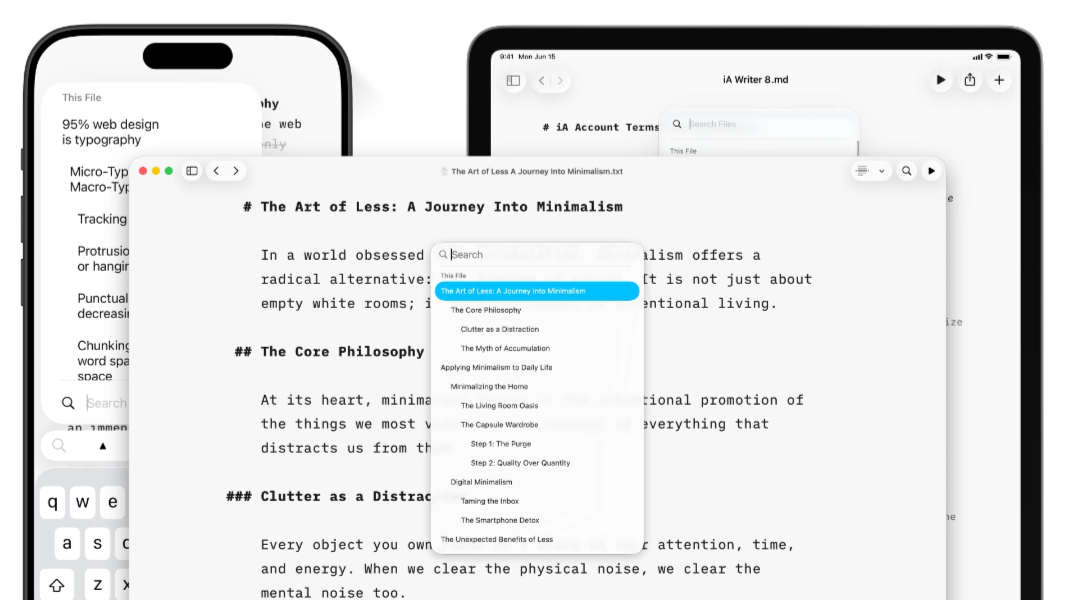
“When we write, we don’t think in terms of search, navigation, and file management,” . “We think: Where am I?, What have I already said?, Where was that word? iA Writer 8 merges search and navigation in one place.”
With iA Writer 8 on Apple’s platforms, Document Outline is now built directly into Search. So when you type Shift + ⌘ + O, you get a pane with both functions and, as before, Search can work on the current document or across your document libraries. And you can still use the arrow and Return keys to jump to any heading, filename, or text search result, iA says.
iA Writer also fully supports Apple’s Liquid Glass design language now, so it should look more natural on the ’26 Apple OS releases and newer. The goal, iA says, was to preserve the unique focus that defines iA Writer while also helping the app to feel completely at home on the newer OS versions. But it also took this as an opportunity to rethink the user experience. Some of the changes it implemented include:
-
A compact layout for the Library that hides dates and text excerpts so that large collections of notes are more easily navigated. There’s also a star icon next to Favorite files now.
-
Clearer authorship with author-based coloring so it’s easier to see who wrote what without having to open additional views or menus.
-
A faster Command Palette with a command icon on mobile and a Shift + ⌘ + P keyboard shortcut on Mac.
iA Writer 8 is rolling out now on Mac, iPad, and iPhone. ($49.99) or in , and ($39.99). iA also notes that