Sonos Finally Fixes a Few Meaningful Regressions in its New App
- Paul Thurrott
- Sep 13, 2024
-
4
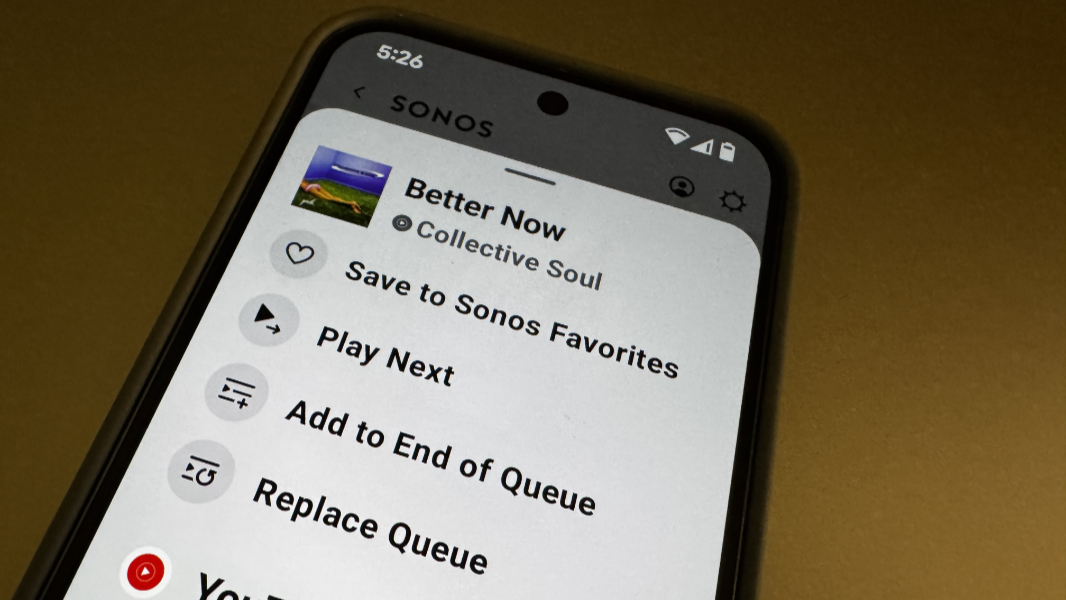
Four months after it kicked off the summer of Sonosgate with its horrible new mobile app, Sonos has finally started crawling back from the abyss. Today, it highlighted some of the recent updates it’s made to that app and a few are basic but meaningful, and they include some of the issues I first pointed out on May 11.
“We’ve been working diligently to improve your Sonos experience and wanted to share the latest progress we’ve made with the app,” a Sonos email to customers explains. “Over the past few weeks, we’ve introduced and refined several features through a series of updates for both iOS and Android.”
There are several changes, some notable. But I want to focus on my initial complaint, as it was mostly addressed by this recent update, and ahead of the schedule CEO Patrick Spence promised back in July.
“My single biggest issue with this [new Sonos] app is rather incredible,” I wrote back in May. “Remember how I wanted Sonos to make it easier to make basic changes to Now Playing? Sonos didn’t do that. Instead, Sonos removed those features entirely. It’s not possible to remove a song from Now Playing. It’s not possible to change the position of a song in Now Playing. It’s not possible to add a song to Now Playing, not after the currently playing song and not at the end of the queue. All you can do is replace the queue with something else (a song, a playlist, whatever). This is so incredible I doubted myself. I mean, come on. This is media player 101 stuff. Obviously, you can edit Now Playing. I must just be missing something. Nope.”
The latest version of the Sonos app now includes two options, “Play Next” and “Add to End of Queue” [Now Playing], that went AWOL when this app first appeared. So for me, that makes the Sonos app minimally usable. That said, you still can’t remove a song from the queue, or change its position. Baby steps, I guess. But when you consider that Spence said we couldn’t expect until “September or October” (which I read as “October”), I will at least celebrate a little bit.
After that, the next biggest upgrade–or, fix for a functional regression–is related to the responsiveness of the volume sliders and swapping the queue: Both happen much more quickly now than before, with less response lag. In my light testing, the volume controls actually work, which is exactly as basic a feature as it sounds, but it was terrible previously. So another meaningful win.
The latest update also added back local music library play and search, more sleep timer settings, mute buttons for individual speakers in a group, and improved navigation for visually impaired users. And TV Audio Swap for Sonos Ace now works with the Sonos Beam (both generations) and Ray soundbars, and not just Sonos Arc. The set-up experience for new products is quicker and more reliable now, too, Sonos says.
But let’s get real: That’s one improvement I can’t imagine I’ll ever see personally. They really lost me with this mess.